
Grandstream GRP2610P 2-Line IP Phone PoE Power Adapter not Included

Frequently Asked Questions

First, verify that your network cable is securely connected and that the phone has obtained an IP address (check under Settings > Network). Then confirm the SIP account credentials (username, password) and the registrar server address are entered exactly as provided by your provider. A common issue is a typo in the server or port. If the problem persists, check if your network blocks SIP traffic on UDP 5060; your provider or a Toronto-based VoIP support company can help test alternative ports.
The GRP2610P supports Power over Ethernet but does not include a power adapter. If your network switch does not supply PoE, you will need a separate 5V DC power supply (sold separately). Alternatively, you can use a PoE injector between the switch and the phone. Check the product specifications for the correct voltage and polarity before purchasing an adapter.
First ensure the handset cord is fully plugged into both the phone and the handset. Then check that the phone is powered on and registered to your VoIP service (look for a registration status icon on the display). If the phone is registered but still no dial tone, try plugging a different handset or test the phone with a headset to isolate the issue. If the problem remains, check that your SIP account is not set to 'Do Not Disturb' or blocked.
Most Canadian VoIP providers supply SIP account details including a server address, username, and password. On the phone, go to Settings > Account to enter these values. Ensure the SIP transport (UDP/TCP/TLS) matches what your provider requires. For Bell or Telus business lines, you may need to configure VLAN settings or use a specific proxy. If you are unsure, contact your provider's support or a local VoIP integration specialist in Toronto for step-by-step help.
This usually indicates a registration or NAT issue. First, verify that the phone is registered (look for a green status). If it is registered, check your router's SIP ALG setting – disabling SIP ALG often resolves one-way audio and call reception problems. Also ensure that the phone's SIP port is not blocked by a firewall. A quick test is to power cycle both the phone and router. If the issue continues, contact support to check your provider's network path.
The GRP2610P has a RJ9 headset jack and supports Electronic Hookswitch (EHS) with compatible Plantronics headsets. Plug the headset cable into the headset port on the phone. You may need a specific EHS cable (like Plantronics APE-2) if you want to answer/end calls from the headset. Go to Settings > Audio > Headset Mode to enable headset operation. For wireless headsets, check that the base is paired according to the headset's instructions.
Choppy audio is often due to network congestion or packet loss. Start by checking your internet connection speed and latency – run a speed test from a computer on the same network. If using Wi-Fi, switch to a wired Ethernet connection to rule out wireless interference. Also check that the phone's QoS settings (Layer 2/3) are configured if your network supports them. Finally, try switching the codec to G.711 (narrowband) in the account settings; this uses less bandwidth than wideband codecs and may improve stability.
The simplest method is to use Grandstream's Device Management System (GDMS) if your phone is managed remotely. Alternatively, you can update manually: download the latest firmware from Grandstream's website, then log into the phone's web GUI (open its IP address in a browser), go to Maintenance > Firmware Upgrade, and upload the file. After the upgrade, the phone will reboot. Do not power off the phone during the update process. If you are not comfortable with the web interface, ask your VoIP support provider to assist.
First, check that the Ethernet cable is firmly plugged into both the phone and the switch, and that the switch port is active (check for link lights). If using PoE, ensure the switch supplies PoE or that your power adapter is connected. Try a different cable or port. The phone's IP assignment may have failed; go to Settings > Network to see if DHCP is enabled. If you have a static IP, confirm the settings. A temporary network outage could also cause this – restarting the phone and switch often clears the error.
BLF (Busy Lamp Field) keys require proper SIP subscription configuration on the phone and the PBX. First, verify that the monitored extensions are correctly entered in the phone's BLF settings (under Account > BLF). Check that your PBX supports BLF and that the phone is using the correct subscription period. Often the issue is that the monitored extension is not registered or the phone's account has insufficient permissions. Reboot the phone after making changes. For detailed help, consult your PBX administrator.
IP Phones

Grandstream GRP2610P 2-Line IP Phone PoE Power Adapter not Included
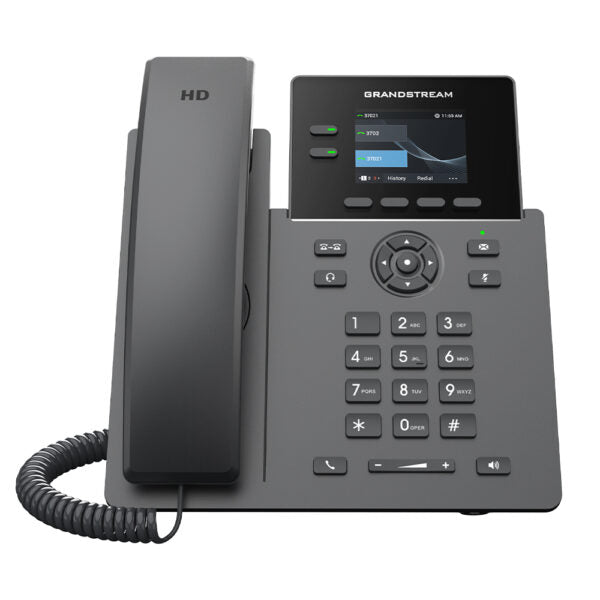
• The GRP2610 is a powerful 2-line carrier-grade IP phone designed with zero-touch provisioning for mass deployment and easy management. It features a sleek design and a suite of next-generation features, including virtual multi-purpose keys (VPKs), a color LCD with swappable face plates for easy logo customization, and more. Key Features: • Supports 2 SIP accounts and 2 multi-purpose line keys • Swappable faceplate to allow for easy logo customization • Equipped with noise shield technology to minimize background noise • Supported by GDMS, providing a centralized interface to configure, provision, manage, and monitor • HD audio supporting all major codecs, including wideband codecs G.722 and Opus • Up to 8 BLF keys • Enterprise-level protection, including secure boot, dual firmware images, and encrypted data storage • Supports 5-way audio conferencing for easy conference calls • 2 Lines and 2 SIP Accounts • 2.4 in Screen • PoE • Color Additional Information: • Weight: 1.85 lbs • Dimensions: 9.76 × 8.29 × 2.24 in • Phone Type: Desk Technical Specifications: • Model: GRP2610P • Package Contents: • Handset with Cord • Phone Stand • Network Cable • Quick Installation Guide • Protocols/Standards: • SIP RFC3261, TCP/IP/UDP, RTP/RTCP, HTTP/HTTPS, ARP, ICMP, DNS(A record, SRV,<br>NAPTR), DHCP, PPPoE, TELNET, TFTP, NTP, STUN, SIMPLE, LLDP, LDAP, TR-069,<br>802.1x, TLS, SRTP, IPV6 • Network Interfaces: • Dual switched auto-sensing 10/100 Mbps Ethernet ports with integrated PoE • Graphic Display: • 2.4-inch (320×240) TFT color LCD • Feature Keys: • 2-line keys with up to 2 SIP accounts, 4 XML programmable context sensitive softkeys, navigation/menu keys, 8 dedicated function keys for: MESSAGE (with LED indicator), TRANSFER, HEADSET, MUTE, SEND/REDIAL, SPEAKERPHONE, VOL+, VOL- • Auxiliary Port: • RJ9 headset jack (allowing EHS with Plantronics headsets) • Voice Codecs and Capabilities: • Support for G7.29A/B, G.711µ/a-law, G.726, G.722(wide-band), G723, iLBC, OPUS,<br>in-band and out-of-band DTMF (in audio, RFC2833, SIP INFO), VAD, CNG, AEC, PLC,<br>AJB, AGC • Telephony Features: • Hold, transfer, forward, 5-way conference, call park, call pickup, shared-call appearance (SCA)/bridged-line-appearance (BLA), downloadable phonebook (XML, LDAP, up to 1000 items), call waiting, call log (up to 1000 records), XML customization of screen, off-hook auto dial, auto answer, click-to-dial, flexible dial plan, hot-desking, personalized music ringtones and music on hold, server redundancy and fail-over • HD Audio: • Yes, HD handset and speakerphone with support for wideband audio • QoS: • Layer 2 QoS (802.1Q, 802.1P), and Layer 3 (ToS, DiffServ, MPLS) QoS • Security: • User and administrator level passwords, MD5 and MD5-sess based authentication,<br>256-bit AES encrypted configuration file, SRTP, TLS, 802.1x media access control,<br>secure boot • Temperature and Humidity: • Operation: 0°C to 40°C • Storage: -10°C to 60°C • Humidity: 10% to 90% non-condensing • Physical: • Dimension: 203mm x 186mm x 28mm • Unit weight: 0.4kg • Package weight: 0.9kg

About This Product

The Grandstream GRP2610P is a straightforward two-line IP phone aimed at small-to-medium businesses looking for reliable, carrier-grade voice communication without the expense of a high-end executive model. It fits naturally on a standard desk and works well in open-plan offices, reception areas, or any shared workspace where a dedicated phone line is needed. The unit supports Power over Ethernet (PoE), but the adapter is not included — a key point for buyers whose network switches do not supply PoE. This phone pairs nicely with Grandstream's GDMS platform for zero-touch provisioning and fleet management, making it a good choice for businesses deploying multiple devices across a single office or multiple locations in the GTA. While it offers solid HD audio and noise shield technology, the GRP2610P has only two SIP accounts and a 2.4-inch color display, so it is not suited for power users who need multiple concurrent calls or advanced visual call handling. It would be overkill for a single-line home office setup where a basic analog adapter suffices, and underpowered for a receptionist or manager who regularly manages four or more active lines. For a small team or branch office that needs a dependable, easy-to-manage VoIP phone at an accessible price point, the GRP2610P is a practical fit.
Services We Provide
  • Professional Installation & Configuration
  • Ongoing Maintenance & Support
  • Troubleshooting & Repairs
  • System Upgrades & Updates



