
Grandstream GRP2611G 3-Line Gigabit PoE IP Phone

Frequently Asked Questions

First, double-check your SIP account credentials (username, password, and domain) entered under Account 1 in the phone’s web interface. Ensure your network allows outbound SIP traffic on ports 5060/5061 and that your router isn’t blocking SIP packets. If the issue persists, a Toronto-based VoIP support provider can usually resolve this remotely.
The phone includes a 5V power adapter in the box—simply plug it into a standard AC outlet and connect to the phone’s DC jack. If you lose the adapter, any 5V DC supply with a 2.1mm barrel connector and at least 1A current rating will work. For a clean desk, consider using a PoE injector or a PoE switch instead.
Verify that the handset cord is fully seated into both the phone and the handset. If using PoE, confirm the switch port is delivering power and the phone’s screen lights up. Log into the phone’s web interface and check the SIP registration status—if it shows “Unregistered,” re-enter your account settings and reboot the phone.
Yes: the phone has an RJ9 headset jack that supports EHS (Electronic Hookswitch) with Plantronics headsets. You can also use the built-in Bluetooth for a wireless headset—press the headset button to activate Bluetooth pairing mode. Check your headset’s manual for specific pairing instructions.
First, check the Ethernet cable connection at both ends and reseat it. If the phone is PoE-powered, try a different port on your switch or use the included power adapter to rule out PoE power issues. Also, ensure your router/switch is not cycling or experiencing DHCP lease conflicts.
You can either use zero-touch provisioning by pointing the phone to a provisioning server via DHCP options or manually enter the SIP server and credentials in the phone’s web interface. Grandstream’s GDMS platform can also push configurations remotely. Check your provider’s setup guide for their specific server addresses and port settings.
Adjust the handset and speaker volumes using the VOL+ and VOL- keys during a call. For persistent low audio, go to Settings > Audio in the phone’s web interface and ensure the codec priority is set to wideband (G.722 or Opus) if your provider supports it. Also confirm the handset receiver isn’t partially blocked.
No, the GRP2611G is a pure SIP IP phone and does not have an FXS port for analog devices. You would need an ATA (analog telephone adapter) like the Grandstream HT801 to connect an analog phone, fax machine, or alarm system. For Canadian compliance, note that some alarm panels require a specific VoIP adapter—check with your alarm provider.
This is often a one-way audio issue. Verify that your router or firewall is not blocking RTP ports (usually UDP 10,000–20,000) and that NAT traversal settings (STUN or ALG) are correctly configured. Try disabling SIP ALG in your router. If the problem persists, a remote support technician can quickly test your network configuration.
Log into the phone’s web interface, go to the “Programmable Keys” section, and assign functions like speed dial, BLF (busy lamp field), or call park to each key. You can also configure them via an XML provisioning file for mass deployment. The phone’s LCD will show up to 12 programmable keys per page.
IP Phones

Grandstream GRP2611G 3-Line Gigabit PoE IP Phone
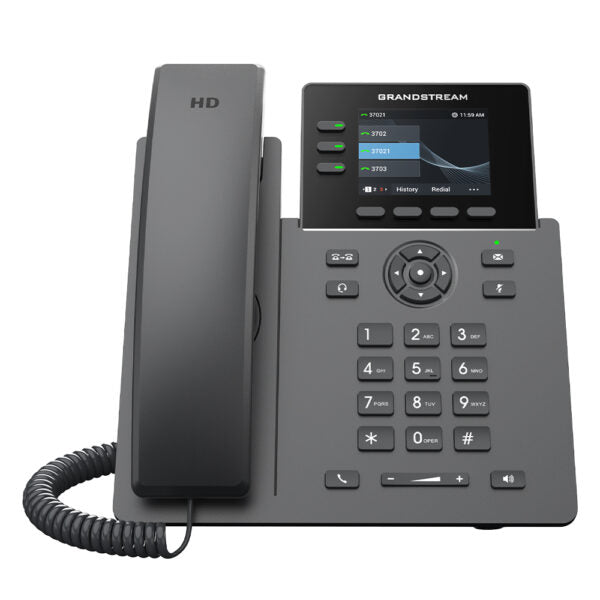
• The GRP2611G is a powerful 3-line carrier-grade IP phone designed for mass deployment and easy management, featuring zero-touch provisioning. • Key features: • 12 virtual multi-purpose keys (VPKs) • Dual Gigabit ports with integrated PoE • Color LCD with swappable face plates for easy logo customization • HD audio supporting all major codecs, including wideband codecs G.722 and Opus • Enterprise-level protection including secure boot, dual firmware images, and encrypted data storage • Supported by Grandstream’s Device Management System (GDMS) for centralized management and monitoring • Additional information: • Weight: 2.01 lbs • Dimensions: 11.28 × 8.29 × 2.24 in • Phone Type: Desk • Technical specifications: • Model: GRP2611G • Package Contents: GRP2611G Phone, Handset with Cord, Phone Stand, 5V Power Adapter, Network Cable, Quick Installation Guide • Protocols/Standards: SIP RFC3261, TCP/IP/UDP, RTP/RTCP, HTTP/HTTPS, ARP, ICMP, DNS(A record, SRV,<br>NAPTR), DHCP, PPPoE, TELNET, TFTP, NTP, STUN, SIMPLE, LLDP, LDAP, TR-069,<br>802.1x, TLS, SRTP, IPV6 • Network Interfaces: Dual switched auto-sensing 10/100/1000 Mbps Gigabit Ethernet ports with integrated PoE • Graphic Display: 2.8-inch (320×240) TFT color LCD • Feature Keys: 3-line keys with up to 3 SIP accounts, 4 XML programmable context sensitive<br>soft-keys, 5 navigation/menu keys, 8 dedicated function keys for: MESSAGE (with LED<br>indicator), TRANSFER, HEADSET, MUTE, SEND/ REDIAL, SPEAKERPHONE, VOL+, VOL- • Auxiliary Port: RJ9 headset jack (allowing EHS with Plantronics headsets) • Voice Codecs and Capabilities: Support for G7.29A/B, G.711µ/a-law, G.726, G.722(wide-band), G723, iLBC, OPUS, in-band and<br>out-of-band DTMF (in audio, RFC2833, SIP INFO), VAD, CNG, AEC, PLC, AJB, AGC • HD Audio: Yes, HD handset and speakerphone with support for wideband audio • QoS: Layer 2 QoS (802.1Q, 802.1P) and Layer 3 (ToS, DiffServ, MPLS) QoS • Security: User and administrator level passwords, MD5 and MD5-sess based authentication,<br>256-bit AES encrypted configuration file, SRTP, TLS, 802.1x media access control,<br>secure boot • Upgrade/Provisioning: Firmware upgrade via FTP/TFTP/TFTPS/HTTP/HTTPS, mass provisioning using<br>GDMS/TR-069 or AES encrypted XML configuration file • Temperature and Humidity: Operation: 0°C to 40°C; Storage: -10°C to 60°C; Humidity: 10% to 90% non-condensing

About This Product

The Grandstream GRP2611G is a three-line SIP desk phone designed for small to medium-sized businesses that need a reliable, manageable fleet of devices. It is a good fit for office environments where staff handle moderate call volumes—receptionists, sales teams, or remote workers with a dedicated phone line—and where IT wants centralized provisioning and monitoring. The phone pairs well with any standards-based SIP PBX (such as FreeSWITCH, 3CX, or most hosted services in Canada) and replaces simpler single-line models without sacrificing audio quality or network integration. Its dual Gigabit ports with PoE simplify desk cabling: the phone can be powered over Ethernet using a single cable, and the pass-through port lets a computer share the same wall jack. The GRP2611G includes a color LCD, 12 virtual multi-purpose keys, and support for wideband codecs including Opus, making it a solid choice for staff who need a clear, feature-rich desk phone without the cost or complexity of a top-end executive model. However, with only three line keys, it is not well suited for high-volume call center agents who require many simultaneous calls or elaborate call handling. For a single home office user, the device may be overkill; a basic Grandstream GXP1610 would suffice. Conversely, large enterprises with hundreds of phones and advanced customization needs may find the GRP2611G’s feature set adequate but may prefer the GXP2170 or GRP2612 for more line keys and expansion modules. In a Canadian business context, this phone works reliably with most Canadian SIP carriers (Rogers Business Voice, Bell MTS, Telus Business Connect, and hosted providers like net2phone or RingCentral) and can be provisioned via zero-touch for quick deployment across a GTA office.
Services We Provide
  • Professional Installation & Configuration
  • Ongoing Maintenance & Support
  • Troubleshooting & Repairs
  • System Upgrades & Updates



