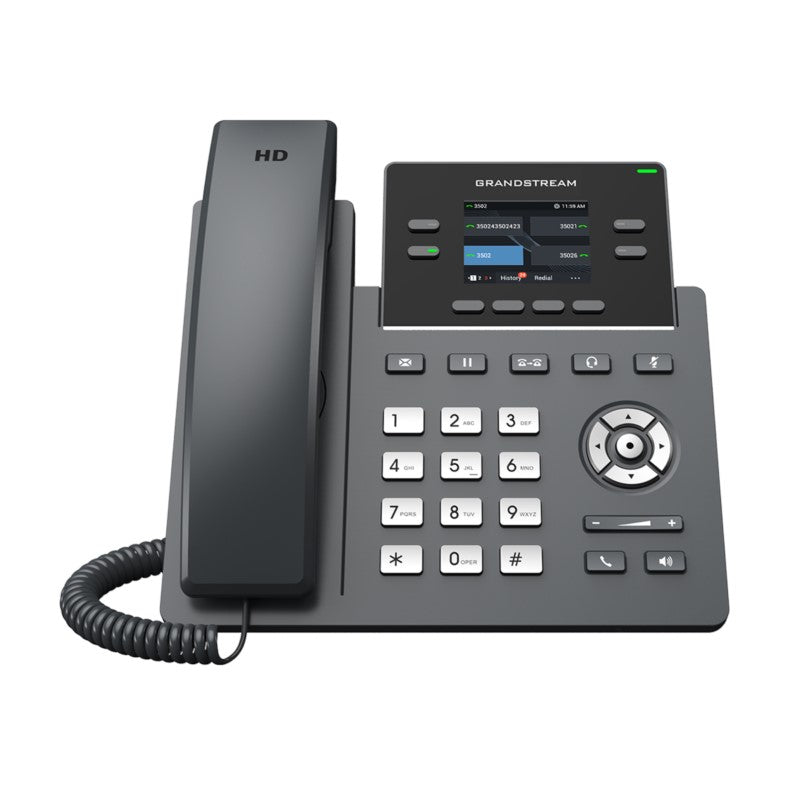
Grandstream GRP2612 4-Line Carrier-Grade IP Phone

Frequently Asked Questions

Start by verifying the network connection: ensure the Ethernet cable is secure and the phone gets an IP address (check via the phone’s menu). Then confirm the SIP server address, username, and password are entered exactly as provided by your VoIP provider—pay attention to any capital letters or special characters. A quick power cycle often clears transient registration glitches. If the issue persists, a Toronto-based VoIP support provider can usually resolve this remotely.
First, check that the provisioning URL is reachable by plugging a laptop into the same network port and opening the URL in a browser. If the phone uses zero-touch provisioning, ensure your DHCP server is offering the correct option 66 or 160 to point the phone to the provisioning server. A simple reboot (unplug and replug the phone) can restart the process and resolve one-time glitches.
Verify on the phone’s screen that at least one line key shows a registered account. If no account is registered, revisit the SIP account settings. Try switching to speakerphone; if you hear dial tone there, the handset cord may be loose or damaged. Also test with a different Ethernet cable and switch port to rule out network issues.
Check for network congestion by running a speed test or ensuring the phone is on a switch with QoS enabled for voice traffic. Disable SIP ALG in your router’s settings if it’s turned on—this feature often distorts VoIP audio. Test with a different headset or handset to rule out a hardware fault, and try a known-good Ethernet cable.
First confirm the power source is stable: if using PoE, ensure the switch can supply sufficient power (the GRP2612 requires 802.3af Class 2). If you are using a power adapter, verify it’s the original Grandstream PSU or a compatible one. Check the phone’s system log (via the web interface) for any error messages prior to the reboot, and consider upgrading the firmware if an update is available. If the issue persists, a Toronto-based VoIP support provider can usually diagnose the cause remotely.
Each line key must be mapped to an SIP account that is registered. Log into the phone’s web interface and go to Line Keys. For each key you want to use, assign it to Account 1 or Account 2, make sure the account itself is enabled and registered. If you need more than two active accounts, note the GRP2612 supports only two SIP registrations—all four keys must share those accounts.
From the phone’s web interface, navigate to Programmable Keys and select a key to edit. Set the mode to BLF, enter the extension number you want to monitor, and choose which SIP account (Account 1 or 2) the BLF should use. Save the changes and the key will light up when the monitored extension is busy. You can configure up to 16 BLF keys across the four physical line keys using the virtual multi-purpose keys.
Yes, the phone supports logo customization. Via the web interface, look for the screensaver or display settings, or use the provisioning template to push a custom .png file. The ideal image size is 160x100 pixels or close to it to fit the color LCD. This feature is often rolled out across a fleet using zero-touch provisioning for consistent office branding.
Absolutely. The phone uses open SIP standards, so it is compatible with any Canadian VoIP provider that offers SIP trunking or hosted PBX services. You will need the provider’s SIP server address, account credentials, and possibly an outbound proxy. Most major Canadian carriers publish configuration guides that apply directly to Grandstream phones.
On the phone’s LCD, go to Menu > System > Accounts, select Account 2, and enable it. Fill in the SIP server, user ID, password, and proxy details exactly as supplied by your provider. Once the account registers, assign it to an available line key in the web interface or hold down a line key on the phone to configure it directly. This gives you a distinct second number that can ring and dial independently.
IP Phones

Grandstream GRP2612 4-Line Carrier-Grade IP Phone

* The GRP2612 is a powerful 4-line carrier-grade IP phone designed for mass deployment and easy management, featuring zero-touch provisioning. • Key Features: • 16 virtual multi-purpose keys (VPKs) for flexible key arrangement • Color LCD with swappable faceplates for logo customization • HD audio supporting all major codecs, including wideband codecs G.722 and Opus • Up to 16 digital BLF Keys for customizable key arrangements • Enterprise-level protection including secure boot, dual firmware images, and encrypted data storage • Technical Specifications: • Supports 2 SIP accounts and 4 multi-purpose line keys • Graphic Display: 2.4 inch (320×240) TFT color LCD • Feature Keys: 4 line keys with up to 2 SIP accounts, 4 XML programmable context sensitive softkeys, 5 navigation/menu keys, 9 dedicated function keys • Voice Codecs and Capabilities: Support for G7.29A/B, G.711µ/a-law, G.726, G.722(wide-band), G723, iLBC, OPUS, in-band and out-of-band DTMF(in audio, RFC2833, SIP INFO) • Additional Information: • Weight: 2 lbs • Dimensions: 12 × 9 × 4 in • Brand: Grandstream

About This Product

Designed for organizations that need a dependable desk phone with modern VoIP features without a steep learning curve, the GRP2612 fits well in front-line roles such as reception desks, call centre agents, or the general office worker who handles a moderate call volume. Its zero-touch provisioning makes it particularly appealing for Canadian businesses with multiple branches, where IT teams can deploy dozens of units consistently from a central location. The phone complements Grandstream’s own UCM series of IP PBXs but works openly with any SIP-compliant platform. It’s a solid step up from basic two-line phones, adding a colour screen, more programmable keys, and advanced security features. That said, anyone evaluating it should note the two-SIP-account limit; while you get four line keys, they can only register across two accounts. For a receptionist juggling calls from separate providers or for legal/executive users who need to separate personal lines, this may prove restrictive. In daily use, the GRP2612’s HD audio and Opus codec support deliver clear conversations, and the secure boot with dual firmware images reduces the risk of downtime after a failed update. Swappable faceplates are a nice touch if you want consistent branding across your phones. The 2.4-inch colour screen is compact but bright; it won’t replace a desktop phone display for heavy visual call handling, but for general duties it’s more than enough. For a typical small business in the Greater Toronto Area considering a VoIP rollout, the GRP2612 hits a sweet spot between price and capability. It’s overkill for a hot-desk “just make a call” scenario, and if your users routinely handle more than two SIP accounts or need a larger display for call management, you’d be better served by a higher-end model. But for the majority of desk workers, it gets the job done with reliability and a touch of enterprise polish.

Services We Provide
  • Professional Installation & Configuration
  • Ongoing Maintenance & Support
  • Troubleshooting & Repairs
  • System Upgrades & Updates