
Grandstream GRP2612P 4-Line Carrier-Grade IP Phone with PoE
Frequently Asked Questions
First, confirm that the phone has a valid IP address and can reach the internet. Then verify that the SIP server address, username, and password entered in the account settings exactly match what your provider gave you. A common issue is a typo in the server URL or port number—double-check those fields. If the problem persists, try power-cycling the phone and your router.
Ensure that the Ethernet cable is securely connected to both the phone's LAN port and a PoE-enabled switch or injector. Verify that the switch port is actually delivering PoE (check its status indicator). Try a different Ethernet cable, as a damaged cable can prevent power delivery. If you have a PoE injector, confirm it is rated for the phone's power requirements (802.3af Class 2).
Start by checking the network connection—poor cabling or interference can cause audio issues. Try replacing the Ethernet cable and ensuring it's not coiled near power cables. If using a headset, test with the handset to isolate the problem. Also, verify that the phone's firmware is up to date, as audio codec fixes are sometimes released in updates.
Confirm that the phone has been configured for zero-touch provisioning via DHCP option 66 or a static provisioning server URL. Check that the provisioning file is correctly formatted and accessible from the phone's network. If you're using Grandstream GDMS, ensure the phone is assigned to the correct device group and that the provisioning template is applied.
BLF functionality depends on the SIP server supporting presence and the phone being subscribed to the right events. First, verify that the BLF keys are programmed with the correct extension numbers or SIP URIs. Then confirm that the SIP server allows BLF subscriptions—some providers require a feature to be enabled. A quick test is to check if BLF works with another phone on the same system.
You can update the firmware through the phone's web interface under Maintenance > Upgrade. Set the firmware server URL to Grandstream's official server or your own TFTP/HTTP server. Click 'Check for Firmware' and then 'Upgrade' if a new version is found. Make sure the phone remains powered and connected during the update to avoid corruption.
Yes, the GRP2612P is a standard SIP phone and should work with any SIP-compliant provider. You'll need to enter the provider's server details, your account credentials, and configure codec preferences. Some Canadian providers may require specific settings for NAT traversal or STUN—check their support documentation or contact them for guidance.
Access the phone's web interface and navigate to Application > DSS Keys. Each key can be assigned a function like speed dial, BLF, or transfer. Choose the function type, then enter the target extension or number. The VPKs are programmable per line or globally, so you can customize them for your workflow. Save and reboot the phone for changes to take effect.
This message indicates that the phone cannot register with the SIP server. First, check your network connection and ensure the phone has internet access. Then review the SIP account settings for any errors. If you recently changed your password, update it on the phone. If the issue persists, contact your VoIP support team to verify that your account is active and the server is not blocked.
The Opus codec is supported but may not be the first priority in the codec list. To use it, log into the phone's web interface, go to Settings > Audio, and move Opus to the top of the allowed codecs. Ensure your SIP provider and the other party's device also support Opus for end-to-end wideband audio. After saving, reboot the phone to apply the change.
IP Phones
Grandstream GRP2612P 4-Line Carrier-Grade IP Phone with PoE
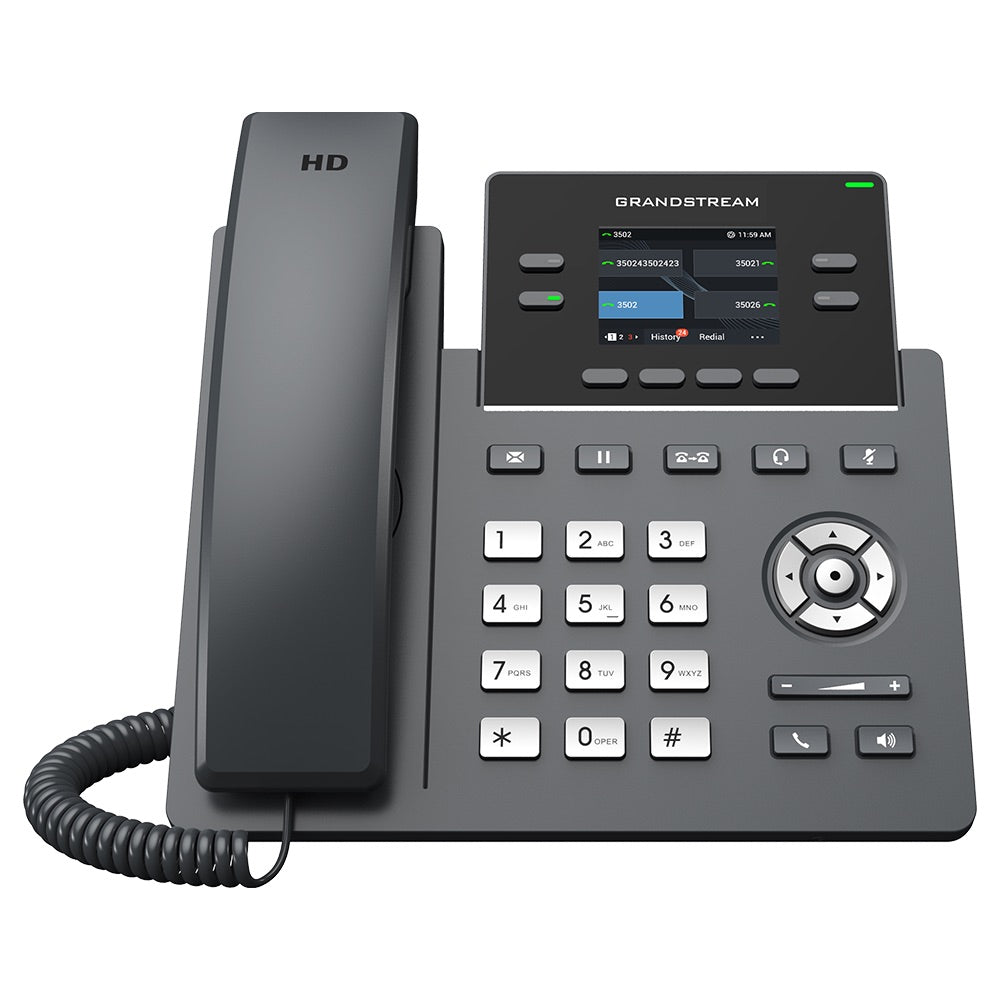
• The GRP2612P is a powerful 4-line carrier-grade IP phone designed with zero-touch provisioning for mass deployment and easy management, featuring a sleek design. • Key features: • 16 virtual multi-purpose keys (VPKs) • Color LCD with swappable faceplates for logo customization • HD audio supporting major codecs including wideband codecs G.722 and Opus • Up to 16 digital BLF Keys • Enterprise-level protection including secure boot, dual firmware images, and encrypted data storage • Supported by Grandstream’s Device Management System (GDMS) for cloud provisioning and centralized management • Built for desktop workers with easy deployment for enterprises, service providers, and high-volume markets
About This Product
The Grandstream GRP2612P is a 4-line IP phone built for busy desktop workers in enterprise and service provider environments. It is especially well-suited for organizations that deploy phones in volume, thanks to zero-touch provisioning and cloud management through Grandstream's GDMS platform. The phone pairs naturally with Grandstream UCM PBX systems or any standard SIP server, and its PoE support simplifies cabling in offices where power outlets are scarce near desks. For Canadian businesses, particularly those in the GTA, the GRP2612P works reliably with major SIP carriers and is a practical choice for hot-desking or shared workspace setups where quick provisioning is a priority.
While the GRP2612P offers 4 line keys and 16 virtual multi-purpose keys that can be programmed for BLF or speed dial, the interface is a basic color LCD rather than a touchscreen. This keeps the price affordable but means users accustomed to high-end touch models may find navigation less intuitive. The swappable faceplates allow for branding customization, which is a nice touch for businesses wanting to match office decor or display a logo. However, the phone lacks built-in Bluetooth or Wi-Fi, so it relies entirely on the wired network—something to consider if your desk layout doesn't have easy Ethernet access.
For deployment context, this phone is overkill for a single home user who only needs one line and basic calling, but it is underpowered for a receptionist or executive who requires many physical line keys or a large color touch display. It hits a sweet spot for general office staff or call center agents who need reliable HD audio, secure boot, and dual firmware images for fail-safe updates. The GRP2612P supports wideband codecs like G.722 and Opus, ensuring clear voice quality on compatible networks. If your organization manages hundreds of phones, the GDMS cloud provisioning and encrypted data storage reduce manual setup time and improve security compliance.
While the GRP2612P offers 4 line keys and 16 virtual multi-purpose keys that can be programmed for BLF or speed dial, the interface is a basic color LCD rather than a touchscreen. This keeps the price affordable but means users accustomed to high-end touch models may find navigation less intuitive. The swappable faceplates allow for branding customization, which is a nice touch for businesses wanting to match office decor or display a logo. However, the phone lacks built-in Bluetooth or Wi-Fi, so it relies entirely on the wired network—something to consider if your desk layout doesn't have easy Ethernet access.
For deployment context, this phone is overkill for a single home user who only needs one line and basic calling, but it is underpowered for a receptionist or executive who requires many physical line keys or a large color touch display. It hits a sweet spot for general office staff or call center agents who need reliable HD audio, secure boot, and dual firmware images for fail-safe updates. The GRP2612P supports wideband codecs like G.722 and Opus, ensuring clear voice quality on compatible networks. If your organization manages hundreds of phones, the GDMS cloud provisioning and encrypted data storage reduce manual setup time and improve security compliance.
Services We Provide
- Professional Installation & Configuration
- Ongoing Maintenance & Support
- Troubleshooting & Repairs
- System Upgrades & Updates



