
Grandstream GRP2612P IP Phone with PoE -New in Open Box

Frequently Asked Questions

First, verify that the SIP server address, username, and password in the phone's account settings exactly match what your provider gave you — even a typo in the domain can cause registration failure. Next, check that the phone has a valid IP address and can reach the internet by pinging a public address from the phone's network menu. If the issue persists, a Toronto-based VoIP support provider can usually resolve this remotely.
If you are using Power over Ethernet, make sure the PoE switch or injector is working and that the Ethernet cable is firmly plugged into both the phone and the switch. If the phone is powered by an AC adapter, try a different outlet or swap the adapter with a known working one of the same voltage. If neither brings the screen to life, the phone may need replacement.
Ensure the handset cord is fully inserted into both the handset and the base — a loose connection is a common cause. Then, in the phone's settings, confirm that the microphone is not muted (the MUTE button should be off). If the problem continues, try a different handset or headset to rule out a hardware fault.
Log into the phone's web interface using its IP address, go to the 'Key Programming' section, and assign a line key as 'BLF' with the target extension number and SIP ID. The phone will then show that person's status (idle, ringing, busy) on the LCD when you press the corresponding button. You may need to confirm that your PBX supports BLF subscriptions.
Begin by unplugging the Ethernet cable (or removing power for 30 seconds), then reconnecting it — this power cycle clears most temporary glitches. If the screen remains frozen, hold down the OK button for about 10 seconds to force a reboot (this does not erase settings). Should that fail, contact your VoIP support before attempting a factory reset.
Generally yes, provided your service offers SIP credentials and supports SIP RFC3261 — the GRP2612P is standards-compliant. You will need the provider's server address, your account credentials, and sometimes a specific codec setting (G.711 or G.722). Check with your provider to confirm they allow third-party hardware and do not lock their service to their own phones.
First, re-enter your account and network settings manually through the phone's menu and test registration. If you had a provisioning file, re-upload it via the web interface. A firmware update can sometimes reset to defaults if the upgrade file was large or the process was interrupted. For future updates, always back up your configuration before starting.
This is often caused by a SIP session timer (or re-INVITE interval) mismatch between your phone and the provider. Log into the phone's web interface, go to the account settings, and set the 'Session Timer' to match what your provider recommends — commonly 180 seconds. Restart the phone and test the call again.
The phone has a dedicated RJ9 headset port on the side of the base. Plug your headset into that port, then press the HEADSET button on the phone to engage headset mode. For wireless headsets, you may need an adapter that connects to the RJ9 port — check the headset manufacturer's compatibility list.
IP Phones

Grandstream GRP2612P IP Phone with PoE -New in Open Box
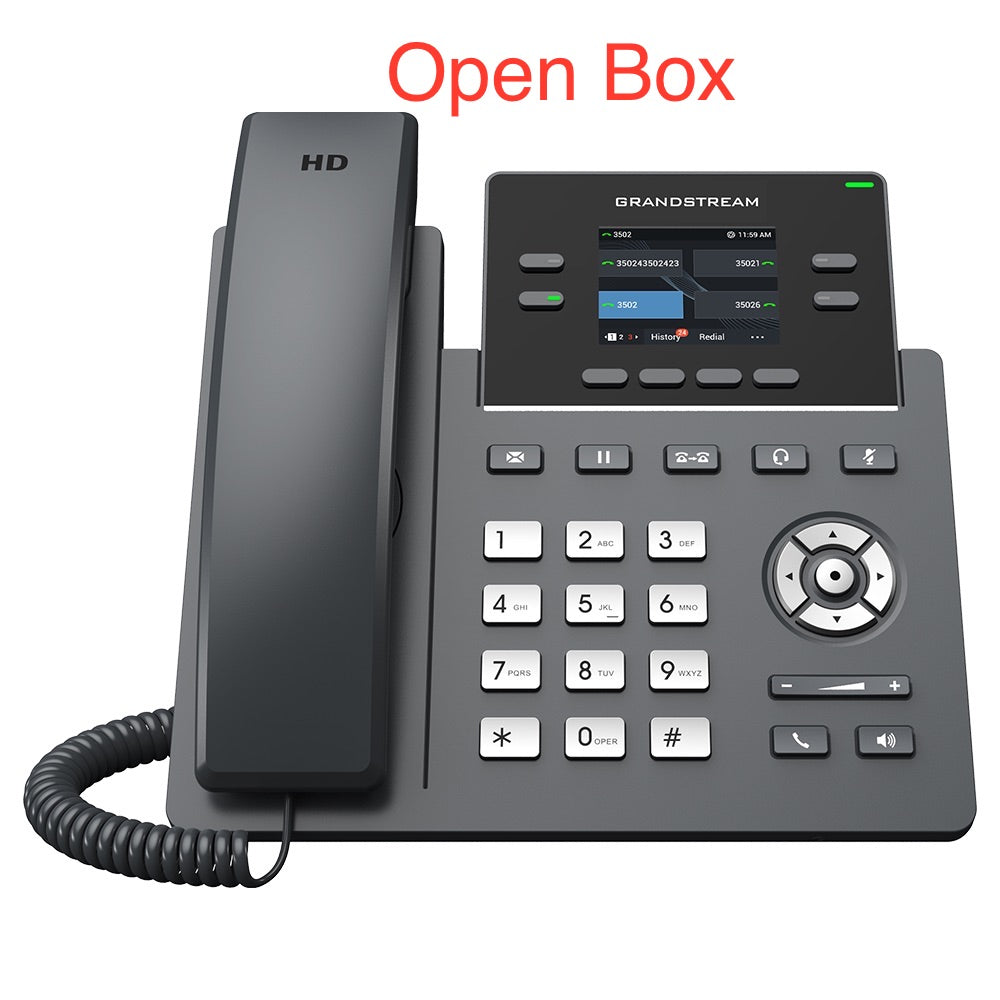
• The GRP2612P is a powerful, 4-line carrier-grade IP phone designed for mass deployment and easy management. It features a sleek design and a suite of next-generation features. Key Features: • 16 virtual multi-purpose keys (VPKs) • Color LCD with swappable faceplates for easy logo customization • HD audio supporting all major codecs, including wideband codecs G.722 and Opus • Up to 16 digital BLF Keys • Enterprise-level protection including secure boot, dual firmware images, and encrypted data storage This phone is designed for desktop workers and offers an easy-to-use and easy-to-deploy voice endpoint. Note: New-in-Open-Box items are in perfect condition and have been carefully tested. They are final sale, except in case of defects. Weight: 2.6 lbs Dimensions: 12 × 9 × 4 in Brand: Grandstream Phone Type: Desk Protocols/Standards: • SIP RFC3261 • TCP/IP/UDP • RTP/RTCP • HTTP/HTTPS • ARP • ICMP • DNS(A record, SRV, NAPTR) • DHCP • PPPoE • TELNET • TFTP • NTP • STUN • SIMPLE • LLDP • LDAP • TR-069 • 802.1x • TLS • SRTP • IPV6 Network Interfaces: • Dual switched auto-sensing 10/100 Mbps Ethernet ports with integrated PoE Graphic Display: 2.4 inch (320×240) TFT color LCD

About This Product

The Grandstream GRP2612P is a 4-line SIP desk phone built for business environments where reliability and easy management matter more than flashy extras. Its compact design and PoE support make it a natural fit for open-plan offices or cubicle-based setups in the Greater Toronto Area, where power outlets at every desk can be scarce. The 2.4-inch color LCD and 16 virtual multi-purpose keys give desk workers quick access to frequently used features without overwhelming them. This phone pairs well with any standard SIP trunk provider in Canada or with a Grandstream UCM for on-site PBX control. However, the 10/100 Mbps Ethernet ports mean it is not ideal for networks carrying heavy data traffic through the phone — if your office runs gigabit networking everywhere, the phone will still work but will limit throughput on the downstream device. For a small business or a branch office where calls are moderate and budgets are tight, the GRP2612P delivers solid HD voice and straightforward provisioning without the cost of a top-tier model. It would be overkill for a home office needing only one line, and underpowered for a high-volume call center that requires dozens of programmable keys per station.
Services We Provide
  • Professional Installation & Configuration
  • Ongoing Maintenance & Support
  • Troubleshooting & Repairs
  • System Upgrades & Updates



