
Grandstream GRP2612W 4-Line Carrier-Grade IP Phone

Frequently Asked Questions

First, double-check that the SIP server address, username, and password entered in the phone's web interface or provisioning file are exactly correct. A common issue is a typo in the server URL or a mismatch in the authentication credentials. If the settings look right, verify that your network allows outbound SIP traffic on ports 5060 or 5061 and that your firewall isn't blocking the phone's IP address.
Make sure the Wi-Fi is enabled in the phone's network settings and that you've selected the correct SSID. If the network is hidden, you'll need to manually enter the SSID and security type. Also confirm that the Wi-Fi password is entered correctly—case sensitivity matters. If the phone still won't connect, try power cycling the phone and your access point.
One-way audio is usually a network issue. Start by checking whether the phone is behind a NAT router that isn't properly handling SIP traffic. Ensure that SIP ALG is disabled on your router, as it often causes this problem. If the phone is on Wi-Fi, try switching to a wired Ethernet connection temporarily to rule out wireless interference.
You can configure BLF keys through the phone's web interface under the 'DSS Keys' or 'Programmable Keys' section. Each key needs to be assigned a BLF type and the SIP URI of the extension you want to monitor. Make sure your PBX supports BLF and that the phone is registered to the same server as the monitored extensions.
'No Service' typically means the phone cannot register with the SIP server. Verify that the SIP account settings are correct and that the server is reachable from your network. You can test connectivity by pinging the server's IP address from a computer on the same subnet. If the server is reachable but registration still fails, check if the account is already registered elsewhere or if the server requires a specific transport protocol (UDP/TCP/TLS).
Yes, the Grandstream GRP2612W is a standard SIP phone and should work with any Canadian carrier that offers SIP trunking or hosted VoIP, including Rogers, Bell, and many regional providers. You'll need to obtain the correct SIP server settings and credentials from your provider. Some carriers may require specific codec or DTMF settings, so check their documentation or support.
Poor audio quality is often caused by network congestion or high latency. If you're using Wi-Fi, try moving the phone closer to the access point or reducing interference from other devices. On a wired connection, check that the Ethernet cable is securely connected and not damaged. You can also try switching to a different codec, such as G.711 or Opus, in the phone's audio settings to see if that improves clarity.
The GRP2612W supports zero-touch provisioning using a provisioning server. You'll need to set up a TFTP, HTTP, or HTTPS server with a configuration file that contains the settings for all phones. In the phone's web interface, enter the provisioning server URL under 'Maintenance' > 'Upgrade and Provisioning'. Once configured, the phone will download the file on boot. For large deployments, consider using Grandstream's UCM series or a third-party provisioning tool.
Intermittent drops are often due to network instability. Start by checking the phone's network connection—if on Wi-Fi, ensure the signal strength is strong and stable. If wired, inspect the Ethernet cable and port. Also, verify that your router's DHCP lease time is long enough and that the phone's keep-alive interval is set appropriately (typically 30-60 seconds). If the issue persists, try a different power source or PoE switch.
Yes, the GRP2612W has a dedicated headset button and supports both wired headsets via the RJ9 port and Bluetooth headsets (if the model includes Bluetooth, which this one does not). For a wired headset, use a standard RJ9 connector. The phone also supports EHS (Electronic Hookswitch) with compatible Plantronics or Jabra headsets for remote call control. Check the headset's compatibility with Grandstream phones before purchasing.
IP Phones

Grandstream GRP2612W 4-Line Carrier-Grade IP Phone
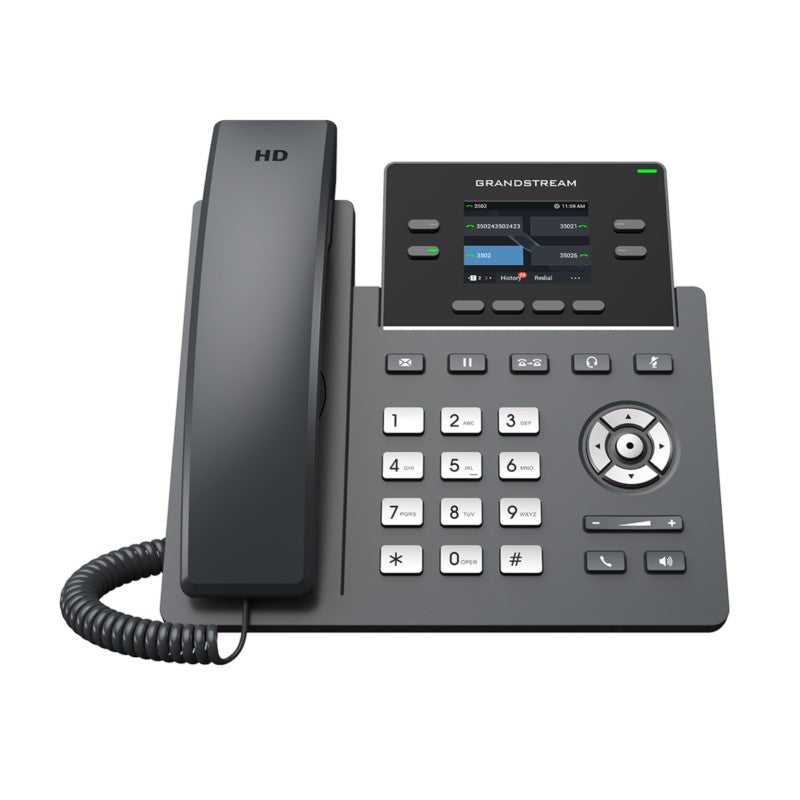
• Zero-touch provisioning for mass deployment and easy management • Sleek design with a suite of next-generation features, including: • Wi-Fi support • 16 virtual multi-purpose keys (VPKs) • Color LCD with swappable faceplates for easy logo customization • HD audio supporting all major codecs • Up to 16 digital BLF Keys • Enterprise-level protection including secure boot, dual firmware images, and encrypted data storage • Supports 2 SIP accounts and 4 multi-purpose line keys • Integrated dual-band Wi-Fi 802.11 a/b/g/n/ac (2.4Ghz & 5Ghz) • Swappable faceplate to allow for easy logo customization • HD audio supporting all major codecs, including wideband codecs G.722 and Opus • Up to 16 digital BLF Keys • Enterprise-level protection including secure boot, dual firmware images, and encrypted data storage • Weight: 2.4 lbs • Dimensions: 12 × 9 × 4 in • Brand: Grandstream • Supports protocols/standards such as SIP RFC3261, TCP/IP/UDP, RTP/RTCP, HTTP/HTTPS, ARP, ICMP, DNS(A record, SRV, NAPTR), DHCP, PPPoE, TELNET, TFTP, NTP, STUN, SIMPLE, LLDP, LDAP, TR-069, 802.1x, TLS, SRTP, IPV6 • Network Interfaces: Dual switched auto-sensing 10/100 Mbps Ethernet ports with integrated PoE • Graphic Display: 2.4 inch (320×240) TFT color LCD • Feature Keys: 4 line keys with up to 2 SIP accounts, 4 XML programmable context sensitive softkeys, 5 navigation/menu keys, 9 dedicated function keys for: MESSAGE(with LED indicator), TRANSFER, HOLD, HEADSET, MUTE, SEND/REDIAL, SPEAKERPHONE, VOL+, VOL-

About This Product

The Grandstream GRP2612W is a solid choice for a small to medium-sized business that needs a reliable, carrier-grade IP phone with the flexibility of Wi-Fi. It's particularly well-suited for a desk in an open office or a shared workspace where running Ethernet might be impractical, thanks to its integrated dual-band Wi-Fi. While it supports only two SIP accounts, the four multi-purpose line keys and 16 virtual multi-purpose keys (VPKs) give it enough capacity for a user who handles a moderate call volume or needs quick access to BLF statuses for colleagues. The swappable faceplate is a nice touch for branding in a reception area or a company lobby.

This phone pairs well with a hosted VoIP service or an on-premises PBX that supports zero-touch provisioning, making deployment straightforward for an IT team. It replaces a basic single-line desk phone or a Wi-Fi-enabled handset that lacks the feature set for business use. The tradeoff is that the network ports are limited to 10/100 Mbps, which is fine for voice but means you shouldn't expect to daisy-chain a high-bandwidth device through it. For a power user who needs more than two active lines or advanced call handling, the GRP2612W might feel underpowered; it's better suited for a receptionist, a manager, or a remote worker than for a high-volume call center agent.

In a Canadian context, this phone works well with most major SIP carriers, and its support for secure boot and encrypted storage is reassuring for businesses in the GTA that need to meet data privacy standards. The lack of Gigabit Ethernet is a minor limitation, but for voice-only traffic it's rarely a bottleneck. If you're deploying in a dense office with many Wi-Fi devices, you'll want to ensure your wireless network is properly configured to prioritize voice traffic, as the phone's Wi-Fi performance depends on the quality of your access points.
Services We Provide
  • Professional Installation & Configuration
  • Ongoing Maintenance & Support
  • Troubleshooting & Repairs
  • System Upgrades & Updates



