
Grandstream GRP2612W 4-Line IP Phone- New in Open Box

Frequently Asked Questions

First, verify that the SIP server address, username, and password entered in the phone's account settings exactly match what your provider gave you. Check that the phone has a valid IP address and can reach the internet—try pinging the provider's server from the phone's network diagnostics menu. If the issue persists, a Toronto-based VoIP support provider can usually resolve this remotely.
Make sure you're using a Power over Ethernet (PoE) switch or the included power adapter, as the GRP2612W does not ship with a power supply in all packages. If using PoE, confirm the switch port is enabled and delivering power. If using the adapter, try a different wall outlet and ensure the cable is fully seated.
Press the Menu button, navigate to Network > Wi-Fi Settings, and scan for available networks. Select your SSID and enter the password. For best call quality, use a 5 GHz band if your network supports it, and avoid placing the phone far from the access point or behind metal obstructions.
This usually means the phone isn't registered to a SIP account. Check the LCD for a registration status—if it shows 'Not Registered,' review the account settings as described in the first FAQ. Also ensure the handset cord is firmly plugged into both the phone and the handset itself.
Yes, the GRP2612W is a standard SIP phone and should work with any provider that offers SIP trunking, including many Canadian carriers and independent VoIP services. You'll need to configure the SIP account settings provided by your carrier—some may require specific codec or proxy settings, which their support can help with.
Go to Menu > Settings > LCD > Key as BLF, then select an unused key and assign it the extension number you want to monitor. Make sure the phone is registered and the other extension is on the same PBX or server that supports presence. The LED will light green when idle and red when busy.
If using Wi-Fi, check for signal interference or weak signal by moving the phone closer to the access point. On a wired connection, try a different Ethernet cable and verify the switch port isn't faulty. Also check if the phone's IP address is set to DHCP and that the lease isn't expiring too frequently.
Choppy audio often points to network congestion or high latency. First, try reducing the phone's audio codec to a lower bandwidth codec like G.711 from the account settings. If on Wi-Fi, switch to a wired connection temporarily to isolate the issue. Also ensure no large downloads or streaming are happening on the same network during calls.
Before attempting a factory reset, try simpler troubleshooting steps like power cycling the phone. If a reset is truly needed, note that it will erase all settings and accounts—you should first confirm with your VoIP provider or IT team that a reset is the correct step. If directed, press and hold the 'OK' button while powering on the phone, or use the web interface under Maintenance > Factory Reset.
This typically means the phone can't reach the SIP server. Confirm the server address is correct and that your network allows outbound SIP traffic (ports 5060/5061 UDP/TCP). If you're behind a firewall, check that SIP ALG is disabled, as it can cause registration issues. A Toronto-based VoIP support provider can help test and adjust firewall settings remotely.
IP Phones

Grandstream GRP2612W 4-Line IP Phone- New in Open Box
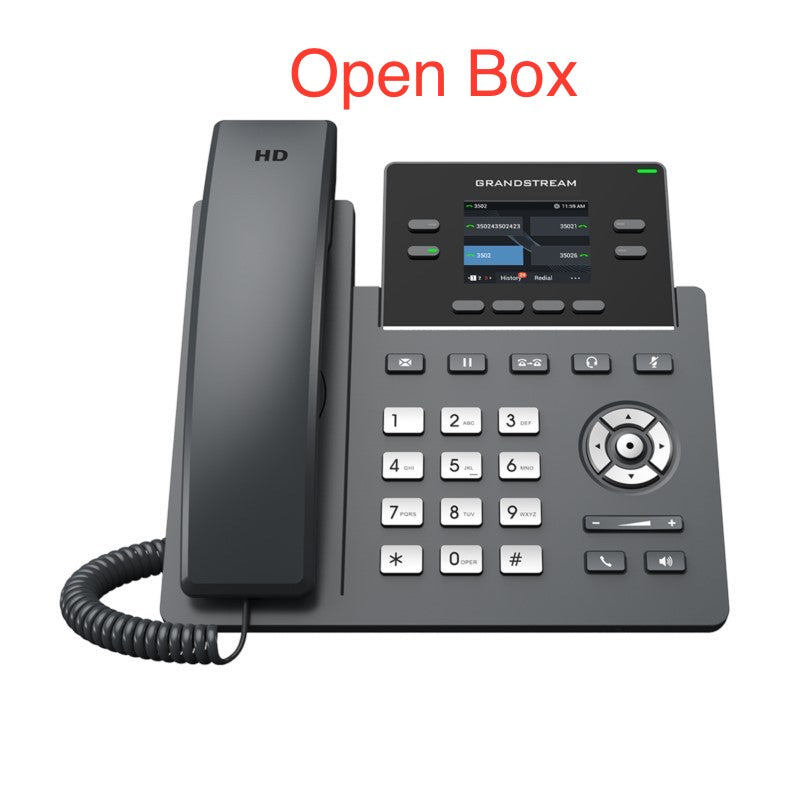
• The GRP2612W is a powerful, 4-line carrier-grade IP phone designed for zero-touch provisioning and mass deployment. Its sleek design features a suite of next-generation technologies, including Wi-Fi support, 16 virtual multi-purpose keys (VPKs), and a color LCD with swappable faceplates. • Key Features: • Supports 2 SIP accounts and 4 multi-purpose line keys • Built-in dual-band Wi-Fi support for seamless connectivity • Swappable faceplate for easy logo customization • HD audio supporting all major codecs, including wideband codecs G.722 and Opus • Up to 16 digital BLF Keys for efficient key management • Enterprise-level protection, including secure boot, dual firmware images, and encrypted data storage • Additional Specifications: • Weight: 2.4 lbs • Dimensions: 12 × 9 × 4 in • Brand: Grandstream

About This Product

The Grandstream GRP2612W is a 4-line IP phone aimed at businesses that need a reliable, feature-rich desk phone without breaking the bank. It fits well in small to medium-sized offices, including those in the Greater Toronto Area, where a mix of wired and Wi-Fi connectivity can simplify desk layout and reduce cabling. The phone's dual-band Wi-Fi support makes it a good fit for environments where running Ethernet to every desk is impractical, and its swappable faceplate allows for basic branding customization. While it supports up to 16 virtual multi-purpose keys for busy attendant-style functionality, it is limited to 2 SIP accounts, so it is best suited for users who need multiple lines but not a high volume of simultaneous calls. It pairs well with Grandstream's own UCM series PBX or any standard SIP-based VoIP service, but it may be overkill for a single-line home office user and underpowered for a receptionist or call center agent who requires more than two active call appearances. Buyers should note that while the phone supports Wi-Fi, a wired Ethernet connection will always provide the most stable voice quality, especially in congested wireless environments common in multi-tenant office buildings.
Services We Provide
  • Professional Installation & Configuration
  • Ongoing Maintenance & Support
  • Troubleshooting & Repairs
  • System Upgrades & Updates



