
Grandstream GRP2613 3-Line Carrier-Grade IP Phone

Frequently Asked Questions

Start by confirming the Ethernet cable is securely connected to the correct port and the link lights are active. Then log into the phone’s web interface and verify the SIP server address, username, and password under account settings—typos and extra spaces are common culprits. If your network uses a VLAN for voice, ensure the VLAN ID is set correctly on the phone. A Toronto-based VoIP support provider can usually resolve persistent registration failures remotely.
First, test the same Ethernet cable and switch port with another PoE device to confirm the port is delivering power. If the port is good, try a different cable—sometimes a damaged pair prevents power from reaching the phone. Also check that the switch port hasn’t been administratively disabled or set to a non-PoE mode.
This typically points to a network routing or firewall issue. Confirm that the phone’s gateway and subnet mask are correct, and that SIP ALG is disabled on your router or firewall. If the problem only happens with external calls, check that the necessary RTP port range is open and not being blocked by your network’s NAT configuration.
Verify that the provisioning server URL is reachable from the phone’s network and that the configuration file is being served correctly. Check whether the phone is set to download the config on every reboot or only on a schedule. If the server requires authentication, ensure the credentials in the phone’s provisioning settings haven’t expired or been changed.
Access the phone’s web interface and navigate to the network settings section. You can manually enter the voice VLAN ID, or if your switch supports LLDP, enable LLDP on the phone so it discovers the voice VLAN automatically. After applying the change, reboot the phone and confirm it receives an IP address from the voice subnet.
Yes. Even without zero-touch provisioning, you can configure the GRP2613 manually through its web interface. You’ll need the SIP server address, account credentials, and any codec preferences from your provider. Once entered, the phone will register and operate normally—it simply won’t benefit from automated configuration updates.
The phone syncs time via NTP by default. Check that the NTP server address in the phone’s settings is reachable and that your network allows NTP traffic. If you’re using a local NTP server, verify its IP address is correct and that the phone can route to it. You can also set the correct time zone under the phone’s date and time settings.
Intermittent audio usually indicates packet loss or jitter on the network. Check whether the phone and the switch port it’s connected to are both set to full duplex and the same speed. If the phone shares a network segment with heavy data traffic, consider prioritizing voice traffic through QoS settings on your switch or router.
Confirm that the BLF subscription URIs match exactly what your SIP server expects, and that the server supports the event package the phone is using. Also verify that the monitored extensions haven’t changed their registration status or been removed. A mismatch in transport protocol between the phone and server can also prevent BLF updates from arriving.
IP Phones

Grandstream GRP2613 3-Line Carrier-Grade IP Phone
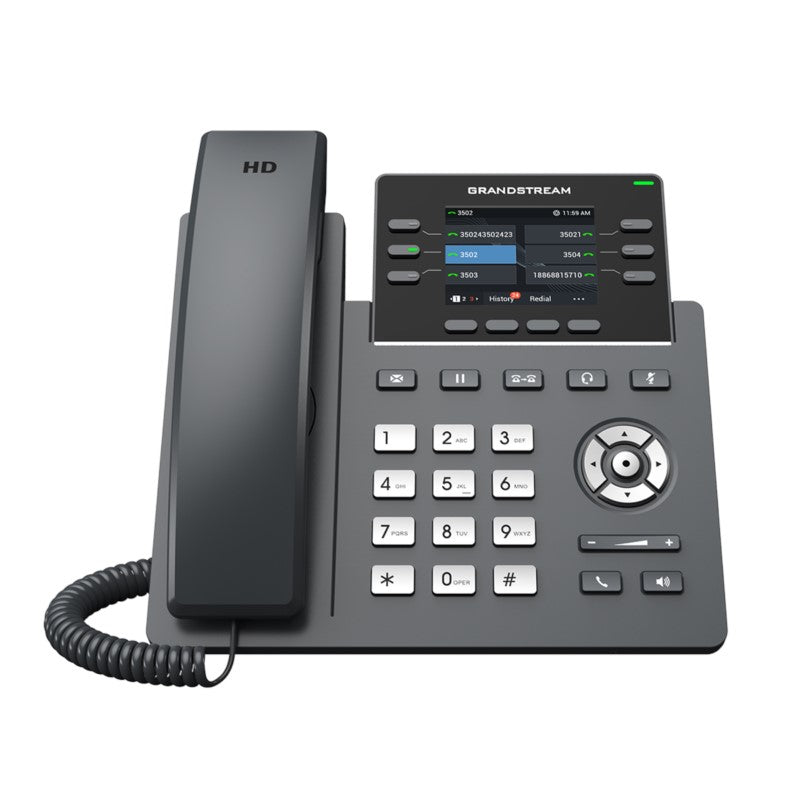
* Powerful 3-line carrier-grade IP phone with zero-touch provisioning for mass deployment and easy management * Sleek design and next-generation features, including: • 24 virtual multi-purpose keys (VPKs) • Dual Gigabit ports • Color LCD with swappable face plates for logo customization • Enterprise-level security features, including: • Secure boot • Dual firmware images • Encrypted data storage * Supported by Grandstream’s Device Management System (GDMS) for cloud provisioning and centralized management * Designed for easy deployment in high-volume markets, with a weight of 1.8 lbs and dimensions of 12 × 9 × 4 in • Features: • Supports up to 3 SIP accounts and 6 multipurpose line keys • Swappable faceplates for logo customization • Dual switched autosensing 10/100/1000 Mbps Gigabit Ethernet ports with integrated PoE • HD audio with support for all major codecs, including wideband codecs G.722 and Opus • Additional information: • Weight: 1.8 lbs • Dimensions: 12 × 9 × 4 in • Brand: Grandstream * Technical specifications: • Protocols/Standards: SIP RFC3261, TCP/IP/UDP, RTP/RTCP, HTTP/HTTPS, ARP, ICMP, DNS(A record, SRV, NAPTR), DHCP, PPPoE, TELNET, TFTP, NTP, STUN, SIMPLE, LLDP, LDAP, TR-069, 802.1x, TLS, SRTP, IPV6 • Network Interfaces: Dual switched auto-sensing 10/100/1000 Mbps Gigabit Ethernet ports with integrated PoE • Graphic Display: 2.8 inch (320×240) TFT color LCD

About This Product

The GRP2613 is built for organizations that need a dependable, multi-line desk phone that can be deployed at scale without adding IT overhead. It fits well in mid-sized offices, branch locations, and any setting where staff handle moderate call volume across a few lines—think customer service desks, sales teams, or administrative hubs. With three SIP accounts and dual Gigabit ports, it slots neatly into networks that separate voice and data traffic, and the integrated PoE simplifies cabling in both new builds and retrofits across the GTA.

This model makes the most sense when paired with Grandstream’s cloud management platform, GDMS, or a compatible provisioning system. The zero-touch deployment design means a batch of these phones can be configured remotely before they even reach a user’s desk—a practical advantage for multi-site Canadian businesses that want consistency without sending a technician to every location. The swappable faceplate is a small but useful touch for organizations that want branded hardware in client-facing areas.

A buyer should understand that this is a wired, desk-bound phone with no built-in Wi-Fi or Bluetooth. It depends entirely on Ethernet connectivity, so it’s not the right choice for roaming staff or hot-desking setups that lack a network drop at every seat. The 2.8-inch color screen is functional and clear, but it is not a large touchscreen, so heavy users who expect a smartphone-like interface or extensive visual presence management may find it constrained.

For a three-person reception team or a busy professional who juggles a few lines, the GRP2613 is well-matched. It becomes overkill for a lobby phone that only needs a single line, and it is underpowered for an executive or call-center supervisor who needs programmable sidecar expansion or a large touch-driven display. In the right middle ground, it delivers carrier-grade voice quality and centralized manageability at a price point that scales sensibly.
Services We Provide
  • Professional Installation & Configuration
  • Ongoing Maintenance & Support
  • Troubleshooting & Repairs
  • System Upgrades & Updates



