
Grandstream GRP2614 4-Line Carrier-Grade IP Phone
Frequently Asked Questions
Grandstream GRP2614 4-Line Carrier-Grade IP Phone
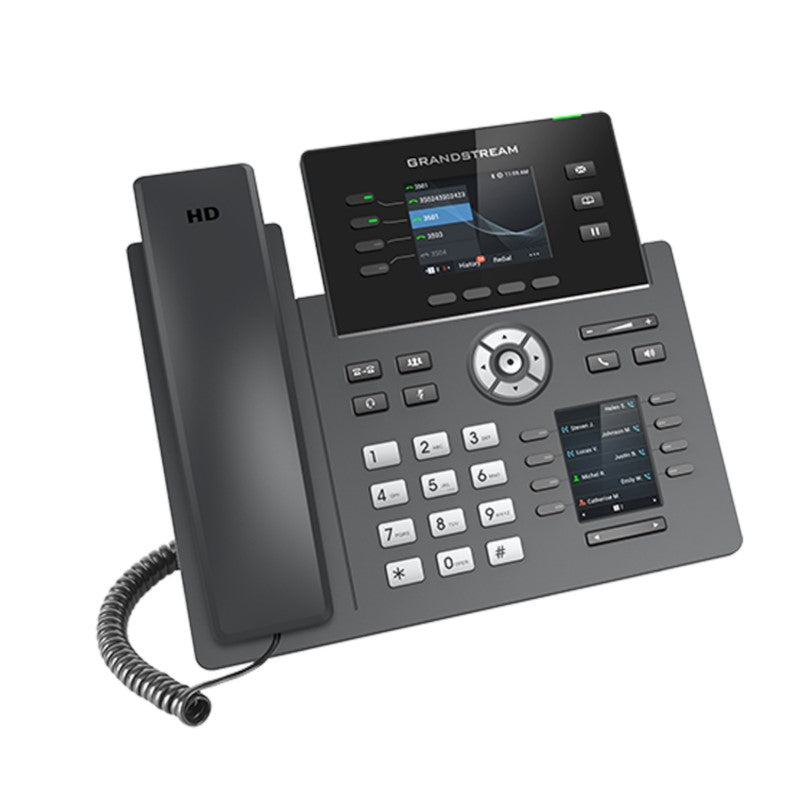
The GRP2614 is a 4-line carrier-grade IP phone designed with zero-touch provisioning for mass deployment and easy management. Its sleek design features a suite of next-generation features, including: • Dual LCD screens with 40 virtual multi-purpose keys (VPKs) • Integrated Wi-Fi • Bluetooth support • Dual Gigabit ports with integrated PoE • Enterprise-level security features, such as: + Secure boot + Dual firmware images + Encrypted data storage • Centralized management through Grandstream's Device Management System (GDMS) Key Features: • HD audio with handset and speakerphone support for wide-band audio • 4-line keys with up to 4 SIP accounts and 8MPK extension keys with dual-color LED • Dual LCD screens with digital BLF keys • Enterprise-level protection, including secure boot, dual firmware images, and encrypted data storage • Integrated dual-band Wi-Fi 802.11 a/b/g/n/ac • Dual switched auto-sensing 10/100/1000 Mbps Gigabit Ethernet ports with integrated PoE • Integrated Bluetooth • Weight: 3.2 lbs • Dimensions: 12 × 10 × 4 in Technical Specifications: • Protocols/Standards: SIP RFC3261, TCP/IP/UDP, RTP/RTCP, HTTP/HTTPS, ARP, ICMP, DNS(A record, SRV, NAPTR), DHCP, PPPoE, TELNET, TFTP, NTP, STUN, SIMPLE, LLDP, LDAP, TR-069, 802.1x, TLS, SRTP, IPV6 • Network Interfaces: Dual switched auto-sensing 10/100/1000 Mbps Gigabit Ethernet ports with integrated PoE • Bluetooth: Yes, integrated • Wi-Fi: Yes, integrated dual-band Wi-Fi 802.11 a/b/g/n/ac (2.4GHz & 5GHz) • Graphic Display: 2.8 inch (320×240) TFT color LCD, 2.4 inch (320×240) additional screen • Voice Codecs and Capabilities: Support for G7.29A/B, G.711µ/a-law, G.726, G.722(wide-band), G723,iLBC, OPUS, in-band and out-of-band DTMF(in audio, RFC2833, SIP INFO), VAD, CNG, AEC, PLC, AJB, AGC • Telephony Features: Hold, transfer, forward, 3-way conference, call park, call pickup, shared-call appearance(SCA)/bridged-line-appearance(BLA), downloadable phonebook(XML, LDAP, up to 2000 items), call waiting, call log(up to 2000 records), XML customization of screen, off-hook auto dial, auto answer, click-to-dial, flexible dial plan, hot-desking, personalized music ringtones and music on hold, server redundancy and fail-over
About This Product
The device fits squarely in the middle of a professional phone lineup. It is not a conference room appliance and not a stripped‑down cubicle phone; its dual Gigabit ports and PoE ensure it slots into standard enterprise networks without extra power bricks. The dual firmware images and secure boot provide a safety net that IT teams will appreciate when managing devices remotely. However, a very small office that only needs a single line and never uses sidecars will find the GRP2614 over‑equipped, while a busy contact centre that requires dozens of BLF keys on every set will quickly outgrow its 8‑MPK limit and might prefer something like a GXP2170 with expansion modules.
Where the GRP2614 truly shines is in settings that value reliability over flash. It does not chase video or touchscreen trends, but it delivers the kind of call handling that a law firm, accounting practice, or property management office depends on every day. The wide‑band audio codec support keeps conversations crisp, and the server redundancy feature means the phone keeps working even if one call server goes dark — a practical benefit in any multi‑site or cloud‑first deployment. Just keep in mind that the integrated Wi‑Fi, while convenient, still operates best when the phone is within reasonable range of a well‑planned access point; a weak signal will affect call quality as much as on any other wireless endpoint.
For Canadian businesses evaluating their phone fleet, the GRP2614 lands at a sensible mid‑point. It is an easy upgrade from an aging single‑line IP phone, giving staff more screen real estate and better headset options without a steep learning curve. Since it supports standard SIP, it will work with most certified Canadian carriers and with on‑premise systems from other brands — but its GDMS management and provisioning shortcuts are fully unlocked only when paired with Grandstream provisioning infrastructure.
Services We Provide
- Professional Installation & Configuration
- Ongoing Maintenance & Support
- Troubleshooting & Repairs
- System Upgrades & Updates



