
Grandstream GRP2615 10-Line Carrier-Grade IP Phone
AIM Telecom provides troubleshooting and configuration support for this product to businesses across Canada and the USA. Contact us to confirm whether the issue can be handled by phone or requires on-site service.
Get Support Call 416-312-4819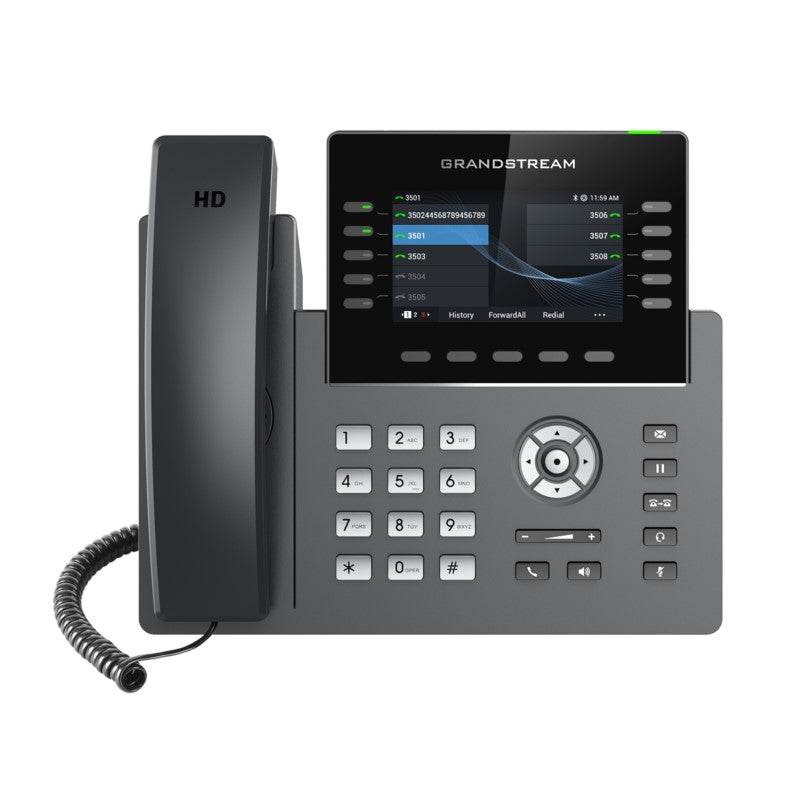
Common issues and fixes
Reviewed troubleshooting steps are not yet available for this model.
Ask AIM Telecom about this productAbout this product
*The GRP2615 is a high-end carrier-grade IP phone designed with zero-touch provisioning for mass deployment and easy management. It supports up to 10 lines and 5 SIP accounts while featuring a sleek design and a suite of next-generation features, including:
• Integrated Wi-Fi
• Bluetooth support
• 40 multi-purpose keys (MPKs)
• Available extension module
• Dual Gigabit ports with integrated PoE
• Swappable faceplates for easy logo customization
• High-definition audio and handset/speakerphone capabilities
This device is designed to provide enterprise-level security, including:
• Secure boot
• Dual firmware images
• Encrypted data storage
The GRP2615 is supported by Grandstream's Device Management System (GDMS), which provides a centralized interface for configuring, provisioning, managing, and monitoring deployments. The phone is built for busy desktop workers and designed for easy deployment by enterprises, service providers, and other high-volume markets.
Key Features:
• HD audio with handset and speakerphone support
• 10 line keys with up to 5 SIP accounts
• 40 built-in digital BLF keys; available extension module offers 40 BLF/speed dial keys per module
• Enterprise-level protection including secure boot, dual firmware images, and encrypted data storage
• Integrated dual-band Wi-Fi 802.11 a/b/g/n/ac (2.4GHz & 5GHz)
• Dual switched auto-sensing 10/100/1000 Mbps Gigabit Ethernet ports with integrated PoE
• Swappable faceplates for easy logo customization
• Integrated Bluetooth
Additional Information:
• Weight: 2.6 lbs
• Dimensions: 14 × 10 × 4 in
• Brand: Grandstream
• Integrated Wi-Fi
• Bluetooth support
• 40 multi-purpose keys (MPKs)
• Available extension module
• Dual Gigabit ports with integrated PoE
• Swappable faceplates for easy logo customization
• High-definition audio and handset/speakerphone capabilities
This device is designed to provide enterprise-level security, including:
• Secure boot
• Dual firmware images
• Encrypted data storage
The GRP2615 is supported by Grandstream's Device Management System (GDMS), which provides a centralized interface for configuring, provisioning, managing, and monitoring deployments. The phone is built for busy desktop workers and designed for easy deployment by enterprises, service providers, and other high-volume markets.
Key Features:
• HD audio with handset and speakerphone support
• 10 line keys with up to 5 SIP accounts
• 40 built-in digital BLF keys; available extension module offers 40 BLF/speed dial keys per module
• Enterprise-level protection including secure boot, dual firmware images, and encrypted data storage
• Integrated dual-band Wi-Fi 802.11 a/b/g/n/ac (2.4GHz & 5GHz)
• Dual switched auto-sensing 10/100/1000 Mbps Gigabit Ethernet ports with integrated PoE
• Swappable faceplates for easy logo customization
• Integrated Bluetooth
Additional Information:
• Weight: 2.6 lbs
• Dimensions: 14 × 10 × 4 in
• Brand: Grandstream
More product details
The Grandstream GRP2615 is built for demanding desktop environments where a high call volume and many line appearances are the norm. It fits well in reception areas, executive desks, and call center roles that need quick access to multiple lines and busy lamp field (BLF) monitoring. With five SIP accounts and 40 programmable keys, the phone suits a power user who manages several extensions or oversees team presence, while the optional extension module lets the setup grow with a business. In a Canadian context, this model is a common sight in medium to large offices across the GTA that require reliable voice traffic over a gigabit network.
This phone shines in centrally managed deployments where the IT team uses Grandstream's Device Management System (GDMS) for zero-touch provisioning and firmware control. It pairs naturally with Grandstream UCM series IP PBXs and SIP trunking services, making it a reasonable choice for service providers delivering hosted voice to clients. The dual Gigabit ports with PoE keep cabling simple, and the swappable faceplates offer a tidy way to present custom branding without stickers or after-market modifications.
A buyer should note the GRP2615 is overkill for a small office where a single line and a handful of calls per day are sufficient; a simpler Grandstream model would reduce cost without sacrificing call quality. The integrated Wi-Fi and Bluetooth add flexibility, but if the phone will always live at a wired desk, those radios go unused. The phone is relatively large and heavy at 2.6 lbs, so wall-mounting or sharing a cramped countertop should be planned in advance.
For businesses evaluating whether this is enough phone, the GRP2615 lands in a sweet spot: it is not the top-of-line executive video phone, but it delivers carrier-grade voice and security features for the daily workflow. It will feel underpowered only in roles that require video calling or advanced unified communications integrations that the phone does not attempt to provide.
This phone shines in centrally managed deployments where the IT team uses Grandstream's Device Management System (GDMS) for zero-touch provisioning and firmware control. It pairs naturally with Grandstream UCM series IP PBXs and SIP trunking services, making it a reasonable choice for service providers delivering hosted voice to clients. The dual Gigabit ports with PoE keep cabling simple, and the swappable faceplates offer a tidy way to present custom branding without stickers or after-market modifications.
A buyer should note the GRP2615 is overkill for a small office where a single line and a handful of calls per day are sufficient; a simpler Grandstream model would reduce cost without sacrificing call quality. The integrated Wi-Fi and Bluetooth add flexibility, but if the phone will always live at a wired desk, those radios go unused. The phone is relatively large and heavy at 2.6 lbs, so wall-mounting or sharing a cramped countertop should be planned in advance.
For businesses evaluating whether this is enough phone, the GRP2615 lands in a sweet spot: it is not the top-of-line executive video phone, but it delivers carrier-grade voice and security features for the daily workflow. It will feel underpowered only in roles that require video calling or advanced unified communications integrations that the phone does not attempt to provide.