
Grandstream GRP2616 High-end Carrier-Grade IP Phone
Frequently Asked Questions
Grandstream GRP2616 High-end Carrier-Grade IP Phone
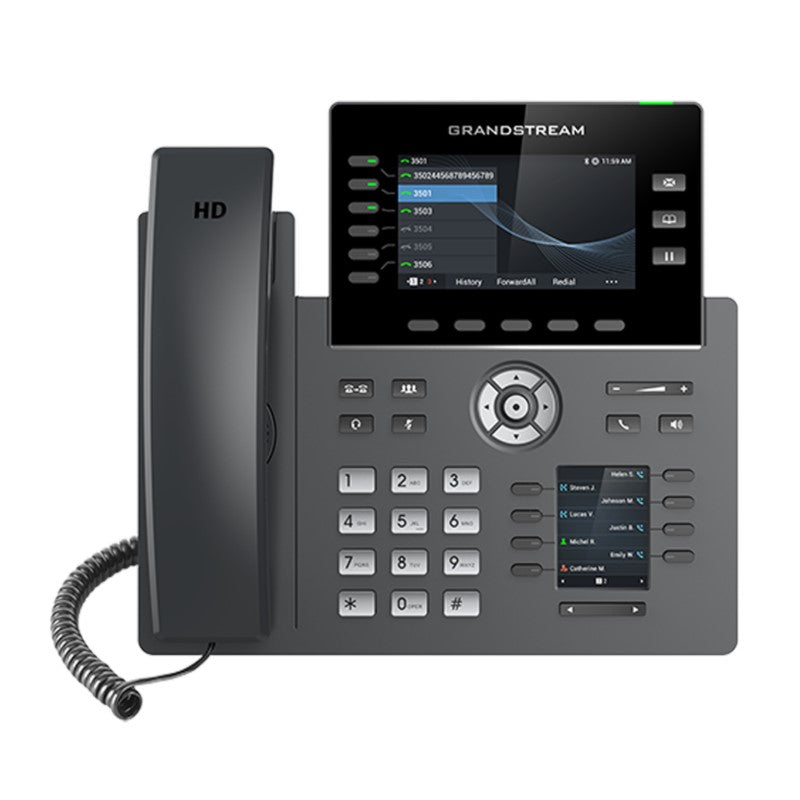
*The GRP2616 is a high-end carrier-grade IP phone designed with zero-touch provisioning for mass deployment and easy management. It supports 6 lines and 6 SIP accounts while featuring a sleek design and a suite of next-generation features including integrated Wi-Fi, Bluetooth support, 48 virtual multi-purpose keys (MPKs), dual Gigabit ports and more. • High-density support for up to 6 lines and 6 SIP accounts • Sleek design with integrated Wi-Fi and Bluetooth • 48 virtual multi-purpose keys (MPKs) for enhanced productivity • Dual Gigabit ports with integrated PoE for reliable connectivity The GRP2616 features a 4.3 inch color LCD screen with swappable faceplates to allow for easy logo customization and an additional 2.4 inch display screen. • High-definition audio and handset speakerphone with wide-band audio support • Dual LCD screens with digital BLF Keys for improved user experience • Enterprise-level protection including secure boot, dual firmware images, and encrypted data storage Integrated Wi-Fi, Bluetooth, and Gigabit Ethernet ports enable seamless connectivity and compatibility. The device also features a 4.3 inch color LCD screen with swappable faceplates to allow for easy logo customization and an additional 2.4 inch display screen. • Integrated dual-band 802.11 a/b/g/n/ac Wi-Fi • Dual switched auto-sensing 10/100/1000 Mbps Gigabit Ethernet ports with integrated PoE • Swappable faceplates for easy logo customization Additional features include: • Weight: 3.6 lbs • Dimensions: 14 × 11 × 4 in • Brand: Grandstream Technical specifications include: • Protocols/Standards: SIP RFC3261, TCP/IP/UDP, RTP/RTCP, HTTP/HTTPS, ARP, ICMP, DNS(A record, SRV, NAPTR), DHCP, PPPoE, TELNET, TFTP, NTP, STUN, SIMPLE, LLDP, LDAP, TR-069, 802.1x, TLS, SRTP, IPV6 • Network Interfaces: Dual switched auto-sensing 10/100/1000 Mbps Gigabit Ethernet ports with integrated PoE • Bluetooth: Yes, integrated • Wi-Fi: Yes, integrated dual-band Wi-Fi 802.11 a/b/g/n/ac (2.4GHz & 5GHz) • Graphic Display: 4.3 inch (480×272) TFT color LCD, 2.4 inch (240×320) additional screen The device supports various voice codecs and capabilities including G7.29A/B, G.711µ/a-law, G.726, G.722(wide-band), G723, iLBC, OPUS, in-band and out-of-band DTMF(in audio, RFC2833, SIP INFO), VAD, CNG, AEC, PLC, AJB, AGC. • Voice Codecs and Capabilities: Support for various voice codecs and capabilities Telephony features include hold, transfer, forward, 3-way conference, call park, call pickup, shared-call appearance(SCA)/bridged-line-appearance(BLA), downloadable phonebook(XML, LDAP, up to 2000 items), call waiting, call log(up to 2000 records), XML customization of screen, off-hook auto dial, auto answer, click-to-dial, flexible dial plan, hot-desking, personalized music ringtones and music on hold, server redundancy and fail-over • Telephony Features: Advanced telephony features for improved productivity
About This Product
For Canadian businesses, the GRP2616 fits easily into deployments using hosted VoIP providers or on-premise IP PBXs, with broad codec support and standard SIP compatibility. Companies in the GTA or across the country will appreciate the zero-touch provisioning, which simplifies rolling out phones across multiple locations. The dual Gigabit ports with PoE also reduce clutter and cabling costs when paired with compatible switches.
One practical trade-off is the size and feature set: while the dual screens and Wi-Fi add real utility, the phone might be more than a basic knowledge worker needs. For a simple hotelling or occasional-call environment, a lower-tier model may be more cost-effective. Conversely, for heavy headset-bound call centre agents, the handset's wideband audio is beneficial, but the phone doesn't replace a dedicated headset solution; you'll still want to pair it with a quality wired or Bluetooth headset.
Overall, the GRP2616 sits in a sweet spot for mid-market and enterprise teams wanting advanced telephony features without stepping up to a touchscreen executive phone. It offers a nice balance of customization (swappable faceplates, programmable keys), connectivity, and security (secure boot, dual firmware) at a price point that makes bulk deployment reasonable.
Services We Provide
- Professional Installation & Configuration
- Ongoing Maintenance & Support
- Troubleshooting & Repairs
- System Upgrades & Updates



