
Grandstream GRP2624 8-Line Professional Carrier-Grade IP Phone

Frequently Asked Questions

Start by checking that the phone has a valid IP address and can reach the internet—try pinging a public address from the phone's network menu. Then verify the SIP account settings (server address, username, password) exactly as provided by your provider. If the problem persists, confirm that your firewall or router isn't blocking SIP (port 5060) or RTP ports. A Toronto-based VoIP support provider can help isolate network-level issues if needed.
First, ensure your PoE switch or injector is compliant with 802.3af/at and can deliver at least 10.8W to the phone. Try a different powered Ethernet port or a known-good cable. If the phone powers on with the included AC adapter but not PoE, the issue is either the PoE source or the Ethernet cable (check for damaged pairs). A quick test with a different PoE source can confirm which side is at fault.
From the phone's web interface, go to 'Settings' > 'Provisioning' and set the provisioning server URL to your GDMS server address, then enable 'Zero Touch Provisioning'. Make sure the phone is on a network that can reach the GDMS server (often on the internet). If using TR-069, ensure that the ACS URL and credentials are correctly entered. The phone will then download its configuration on next reboot or via an automatic check-in.
First, confirm that the issue is one-way or no audio by testing the handset, speakerphone, and a headset separately. If audio works on one but not another, the problem is hardware-specific. If no audio at all, check the volume settings and ensure the handset cord is fully inserted. For one-way audio, the typical cause is a firewall or NAT blocking RTP return traffic—check that your router is handling SIP ALG properly or disable it if possible.
Start by moving the phone closer to your wireless access point and away from metal objects or other electronics. Ensure the phone is connected to a 5 GHz network for less interference, and confirm your Wi-Fi credentials are correct. If drops continue, try resetting the network settings on the phone or rebooting the access point. For mission-critical calls, a wired Ethernet connection is far more reliable than Wi-Fi.
Each of the four SIP accounts can be assigned to one or more line keys. In the phone's web interface, go to 'Account X' settings to enter the SIP server and credentials. Then under 'DSS Keys', assign each line key to an account and choose how calls are handled. You can have different line keys for the same account (shared line appearance) or separate accounts for different numbers. After saving, reboot the phone to apply the changes.
The GRP2624 supports EHS (Electronic Hookswitch) for Plantronics headsets. First, ensure your headset base is connected to the phone's RJ9 headset port and that EHS is enabled in the phone's settings under 'Audio' > 'Headset' > 'EHS Mode'. If it still doesn't work, try pairing via Bluetooth instead if your headset supports it, or contact your headset manufacturer for compatibility details with Grandstream phones.
First, reseat all cable connections to the phone, including the handset cord. If the screen still flickers, disconnect power or PoE for 30 seconds then reconnect. A blank screen that does not respond after a power cycle may indicate a hardware issue—try connecting a known-good power adapter to rule out power supply problems. If the issue persists, the LCD may need servicing.
BLF keys require your VoIP provider to support presence subscriptions. In the phone's web interface, go to 'DSS Keys' and assign a key to 'BLF' or 'Extension Presence'. Enter the SIP extension of the user you want to monitor. Make sure the SIP account used for monitoring is provisioned with the correct credentials. After saving, the key should light up green when idle and red when in use.
Yes, the GRP2624 is a standard SIP phone and works with any SIP-based VoIP provider, including most Canadian carriers that offer SIP trunking or hosted PBX services. You'll need to obtain the correct SIP server address, port, and authentication credentials from your provider. Some providers may require specific codec settings (e.g., G.711) for optimal compatibility, which you can configure under the account's audio settings.
IP Phones

Grandstream GRP2624 8-Line Professional Carrier-Grade IP Phone
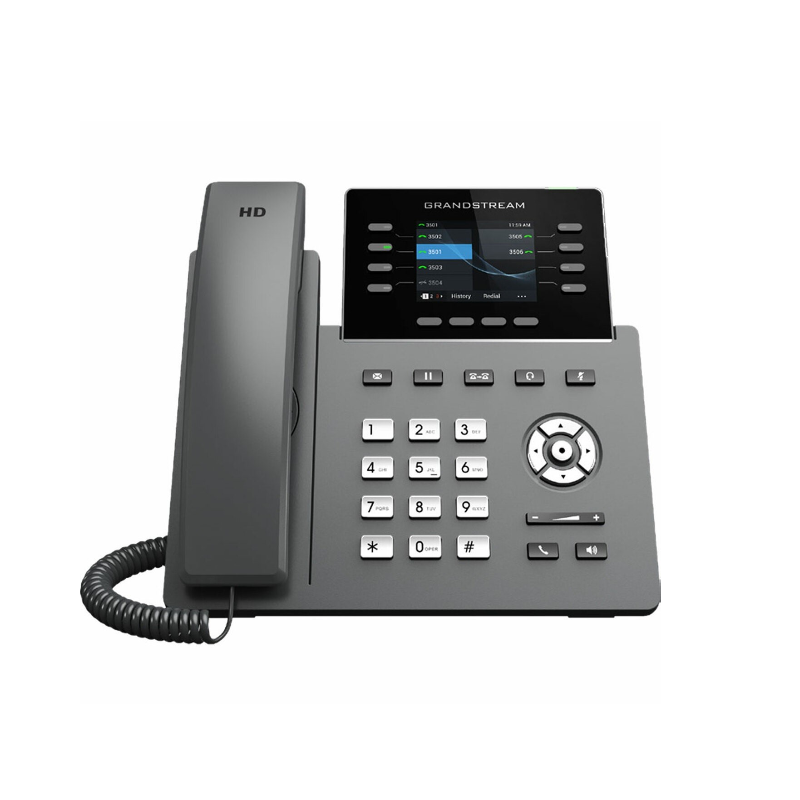
• The GRP2624 is a professional 8-line model designed with zero-touch provisioning for mass deployment and easy management. Its sleek design features a suite of next-generation technologies, including: • 5-way voice conferencing to maximize productivity • Integrated Wi-Fi and Bluetooth support • Full HD audio on both the speaker and handset for utmost clarity • EHS support for Plantronics headsets and USB support for Grandstream's GUV Series headsets • The GRP2624 is compatible with the GBX20 Extension Module, which adds functionality, versatility, and flexibility with up to 40 contacts per module and support for up to 160 contacts by connecting 4 extension modules. • Carrier-grade security features include secure boot, dual firmware images, and encrypted data storage. For cloud provisioning and centralized management, Grandstream's Device Management System (GDMS) provides a centralized interface to configure, provision, manage, and monitor deployments of Grandstream endpoints. • Key features: • 8 lines with 4 SIP accounts • Supported by GDMS for centralized configuration and management • Integrated Bluetooth for headset connectivity • Full-duplex speakerphone with HD audio • Noise shield technology to minimize background noise • Dual switched autosensing Gigabit Ethernet ports with integrated PoE • 5-way audio conferencing for easy conference calls • Enterprise-level protection including secure boot and encrypted data storage • Swappable faceplate for logo customization • Integrated dual-band Wi-Fi 802.11 a/b/g/n/ac • Weight: 2.73 lbs • Dimensions: 11.73 × 8.31 × 3.19 in • Technical specifications: • Protocols/Standards: SIP RFC3261, TCP/IP/UDP, RTP/RTCP, HTTP/HTTPS, ARP, ICMP, DNS (A record, SRV, NAPTR), DHCP, PPPoE, TELNET,TFTP, NTP, STUN,SIMPLE, LLDP, LDAP, TR-069, 802.1x, TLS, SRTP, IPV6 • Network Interfaces: Dual switched auto-sensing 10/100/1000 Mbps Gigabit Ethernet ports with integrated PoE • Graphic Display: 2.8-inch (320×240) TFT color LCD • Wi-Fi: Yes, integrated dual-band Wi-Fi 802.11 a/b/g/n/ac (2.4Ghz & 5Ghz) • Bluetooth: Yes, integrated • Feature Keys: 8-line keys with up to 4 SIP accounts, XML programmable context sensitive softkeys, navigation/menu keys, dedicated function keys for various functions • Auxiliary Port: RJ9 headset jack and USB port for Grandstream's GUV Series headsets and other USB headsets • Voice Codecs and Capabilities: Support for G7.29A/B, 711µ/a-law, 726, 722 (wide-band), G723, iLBC, OPUS, in-band and out-of-band DTMF (in audio, RFC2833, SIP INFO) • Telephony Features: Hold, transfer, forward, 5-way conference, call park, call pickup, shared-call appearance/bridged-line-appearance, downloadable phonebook, call waiting, call log, XML customization of screen • HD Audio: Yes, HD handset and speakerphone with support for wideband audio and dual microphone • Extension Module: Yes, GBX20 • Base Stand: Yes, 2 angle positions available, wall mountable (wall mount sold separately) • QoS: Layer 2 QoS (802.1Q, 802.1P) and Layer 3 (ToS, DiffServ, MPLS) QoS • Security: User and administrator level passwords, MD5 and MD5-sess based authentication, 256-bit AES encrypted configuration file, SRTP, TLS, 1x media access control, secure boot • Multi-language: English, German, Italian, French, Spanish, Portuguese, Russian, Croatian, Chinese, Korean, Japanese, and more • Upgrade/Provisioning: Firmware upgrade via FTP/TFTP / HTTP / HTTPS, mass provisioning using GDMS/TR069 or AES encrypted XML configuration file • Power & Green Energy Efficiency: Universal power adapter included with integrated PoE, max power consumption 9.5W (power adapter) or 10.8W (PoE) • Temperature and Humidity: Operation: 0°C to 40°C, Storage: -10°C to 60°C, Humidity: 10% to 90% Non-condensing • Package Content: GRP2624 phone, handset with cord, phone stand, 12V power adapter, network cable, Quick Installation Guide, GPL license

About This Product

The Grandstream GRP2624 is a professional-grade IP phone designed for businesses that need reliable, multi-line communication without the complexity of a full-contact center terminal. With eight programmable line keys and support for four SIP accounts, it suits receptionists, managers, or anyone who handles multiple calls throughout the day. Its integrated Wi-Fi and Bluetooth give you flexibility in desk placement or headset use, but for voice quality and network stability, a wired Gigabit Ethernet connection with PoE is strongly recommended in a Toronto office environment where call reliability matters. The phone pairs naturally with Grandstream's GBX20 extension modules—up to four of them—letting you scale to 160 programmable contacts without swapping hardware. It's also a good match for hosted PBX services common among Canadian carriers, as its zero-touch provisioning and GDMS management make rollout painless across multiple desks. That said, the GRP2624 is overkill if you only need one or two lines; a simpler model would save cost. And while it's built for professional use, it lacks the dedicated programmable keys and advanced call-routing features of a purpose-built contact-center phone, so it's underpowered for a high-volume call center agent handling dozens of queues. For a standard office desk—especially one where multi-line handling, HD audio, and a sleek design matter—this phone hits a practical sweet spot.
Services We Provide
  • Professional Installation & Configuration
  • Ongoing Maintenance & Support
  • Troubleshooting & Repairs
  • System Upgrades & Updates



