
Grandstream GRP2634 8-Line Professional Carrier-Grade IP Phone
AIM Telecom provides troubleshooting and configuration support for this product to businesses across Toronto and the GTA. Contact us to confirm whether the issue can be handled by phone or requires on-site service.
Get Support Call 416-312-4819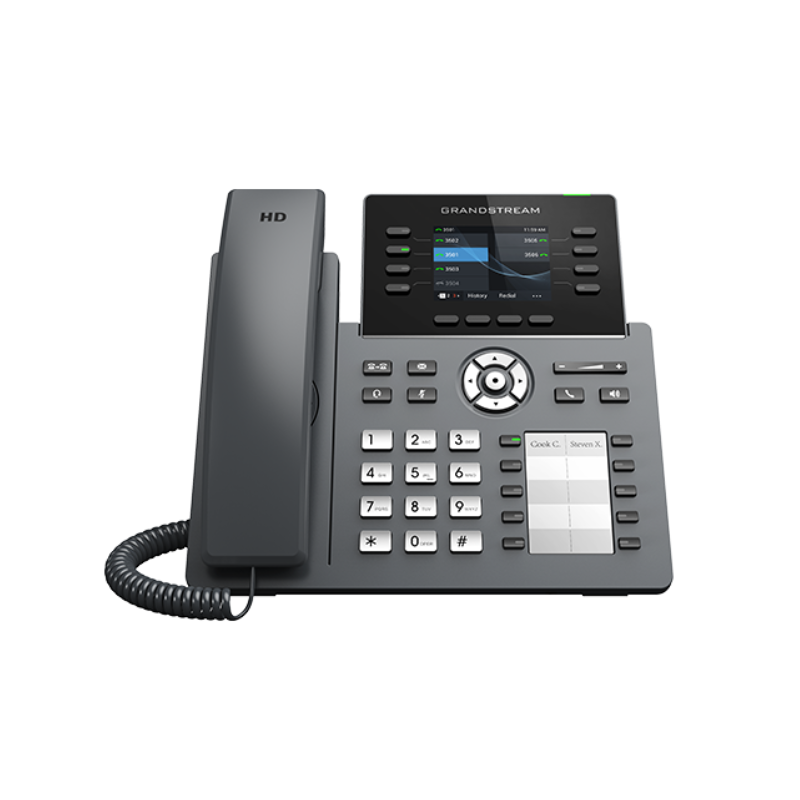
Common issues and fixes
Reviewed troubleshooting steps are not yet available for this model.
Ask AIM Telecom about this productAbout this product
• The GRP2634 is a professional 8-line model designed with zero-touch provisioning for mass deployment and easy management.
• It features a sleek design and a suite of next-generation features, including:
• 5-way voice conferencing to maximize productivity
• Integrated PoE & Wi-Fi
• Full HD audio on both the speaker and handset for clear communication
• EHS support for Plantronics headsets
• USB to support Grandstream’s GUV Series Headsets
• The GRP2634 includes carrier-grade security features, such as secure boot, dual firmware images, and encrypted data storage.
• It is supported by Grandstream’s Device Management System (GDMS), which provides a centralized interface for configuration, provisioning, management, and monitoring of deployments.
• With 32 Virtual Multi-Purpose Keys (VPK) and 10 Multi-Purpose Keys (MPK), the GRP2634 is ideal for busy professionals and receptionists handling high call volumes.
Key Features:
- 8 lines, 4 SIP accounts
- Supported by GDMS for centralized management
- RJ9 headset jack with EHS support for Plantronics headsets
- Full-duplex speakerphone with HD audio
- Equipped with noise shield technology to minimize background noise
- Dual switched autosensing 10/100/1000 Mbps Gigabit Ethernet ports with integrated PoE
- Supports 5-way audio conferencing
- Enterprise-level protection, including secure boot, dual firmware images, and encrypted data storage
- Swappable faceplate for logo customization
- Integrated dual-band Wi-Fi 802.11 a/b/g/n/ac (2.4Ghz & 5Ghz)
- Auxiliary Port: RJ9 headset jack and USB to support Grandstream’s GUV Series headsets
Technical Specifications:
- Protocols/Standards: SIP RFC3261, TCP/IP/UDP, RTP/RTCP, HTTP/HTTPS, ARP, ICMP, DNS(A record, SRV, NAPTR), DHCP, PPPoE, TELNET, TFTP, NTP, STUN, SIMPLE, LLDP, LDAP, TR-069, 802.1x, TLS, SRTP, IPV6
- Network Interfaces: Dual switched auto-sensing 10/100/1000 Mbps Gigabit Ethernet ports with integrated PoE
- Graphic Display: 2.8-inch (320×240) TFT color LCD
- Wi-Fi: Yes, integrated dual-band Wi-Fi 802.11 a/b/g/n/ac (2.4Ghz & 5Ghz)
- Feature Keys: 8-line keys with up to 4 SIP accounts, 10 MPK extension keys, and more
- Voice Codecs and Capabilities: Support for G7.29A/B, 711µ/a-law, 726, 722 (wide-band), G723, iLBC, OPUS
- Telephony Features: Hold, transfer, forward, 5-way conference, call park, call pickup, downloadable phonebook, and more
- HD Audio: Yes, HD handset and speakerphone with support for wideband audio
- Power & Green Energy Efficiency: Universal power adapter included, integrated Power-over-Ethernet (802.3af), and max power consumption 9.5W (power adapter) or 10.8W (PoE)
- Temperature and Humidity: Operation: 0°C to 40°C, Storage: -10°C to 60°C, Humidity: 10% to 90% Non-condensing
- Package Content: GRP2624 phone, handset with cord, phone stand, 12V power adapter, network cable, quick installation guide, GPL license
• It features a sleek design and a suite of next-generation features, including:
• 5-way voice conferencing to maximize productivity
• Integrated PoE & Wi-Fi
• Full HD audio on both the speaker and handset for clear communication
• EHS support for Plantronics headsets
• USB to support Grandstream’s GUV Series Headsets
• The GRP2634 includes carrier-grade security features, such as secure boot, dual firmware images, and encrypted data storage.
• It is supported by Grandstream’s Device Management System (GDMS), which provides a centralized interface for configuration, provisioning, management, and monitoring of deployments.
• With 32 Virtual Multi-Purpose Keys (VPK) and 10 Multi-Purpose Keys (MPK), the GRP2634 is ideal for busy professionals and receptionists handling high call volumes.
Key Features:
- 8 lines, 4 SIP accounts
- Supported by GDMS for centralized management
- RJ9 headset jack with EHS support for Plantronics headsets
- Full-duplex speakerphone with HD audio
- Equipped with noise shield technology to minimize background noise
- Dual switched autosensing 10/100/1000 Mbps Gigabit Ethernet ports with integrated PoE
- Supports 5-way audio conferencing
- Enterprise-level protection, including secure boot, dual firmware images, and encrypted data storage
- Swappable faceplate for logo customization
- Integrated dual-band Wi-Fi 802.11 a/b/g/n/ac (2.4Ghz & 5Ghz)
- Auxiliary Port: RJ9 headset jack and USB to support Grandstream’s GUV Series headsets
Technical Specifications:
- Protocols/Standards: SIP RFC3261, TCP/IP/UDP, RTP/RTCP, HTTP/HTTPS, ARP, ICMP, DNS(A record, SRV, NAPTR), DHCP, PPPoE, TELNET, TFTP, NTP, STUN, SIMPLE, LLDP, LDAP, TR-069, 802.1x, TLS, SRTP, IPV6
- Network Interfaces: Dual switched auto-sensing 10/100/1000 Mbps Gigabit Ethernet ports with integrated PoE
- Graphic Display: 2.8-inch (320×240) TFT color LCD
- Wi-Fi: Yes, integrated dual-band Wi-Fi 802.11 a/b/g/n/ac (2.4Ghz & 5Ghz)
- Feature Keys: 8-line keys with up to 4 SIP accounts, 10 MPK extension keys, and more
- Voice Codecs and Capabilities: Support for G7.29A/B, 711µ/a-law, 726, 722 (wide-band), G723, iLBC, OPUS
- Telephony Features: Hold, transfer, forward, 5-way conference, call park, call pickup, downloadable phonebook, and more
- HD Audio: Yes, HD handset and speakerphone with support for wideband audio
- Power & Green Energy Efficiency: Universal power adapter included, integrated Power-over-Ethernet (802.3af), and max power consumption 9.5W (power adapter) or 10.8W (PoE)
- Temperature and Humidity: Operation: 0°C to 40°C, Storage: -10°C to 60°C, Humidity: 10% to 90% Non-condensing
- Package Content: GRP2624 phone, handset with cord, phone stand, 12V power adapter, network cable, quick installation guide, GPL license
More product details
The GRP2634 is built for front-desk staff, receptionists, and high-volume call handlers who need to manage multiple lines and quick call transfers without fumbling through menus. Its eight line keys and generous bank of programmable keys make it a natural fit for a busy medical office, a law firm reception area, or any Toronto-area business that still relies on a human to direct a steady flow of inbound calls. It’s not a touchscreen executive phone, but the colour LCD and dedicated feature keys give you the speed and tactile feedback that a purely screen-driven interface can’t match during a rush.
This phone shines in deployments where IT needs to provision and manage handsets at scale. The zero-touch provisioning and Grandstream’s cloud management platform mean you can drop-ship units to a new branch office in Mississauga or Markham and have them auto-configure the moment they’re plugged in. It pairs well with Plantronics or Grandstream USB headsets via the built-in EHS and USB ports, so a receptionist can stay hands-free while juggling calls and walk-in visitors.
The integrated dual-band Wi-Fi is a practical advantage in older buildings where running cable to every desk is costly, but keep in mind that Wi-Fi voice quality depends heavily on your access point density and airtime fairness settings. For a single-user office or a quiet cubicle, this model is overkill – a simpler two-line phone would cost less and take up less desk space. On the other end, a large call centre with wallboard software and CRM screen-pop integrations would quickly outgrow the GRP2634’s feature set and should look at attendant consoles or softphone-based workflows.
For Canadian businesses, the carrier-grade security features – secure boot, dual firmware images, and encrypted storage – align well with the compliance expectations of sectors like healthcare and financial services. It’s a sensible middle ground between a basic desk phone and a full-blown executive video endpoint, delivering dependable voice performance with enough programmability to handle a genuinely busy line set.
This phone shines in deployments where IT needs to provision and manage handsets at scale. The zero-touch provisioning and Grandstream’s cloud management platform mean you can drop-ship units to a new branch office in Mississauga or Markham and have them auto-configure the moment they’re plugged in. It pairs well with Plantronics or Grandstream USB headsets via the built-in EHS and USB ports, so a receptionist can stay hands-free while juggling calls and walk-in visitors.
The integrated dual-band Wi-Fi is a practical advantage in older buildings where running cable to every desk is costly, but keep in mind that Wi-Fi voice quality depends heavily on your access point density and airtime fairness settings. For a single-user office or a quiet cubicle, this model is overkill – a simpler two-line phone would cost less and take up less desk space. On the other end, a large call centre with wallboard software and CRM screen-pop integrations would quickly outgrow the GRP2634’s feature set and should look at attendant consoles or softphone-based workflows.
For Canadian businesses, the carrier-grade security features – secure boot, dual firmware images, and encrypted storage – align well with the compliance expectations of sectors like healthcare and financial services. It’s a sensible middle ground between a basic desk phone and a full-blown executive video endpoint, delivering dependable voice performance with enough programmability to handle a genuinely busy line set.