
Grandstream GRP2636 12-Line Professional Carrier-Grade IP Phone

Frequently Asked Questions

Start by confirming the account credentials and SIP server address exactly as the provider supplied—typos in the server port or the authentication name are common. On the phone’s LCD, navigate to the account status page and check whether the SIP registration shows a specific error code; code 408 typically means the phone cannot reach the server at all, while 401 or 403 often point to incorrect username, password, or outbound proxy settings. If your office uses a firewall, make certain it isn’t blocking SIP traffic on the port assigned to the account.
Wireless interference is the usual suspect, especially in a busy office tower or near concrete walls. Try moving the phone to a spot with a clear line of sight to the access point and confirm the phone is connected to a 5 GHz band, which tends to have less congestion than 2.4 GHz. In the phone’s web interface, review the Wi‑Fi signal strength indicator; if it is consistently below “fair,” switch to the wired Gigabit Ethernet port whenever the desk wiring allows.
A working zero‑touch provisioning setup needs the phone to see the internet and reach Grandstream’s redirection service or your own provisioning server URL. Connect the phone to a network port that provides internet access without a captive portal, power it on, and watch the LCD for a “provisioning” status banner. If the phone goes straight to the idle screen without pulling a config, log into the web interface and verify the Config Server Path field under the maintenance settings matches the exact URL your service provider supplied.
That screen usually indicates the phone detected an issue during the normal boot process and is protecting itself by offering access to the secondary firmware image. First, simply select the secondary image from the menu and allow the phone to restart; this doesn’t erase any settings. If it boots normally, the primary firmware image may have become corrupted during the power event, and you should arrange to re‑flash it through your regular management process rather than applying a firmware upgrade hastily.
An RJ9 connector alone does not guarantee EHS signalling; the base of the Plantronics headset usually requires an adapter cable specific to Grandstream phones. Check that the cable is labelled for Grandstream EHS and is fully seated in the RJ9 jack. Then, in the phone’s web interface under the headset settings, confirm the headset type is set to “Plantronics EHS” rather than a generic option.
Each of the six SIP accounts can be assigned to one or more of the twelve line keys through the phone’s programmable key page. After creating the separate accounts under the account tabs, go to the programmable keys section and map a line key type “Account” to the desired account number. The LCD will then show the label you configured for that account, making it straightforward for staff to visually distinguish between the business lines.
First, test the handset to see whether the microphone works there; if it does, the issue is isolated to the speakerphone microphone. A quick check is to gently inspect the small microphone pinhole near the bottom front of the phone for dust or debris—a careful puff of air can clear it. Also, from the phone’s web interface under audio settings, ensure the speakerphone input gain hasn’t been reduced to zero, which is sometimes done unintentionally during remote provisioning.
Yes, the GRP2636 supports uploading a custom wallpaper image through its web interface under the display settings. The faceplate itself is physically swappable for a branded cover, but the on‑screen logo often needs to be a BMP or PNG file sized to the screen’s resolution, which is 480x272 pixels. Most service providers using Grandstream’s management system can push that wallpaper file to many phones at once.
Intermittent restarts are often power‑related when PoE is in use. Confirm the Ethernet cable is Cat‑5e or better and plugged into a PoE switch port rated for 802.3af or 802.3at; an under‑powered port or a failing injector can cause the phone to brown out under load. Temporarily swap to the phone’s optional DC power adapter to see whether the behaviour stops, which would point squarely at the switch port or midspan injector. If the issue persists, a Toronto‑based VoIP support provider can usually resolve this remotely.
Five‑way conferencing usually needs to be enabled on the server side before the phone will allow it, particularly on hosted PBX platforms that cap conference legs per account. Open a browser to the phone’s IP address, check the call settings page for a maximum conference‑party limit, and set it to five. Even after that change, consult your service provider to ensure your extension’s class of service permits bridging five parties.
IP Phones

Grandstream GRP2636 12-Line Professional Carrier-Grade IP Phone
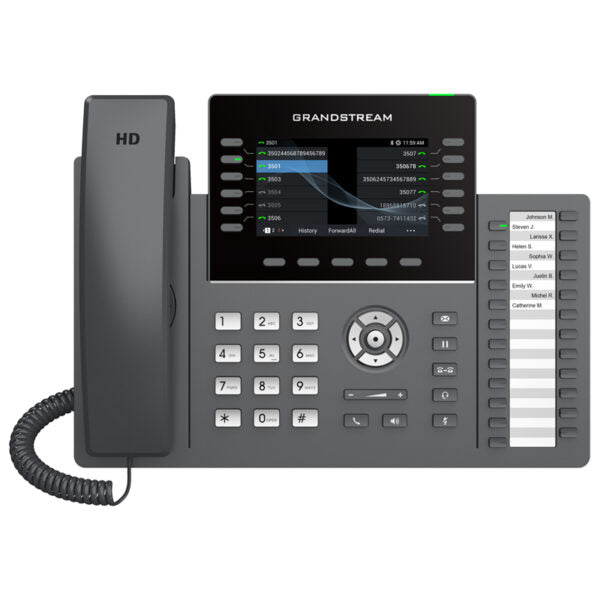
• Part of the GRP series, the GRP2636 is a professional 12-line carrier-grade IP phone designed with zero-touch provisioning for mass deployment and easy management. • Sleek design, full HD audio on both the speaker and handset, integrated PoE & Wi-Fi, and secure boot, dual firmware images, and encrypted data storage are some of its key features. • Supports 5-way audio conferencing, enterprise-level protection, and swappable faceplate for logo customization. • Integrated dual-band Wi-Fi 802.11 a/b/g/n/ac (2.4Ghz & 5Ghz) with RJ9 headset jack allowing EHS with Plantronics headsets. • Weighs 2.78 lbs and measures 8.67 × 8.27 × 3.23 in. • Supported by Grandstream’s Device Management System (GDMS) for cloud provisioning and centralized management. Key Features: • 12 lines • 6 SIP accounts • Supported by GDMS • RJ9 headset jack • Full-duplex speakerphone with HD audio • Noise shield technology • Dual switched autosensing Gigabit Ethernet ports with integrated PoE • Supports 5-way audio conferencing • Enterprise-level protection including secure boot, dual firmware images, and encrypted data storage • Swappable faceplate for logo customization • Integrated dual-band Wi-Fi 802.11 a/b/g/n/ac (2.4Ghz & 5Ghz) • Weight: 2.78 lbs • Dimensions: 8.67 × 8.27 × 3.23 in • Brand: Grandstream • Phone Type: Desk, WiFi / WiFi Capable

About This Product

The Grandstream GRP2636 is aimed squarely at organizations that need a dependable, high‑capacity desktop phone but prefer a lighter on‑premise footprint. It suits receptionists, executive assistants, and power users who routinely juggle multiple call appearances across different departments or tenants. In a Toronto legal office or a property management firm running a hosted PBX, the twelve line keys make it practical to monitor shared lines and quickly transfer callers without hunting through on‑screen menus. The built‑in dual‑band Wi‑Fi, combined with Gigabit PoE, offers flexibility for spaces where running extra cabling is awkward—think a renovated heritage building in downtown Toronto where adding network drops would be costly.

Because it carries six SIP accounts, the GRP2636 works nicely when a single desk needs identities from more than one business entity or service provider. It pairs well with cloud platforms that support Grandstream’s zero‑touch provisioning, so an IT manager can stage devices at a central office and ship them straight to a satellite location. The RJ9 headset jack with EHS means it integrates easily with existing Plantronics wireless headsets, a practical consideration for teams that already standardized on that accessory. Anyone migrating from a basic two‑line phone will notice the jump in audio clarity, particularly on the full‑duplex speakerphone which avoids the clipped half‑duplex experience of older or consumer‑grade desk sets.

A buyer should understand where this model sits in Grandstream’s portfolio. The GRP series prioritizes carrier‑grade manageability: secure boot, dual firmware images, and encrypted storage matter most in regulated or security‑conscious environments. The swappable faceplate is a small touch that white‑label resellers and managed service providers appreciate, but a typical end‑user business won’t swap it often. The phone’s weight—nearly three pounds—reflects substantial build quality; it won’t slide around on a polished desk, though it does demand a reasonably deep surface. The Wi‑Fi is a convenience feature, not a replacement for wired Ethernet in call‑heavy roles where every millisecond of jitter counts.

Deployments that only need one or two lines will find the GRP2636 over‑specified, and there are simpler models in the Grandstream family that cost less and suffice for a basic knowledge worker. Conversely, a true attendant console role with dozens of busy lamp fields across an enterprise campus may outgrow it, pushing toward a dedicated operator panel or a soft‑client‑only setup. For the sweet spot—a multi‑line professional device managed from the cloud with the option to go wireless—the GRP2636 represents a solid bridge between a straightforward desk phone and more complex operator equipment.
Services We Provide
  • Professional Installation & Configuration
  • Ongoing Maintenance & Support
  • Troubleshooting & Repairs
  • System Upgrades & Updates



