
Grandstream GRP2670 Touchscreen Carrier Grade IP Phone

Frequently Asked Questions

First, confirm that the network connection is active by checking the phone's IP address under Settings > Status. Then verify your SIP credentials (username, password, domain) are entered correctly on the Account page. If using a proxy, ensure the transport protocol (UDP/TCP/TLS) matches what your provider requires. A common oversight is forgetting to enable SIP registration for the account.
Make sure the Ethernet cable is securely connected to both the phone and a PoE-enabled switch or injector. Confirm the switch port actually delivers PoE (some ports are PoE-only on specific models). Try a different wall jack or swap the cable. If the phone still doesn't power, test with the included AC adapter; if it powers on, the PoE source may be the issue.
Echo is often caused by the other party's speaker volume being too loud or by network jitter. Start by reducing the handset or speaker volume on your end. Then check your network for packet loss—run a ping test to your SIP server. If one-way audio occurs, verify that your phone's local IP is not behind a strict NAT and that RTP ports are open in your firewall.
First, clean the screen with a dry microfiber cloth to remove any residue or grease. If the issue persists, restart the phone by unplugging power for 10 seconds. If the screen remains unresponsive, navigate to Settings > General > Touch Screen Calibration (if available) or check for a firmware update via the phone's web interface. Do not attempt a factory reset unless instructed by support.
Ensure the Wi-Fi is enabled on the phone under Settings > Wi-Fi and that you are within range of the access point. For enterprise networks, verify that the SSID broadcast is on and the security type (e.g., WPA2) matches. If you are using a static IP, double-check the subnet and gateway. A temporary wired connection can help isolate whether the issue is with the Wi-Fi radio or the network configuration.
Check that the phone has internet access—browse to a public website from its built-in browser. Then confirm the GDMS server URL and authentication key are entered correctly in the provisioning settings (under Settings > Provisioning). If you're behind a firewall, ensure outbound HTTPS (port 443) is allowed to Grandstream's cloud servers. A power cycle of the phone can also re-trigger a provisioning attempt.
Put your headset in pairing mode, then go to the phone's Settings > Bluetooth and set it to 'Discoverable'. The phone should list nearby devices—select your headset and follow any PIN prompts. For business use in a Canadian office, be aware that Bluetooth range is about 10 metres; if you walk away from your desk, the call may drop. Once paired, you can select the headset as the primary audio device per line.
Yes, the GRP2670 supports VPN protocols like L2TP and OpenVPN (check the manual for exact setup). However, for most remote workers, a simpler solution is to use a SIP account over the internet with security features like TLS and SRTP already built in. If you must use a VPN, configure it from the phone's web UI under VPN settings, and test registration after the tunnel is established. Note that added encryption can slightly increase latency.
The network LED shows physical link, not registration status. 'No Service' means the SIP account did not register. Re-enter your authentication credentials carefully—case sensitivity matters. If your service provider requires outbound proxy or specific DNS, add those details under the account settings. You can also try temporarily connecting to a different switch port or rebooting the phone to clear any stale registration state.
Random reboots are often caused by unstable power or overheating. Ensure the phone is not in direct sunlight and that its vents are clear. If using PoE, verify your switch provides sufficient power (the GRP2670 needs at least 802.3af compliant PoE). Try the included power adapter; if the reboots stop, the PoE source is likely insufficient. If the issue continues, contact your support provider before attempting any firmware changes.
IP Phones

Grandstream GRP2670 Touchscreen Carrier Grade IP Phone
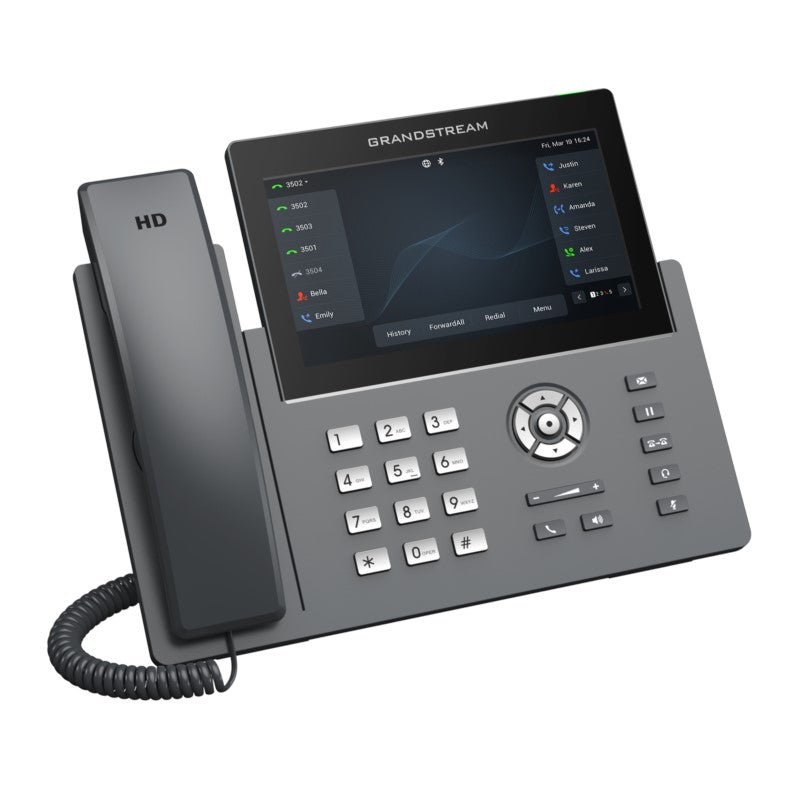
• The GRP2670 is a 12-line, executive-quality carrier-grade IP phone designed for mass deployment and easy management. • It features a sleek design, 7-inch capacitive touch screen, built-in dual-band Wi-Fi, Bluetooth support, and more. • Key features include: + Zero-touch provisioning + Integrated PoE + Full HD audio + Noise shield technology to minimize background noise + Enterprise-level security features such as secure boot, dual firmware images, and encrypted data storage + Support for 64 Virtual Multi-Purpose Keys (VPK) • The phone is supported by Grandstream's Device Management System (GDMS) for centralized management and cloud provisioning. • It also includes a range of connectivity options, including dual switched auto-sensing 10/100/1000 Mbps Gigabit Ethernet ports with integrated PoE, Wi-Fi, Bluetooth, and USB headsets. • The GRP2670 is designed for easy mass deployment by enterprises, service providers, and other high-volume markets. Protocols/Standards: - SIP RFC3261 - TCP/IP/UDP - RTP/RTCP - HTTP/HTTPS - ARP - ICMP - DNS(A record, SRV,NAPTR), DHCP, PPPoE, TELNET, TFTP, NTP, STUN, SIMPLE, LLDP, LDAP, TR-069, 802.1x, TLS, SRTP, IPV6 Network Interfaces: - Dual switched auto-sensing 10/100/1000 Mbps Gigabit Ethernet ports with integrated PoE - Wi-Fi: Yes, integrated dual-band (2.4Ghz & 5Ghz) Wi-Fi - Bluetooth: Yes, integrated - USB headsets supported

About This Product

The Grandstream GRP2670 is a premium executive IP phone designed for busy professionals who need quick access to multiple lines, a large touch interface, and wireless flexibility. It fits naturally in a front office, management suite, or reception area where the user juggles calls, transfers, and conferences throughout the day. While it can serve as a general-purpose desk phone, its 7-inch capacitive touchscreen and extensive virtual multipurpose keys are best leveraged in roles that require managing many contacts or call appearances simultaneously.

For a Toronto office or multi-location Canadian business, the GRP2670 integrates smoothly with Grandstream's GDMS cloud platform, making mass deployment and remote provisioning straightforward across branches. The built-in dual-band Wi-Fi and Bluetooth allow users to work cordlessly or pair a wireless headset, though for the most consistent call quality in a high-density office, using the wired Gigabit Ethernet port with PoE is recommended. This phone is carrier-grade, meaning it supports secure boot and encrypted storage, which matters for organizations subject to privacy regulations like PIPEDA.

One tradeoff buyers should consider is cost: at around $239, this is significantly more than a basic 2-line phone. It would be overkill for a single-line user who only makes and receives calls. Conversely, it might be underpowered for a contact center agent who needs a dedicated headset-only workflow and doesn't require a large screen. The GRP2670 is best suited for knowledge workers who value visual call management and want to reduce desktop clutter with a single device that handles voice, Bluetooth, and status monitoring. Its 12-line capacity is generous, but in practice, most users will only program a handful of lines or extensions unless they are managing several virtual numbers.
Services We Provide
  • Professional Installation & Configuration
  • Ongoing Maintenance & Support
  • Troubleshooting & Repairs
  • System Upgrades & Updates



