
Grandstream GXP1625 IP Phone

Frequently Asked Questions

First, confirm that your network cable is securely connected and the phone has obtained an IP address (check the LCD for an IP under Menu > Status). Then verify that the SIP server address, username, and password entered in the phone's account settings exactly match what your provider issued. If the issue persists, a Toronto-based VoIP support provider can usually resolve this remotely.
Ensure the handset cord is firmly plugged into the handset jack and the base. If you're using a headset, press the HEADSET key to switch back to handset mode. Also check that the line status on the LCD shows 'Registered'—if it says 'Unregistered', follow the registration troubleshooting steps above.
Access the phone's web interface by entering its IP address in a browser (default credentials: admin/admin). Navigate to Accounts > SIP Accounts and enter the account name, SIP server, SIP user ID, and authentication password provided by your carrier. Save and reboot the phone—registration should complete within 30 seconds.
Check your network connection: if using Wi-Fi (not recommended), switch to a wired Ethernet cable. Also verify that no large file transfers or streaming are running on the same network. You can adjust the audio codec priority in the phone's web interface under Settings > Audio to prefer G.711 or G.729, which are less bandwidth-intensive than G.722.
Yes, the GXP1625 supports Electronic Hook Switch (EHS) for Plantronics headsets that have EHS capability. Connect the headset's EHS cable to the phone's headset port (the RJ9 jack labeled 'HEADSET') and enable EHS in the phone's web interface under Settings > Headset. For non-EHS headsets, you can use the standard headset jack with a 2.5mm plug.
If you're using PoE, make sure the Ethernet cable is connected to a PoE-enabled switch or injector. Try a different cable or port. If using the optional power adapter, check that it's plugged into a working outlet and that the adapter is the correct voltage (5V DC, not included with the phone). Reseating the cable and power cycling the switch often resolves the issue.
The phone supports up to 2 SIP accounts. In the web interface, go to Accounts > SIP Accounts and configure Account 1 and Account 2 with the credentials for each line. You can assign each account to a line key under Settings > Programmable Keys. After saving, the LCD will show both lines with their registration status.
Echo is often caused by the phone's speaker volume being too loud or the handset being too close to the earpiece. Try lowering the speaker volume using the VOLUME keys during a call. Also ensure the phone is not placed in a highly reflective room. If the echo persists, check with your VoIP provider to see if they have echo cancellation settings on their side.
Yes, but only download firmware from Grandstream's official website (look for the GXP1625 model). In the phone's web interface, go to Maintenance > Upgrade and enter the URL of the firmware file, or upload it directly. Do not interrupt the process. If you're unsure, contact your VoIP provider—they may push firmware updates automatically via their provisioning server.
This typically indicates the phone cannot connect to your local network. Check that the Ethernet cable is plugged into the LAN port (not the PC port) and that the link light on the switch is solid. If you're using a VLAN, ensure the phone's VLAN settings match your network configuration under Settings > Network > Advanced. A simple power cycle of the phone and switch often clears this.
IP Phones

Grandstream GXP1625 IP Phone
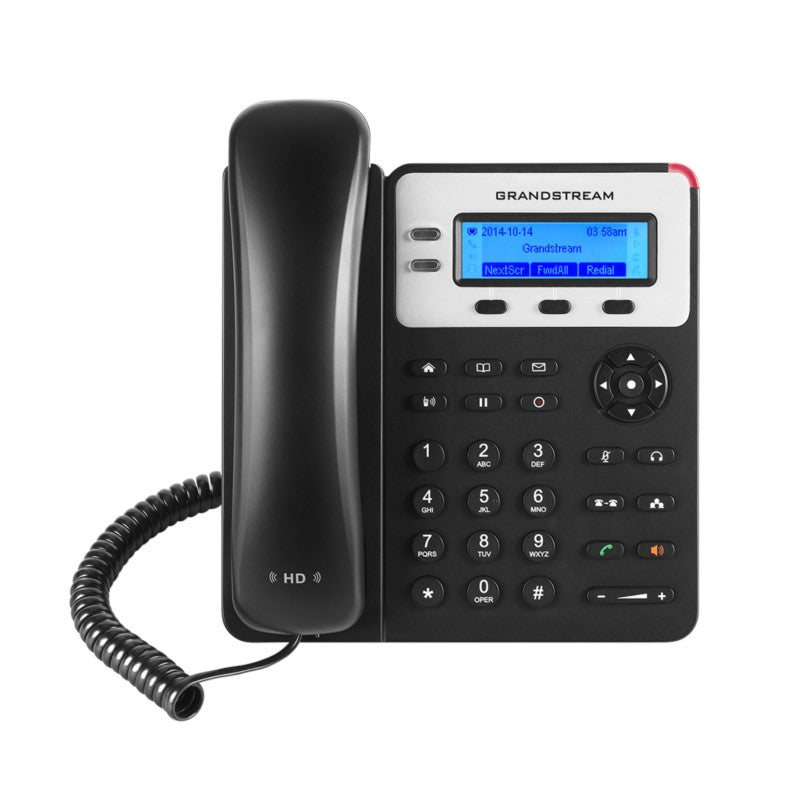
• The Grandstream GXP1625 is a reliable and easy-to-use IP phone designed for small business users. It features powerful VoIP capabilities, including full HD audio on both the speaker and handset. • Key Features: • Up to 2 lines with support for 2 SIP accounts • 3-way conferencing and 3 XML programmable context-sensitive soft keys • Dual-switched 10/100 Mbps ports with integrated PoE • HD audio on speakerphone and handset • EHS support for Plantronics headsets • Up to 1000 contacts, call history up to 200 records • Weight: 1.8 lbs • Dimensions: 11 × 9 × 4 in • Brand: Grandstream • Protocols/Standards: • SIP RFC3261, TCP/IP/UDP, RTP/RTCP, HTTP/HTTPS, ARP/RARP, ICMP, DNS (A record, SRV, NAPTR), DHCP, PPPoE, SSH, TFTP, NTP, STUN, SIMPLE, LLDP-MED, LDAP, TR-069, 802.1x, TLS, SRTP, CDP/SNMP/RTCP-XR • Network Interfaces: • Dual switched auto-sensing 10/100 Mbps Ethernet ports • Integrated PoE (GXP1625 only) • Graphic Display: 132 x 48 (2.95’) backlit graphical LCD display • Feature Keys: • 2 line keys with dual-color LED • 3 XML programmable context sensitive soft keys • Dedicated function keys for MUTE, HEADSET, TRANSFER, CONFERENCE, SEND and REDIAL, SPEAKERPHONE, VOLUME, PHONEBOOK, MESSAGE, HOLD, PAGE/INTERCOM, RECORD, HOME • Voice Codecs: Support for G.711µ/a, G.722 (wide-band), G.723, G.726-32, G.729 A/B, iLBC, inband and out-of-band DTMF (In audio, RFC2833, SIP INFO), VAD, CNG, AEC, PLC, AJB, AGC • Telephony Features: Hold, transfer, forward (unconditional/no-answer/busy), 3-way conferencing, call park/pickup, shared-call appearance (SCA) / bridged-line-appearance (BLA), Down- loadable phone book (XML, LDAP, up to 1000 items), call waiting, call history (up to 200 records), off-hook auto dial, auto answer, click-to-dial, flexible dial plan, hot desking, personalized music ringtones, server redundancy & fail-over

About This Product

The Grandstream GXP1625 is a no-frills IP phone built for small offices, retail counters, and home-based businesses where reliable voice communication matters more than flashy features. With support for two SIP accounts and two lines, it suits a receptionist or a user who needs to handle a personal line and a shared line without confusion. The integrated Power over Ethernet (PoE) simplifies desk wiring—just one Ethernet cable carries both data and power, which is especially handy in crowded GTA office environments where power outlets near desks are scarce.

This phone pairs naturally with any standards-based SIP PBX, whether it's a cloud-hosted service or an on-premise system like Asterisk or 3CX. Its HD audio on both the speakerphone and handset delivers clear conversations, a noticeable upgrade over older analog sets. However, the 10/100 Mbps Ethernet ports mean it won't saturate a gigabit network—fine for voice traffic, but if your desk also hosts a computer that needs full gigabit throughput, you may want a model with a gigabit passthrough port. The graphical LCD is basic (132x48 pixels) and monochrome backlit; it shows caller ID and menu options but won't display photos or large contact lists comfortably.

For a user who only needs one or two lines and doesn't require a color touchscreen, advanced call center features, or gigabit networking, the GXP1625 is a sensible, cost-effective choice. It would be overkill for a single-line home user who could get by with a cheaper analog adapter, but it's underpowered for a busy office where staff handle four or more concurrent calls or need BLF (busy lamp field) keys for monitoring extensions. Canadian businesses should confirm that their VoIP provider supports the codecs this phone offers (G.722 for wideband, G.729 for narrowband) to ensure optimal call quality over typical DSL or cable internet connections.
Services We Provide
  • Professional Installation & Configuration
  • Ongoing Maintenance & Support
  • Troubleshooting & Repairs
  • System Upgrades & Updates



