
Grandstream GXP1628 Entry-level Gigabit IP Phone

Frequently Asked Questions

Start by verifying the SIP account credentials (username, password, and domain/server address) in the phone's web interface under Account 1 or 2. Ensure your network allows SIP traffic; some office firewalls or routers block the default ports. Temporarily disable any firewall or VPN to test, then re-enable once confirmed. If the issue persists, try power cycling both the phone and the router.
First, confirm that the Ethernet cable is securely plugged into both the phone's LAN port and a PoE-capable switch or injector. Check if the switch port is configured to deliver PoE (some managed switches have PoE disabled by default). If the cable run is very long (over 100 metres), PoE may degrade. Try a different cable or a known working PoE port, or use the included power adapter as a backup.
Choppy audio usually indicates network congestion or packet loss. Start by ensuring the phone is connected via a wired gigabit Ethernet connection, not through a Wi-Fi adapter or long cable. Run a speed test from a computer on the same network to verify available bandwidth and latency. If your internet connection is slow, reduce the codec bandwidth in the phone's settings by switching from G.722 (wideband) to G.711 or G.729.
First, verify the file format matches what the phone expects—typically XML or CSV for contacts, and XML for provisioning. Check that the file is hosted on a reachable server (HTTP or HTTPS) and that the phone has a correct server URL under the Provisioning menu. If using TFTP, ensure the TFTP server is running and the port is not blocked by your firewall. A simple test is to use a direct HTTP file URL from a public location.
BLF functionality requires your server or PBX to support SIP presence or subscribe events. Confirm with your VoIP provider that BLF is enabled on your account. Then, in the phone's web interface, assign each BLF key under 'DSS Keys' with the correct extension number or subscriber URI. If the keys still remain dim, check that the phone's firmware is up to date and that the server's BLF subscription interval is compatible.
First test the speakerphone: if speakerphone audio works, the handset or its coil cord may be the issue. Check that the handset cord is fully inserted into both the phone base and the handset. If possible, try swapping with a known working handset from another phone. If still no audio, power cycle the phone and check that the handset volume is not turned all the way down.
First, verify that the Ethernet port on the phone is lit (link light) and connected to a functional switch port. Try releasing and renewing the DHCP lease via the phone's menu: go to Settings → Network → IPv4 and select 'Renew'. If the phone fails to obtain an IP, manually assign a static IP from the same subnet and test connectivity. A faulty cable or switch port is often the culprit.
Random reboots are often related to power issues. If using PoE, ensure the switch port delivers sufficient power—the GXP1628 needs Class 2 PoE (about 6-7 watts). Overheating can also cause restarts; check that the phone's vents are not blocked. Remove any USB or headset accessories temporarily. If the issue continues, update the firmware to the latest stable version via the web interface.
Voicemail is configured by your VoIP provider, not on the phone itself. Once your provider assigns a voicemail mailbox and access number, you can program the Message key to dial that number. On the phone, go to Settings → Preferences → Message Key Setting and enter the voicemail access number. Then simply press the Message key to retrieve messages.
No, the GXP1628 does not support Bluetooth natively. It does support Plantronics headsets via an EHS (Electronic Hookswitch) cable, which requires a wired headset. If you need Bluetooth, consider a model with built-in Bluetooth or use a third-party Bluetooth-to-wired adapter connected to the handset port.
IP Phones

Grandstream GXP1628 Entry-level Gigabit IP Phone
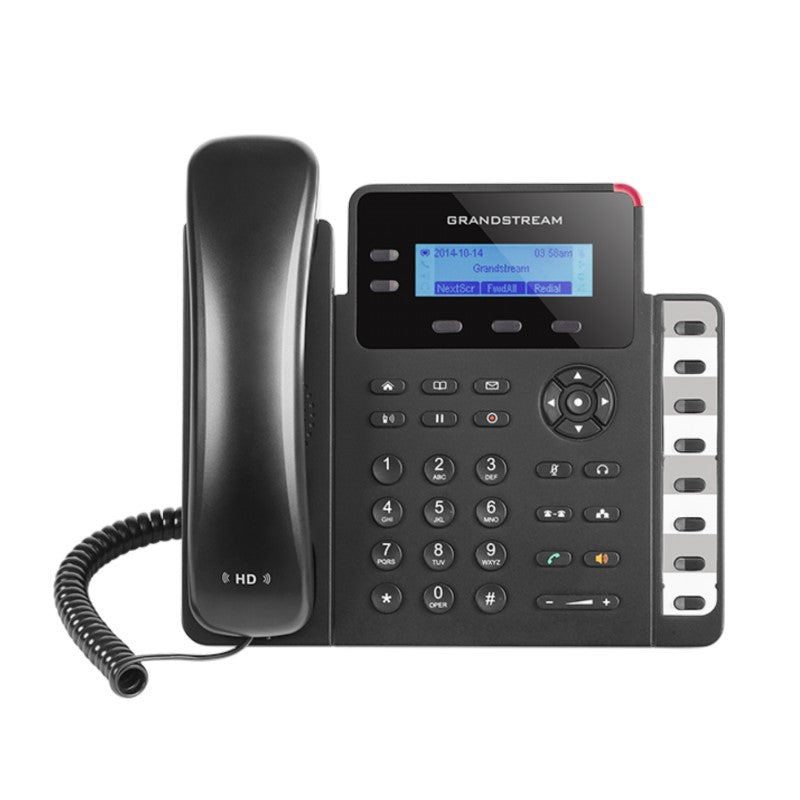
* High-end IP phone for small business users with a modern design and powerful VoIP features. * Supports up to 2 lines and Gigabit ports for maximum connection speeds and call quality. * Features: + 2 SIP accounts, 2 line keys, 3-way conferencing, 3 XML programmable context-sensitive soft keys + HD audio on speakerphone and handset + Dual-switched Gigabit ports, integrated PoE + 8 dual-colored BLF/speed dial keys + EHS support for Plantronics headsets + Up to 1000 contacts, call history up to 200 records * Additional Information: + Weight: 2 lbs + Dimensions: 12 × 9 × 4 in + Brand: Grandstream * Technical Specifications: + Protocols/Standards: SIP RFC3261, TCP/IP/UDP, RTP/RTCP, HTTP/HTTPS, ARP/RARP, ICMP, DNS (A record,S-RV, NAPTR), DHCP, PPPoE, SSH, TFTP, NTP, STUN, SIMPLE, LLDP-MED, LDAP, TR-069, 802.1x, TLS, SRTP, CDP/SNMP/RTCP-XR + Network Interfaces: Dual switched auto-sensing 10/100/1000 Mbps Ethernet ports, integrated PoE + Graphic Display: 132 x 48 (2.95’) backlit graphical LCD display + Feature Keys: 2 line keys with dual-color LED and 2 SIP accounts, 3 XML programmable context sensitive soft keys, 5 (navigation, menu) keys, 8 BLF keys, 13 dedicated function keys for MUTE, HEADSET, TRANSFER, CONFERENCE, SEND and REDIAL, SPEAKERPHONE, VOLUME, PHONEBOOK, MESSAGE, HOLD, PAGE/INTERCOM, RECORD, HOME + Voice Codecs: Support for G.711μ/a, G.722 (wide-band), G.723, G.726-32, G.729 A/B, iLBC, in-band and out-of-band DTMF (In audio, RFC2833, SIP INFO), VAD, CNG, AEC, PLC, AJB, AGC + Telephony Features: Hold, transfer, forward (unconditional/no-answer/busy), call park/pickup, 3-way conference, shared-call-appearance (SCA) / bridged-line-appearance (BLA), downloadable phone book (XML, LDAP, up to 1000 items), call waiting, call history (up to 200 records), off-hook auto dial, auto answer, click-to-dial, flexible dial plan, hot desking, personalized music ringtones, server redundancy & fail-over

About This Product

The Grandstream GXP1628 is best suited for small offices or home offices where the phone is used for moderate call volume. Its two-line capability and eight BLF keys make it a reasonable fit for a receptionist or a user who needs to monitor a few colleagues' extension status without requiring a full-blown operator console. The integrated PoE simplifies cabling in environments where power outlets near desks are scarce, and the dual gigabit ports ensure the desktop PC does not lose network speed thanks to a pass-through connection.

This phone pairs well with a range of hosted VoIP providers popular in Canada, including those that rely on standard SIP trunking. It can replace an older single-line desk phone where basic features like three-way conferencing and HD audio are now expected. The display is a modest monochrome LCD—fine for viewing caller ID and menus but not for heavy graphical use. The handset and speakerphone deliver clear wideband audio, though the microphone may pick up room noise in very open spaces.

The GXP1628 does not include a built-in Wi-Fi, so a wired drop is required. Its two-line capacity may feel limiting for a user who handles multiple active calls simultaneously; a four- or six-line model would be more appropriate in that case. For a single-user desk in a quiet office, however, this phone offers good value without over-engineering the feature set. In a larger deployment across the GTA, these phones work reliably with most hosted PBX platforms, and their TR-069 support makes remote provisioning straightforward for a VoIP support provider.
Services We Provide
  • Professional Installation & Configuration
  • Ongoing Maintenance & Support
  • Troubleshooting & Repairs
  • System Upgrades & Updates



