
Grandstream GXP1630 IP Phone

Frequently Asked Questions

First, confirm that your network cable is securely connected and that the phone has obtained an IP address (check under Menu > Status). Then verify that you've entered the correct SIP server address, username, and password in account settings. If using a static IP, ensure the DNS and gateway are correct. Many Canadian providers require the correct STUN server or outbound proxy, so double-check those fields. If the issue persists, a Toronto-based VoIP support provider can usually resolve this remotely.
Start by reseating the Ethernet cable at both ends, and try a different port on your switch or router. If the phone is receiving PoE, ensure the switch port is PoE-enabled or use the included power adapter as backup. Verify that the network port LEDs are active; if not, the cable may be faulty.
This is often a network bandwidth or jitter issue. First, test the phone on a wired connection (not Wi-Fi) and ensure no large downloads are running on your network. Then, under the phone's network settings, confirm that QoS is enabled if your switch supports it. You can also lower the audio codec priority to G.711 as a temporary test.
Log into the phone's web interface using its IP address. Under the 'Account' or 'DSS Keys' section, assign a key as 'BLF' and enter the extension number you want to monitor. Ensure the monitored extension is on the same SIP server and the server supports BLF subscription. After saving and rebooting, the key should show the extension's status (green for idle, red for busy).
Start by checking the network for packet loss or high latency using ping to your VoIP server. On the phone, increase the registration expiration time (e.g., from 3600 to 6000 seconds) if allowed by your provider. Also, verify that the phone's firmware is up to date, as older versions may have stability bugs.
The phone supports Electronic Hook Switch (EHS) for Plantronics headsets, allowing you to answer/end calls from the headset. For Bluetooth headsets, the GXP1630 does not have built-in Bluetooth, so you would need a USB or EHS adapter that adds Bluetooth functionality, or use a wired headset via the RJ9 port.
Yes, the backlight brightness can be adjusted. Press the Menu button, go to Preferences, then LCD Display. From there you can increase the backlight intensity and also set the timeout. If the display is still unreadable, it may be a hardware issue, but adjusting the contrast (if available) can also help.
Ensure the provisioning server URL is correctly set in the phone's web interface under 'Maintenance > Upgrade and Provisioning'. The phone expects the config file in XML format, typically named with its MAC address. Check that the server is reachable and that the file permissions are set to allow anonymous read. If using TFTP, verify the server is running and the phone's network can reach it.
You can set up call forwarding directly on the phone by pressing the Menu button, selecting 'Call Features' and then 'Call Forward'. Choose between Always, Busy, or No Answer forwarding, and enter the destination number. Alternatively, you can set this from your VoIP provider's web portal, which may offer more options.
While the GXP1630 physically has three line keys, you can assign additional accounts to the BLF keys and switch between them using the soft keys. However, this is not as seamless as having dedicated line keys. For a heavier call volume, consider upgrading to a model with more line keys, such as the GXP2170.
IP Phones

Grandstream GXP1630 IP Phone
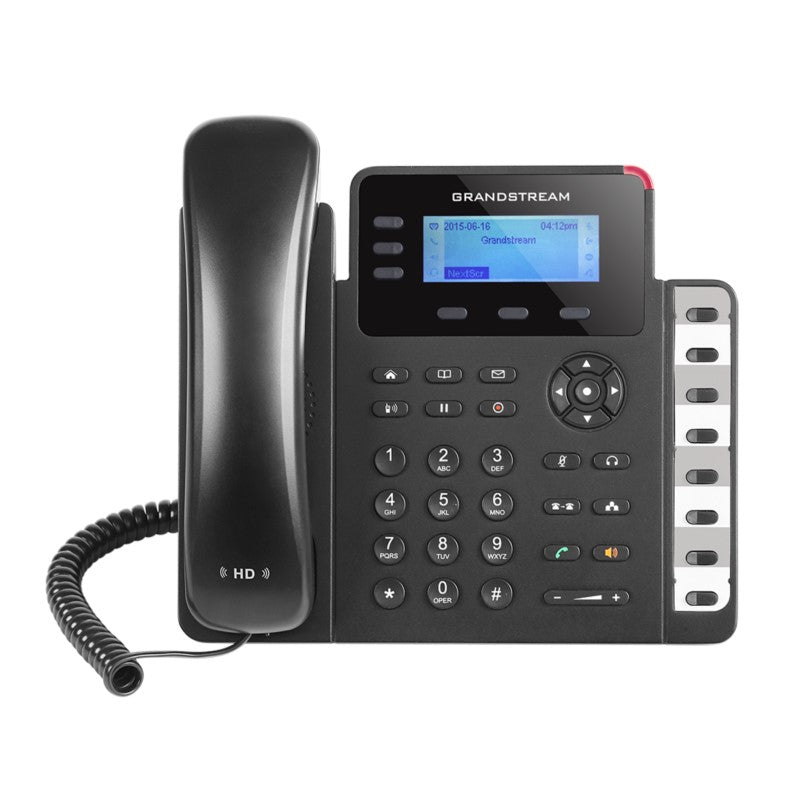
• The GXP1630 is a powerful IP phone designed for small-to-medium businesses, featuring 3 lines, 3 XML programmable soft keys, 8 BLF keys, and 4-way conferencing. • Key features: • Dual-switched Gigabit ports with integrated PoE • HD audio on speakerphone and handset • Backlit LCD screen (132×64, 2.98’) for clear display • 3 SIP accounts, 3 line keys, 4-way conferencing, 3 XML programmable context-sensitive soft keys • Support for up to 1000 contacts and call history up to 200 records • EHS support for Plantronics headsets • Up to 8 dual-colored BLF/speed dial keys • Weight: 1.8 lbs, Dimensions: 12 × 9 × 4 in • Technical specifications: • Protocols/Standards: SIP RFC3261, TCP/IP/UDP, RTP/RTCP, HTTP/HTTPS, ARP/RARP, ICMP, DNS (A record, SRV, NAPTR), DHCP, PPPoE, SSH, TFTP, NTP, STUN, SIMPLE, LLDP-MED, LDAP, TR-069, 802.1x, TLS, SRTP, CDP/SNMP/RTCP-XR • Network Interfaces: Dual switched auto-sensing 10/100/1000 Mbps Ethernet ports with integrated PoE • Graphic Display: 132 x 64 (2.98’’) backlit graphical LCD display • Feature Keys: Support for various keys, including line keys, soft keys, navigation keys, BLF keys, and function keys

About This Product

The Grandstream GXP1630 is a practical choice for small-to-medium businesses that need a reliable desk phone without breaking the budget. With support for three SIP accounts and eight BLF keys, it suits environments like front desks, sales teams, or administrative offices where a handful of extensions need to be monitored. Its dual Gigabit Ethernet ports with PoE simplify cabling, making it a good fit for offices with existing managed switches, while the backlit LCD offers clear visibility even in brighter rooms.

In a typical Toronto business setting, the GXP1630 integrates well with major Canadian VoIP providers such as Telus, Rogers Business, or hosted PBX platforms. It can replace aging analog or basic digital phones, provided the network runs SIP. That said, its 132×64 pixel display is text-only and lacks touch capability, so it's not ideal for heavy directory browsing or visual voicemail. The phone supports HD audio on both handset and speakerphone, which improves call clarity, but the speakerphone is adequate for small rooms rather than open-plan areas.

A buyer should note the three-line limit: if your role requires juggling more than three concurrent calls or advanced call-center features, a higher-tier model with more programmable keys would be better. Conversely, for a single-line user who just needs to make and take calls, the GXP1630 offers features like four-way conferencing and a 1000-contact directory that may go unused. It pairs naturally with Grandstream's UCM series PBX for unified communications, but works equally well with any standard SIP platform. The EHS support for Plantronics headsets is a plus for hands-free workflows, though compatibility should be confirmed with the specific headset model.
Services We Provide
  • Professional Installation & Configuration
  • Ongoing Maintenance & Support
  • Troubleshooting & Repairs
  • System Upgrades & Updates



