
Grandstream GXP2130 Enterprise IP Phone

Frequently Asked Questions

Confirm that the Ethernet cable is plugged into the WAN port on the back of the phone, not the PC port, and that the switch port is providing Power over Ethernet. If the link light on the switch does not illuminate, try a known‑good patch cable and a different port on the same switch. A power cycle often helps, but if the phone still shows no sign of life, the PoE budget on the switch may be exhausted or the port may not be configured for PoE negotiation.
Press the center navigation key to check the account status screen for a clear error message, such as a timeout or authentication failure. Confirm that the SIP server address, username, and password fields match exactly what your VoIP provider or phone system administrator supplied. If the server address is a hostname, verify that the phone’s DNS server is reachable by also checking that an NTP time sync succeeds.
Make sure the RJ9 headset is firmly seated in the dedicated headset port rather than the handset port. Inside the phone’s web interface, under the account or call settings, you can adjust the TX/RX gain sliders for the headset to better match the microphone sensitivity of your specific model. Before changing those values, test the handset and speakerphone to rule out a wider call‑quality problem.
The phone’s PC port is a pass‑through that relies on the internal switch chip; when the phone loses power or the primary link drops, the PC port also goes down. To keep the computer online, ensure the phone is powered by PoE from a switch or injector and that the phone’s firmware is current. If you must disconnect the phone temporarily, plug the computer’s network cable directly into the wall jack while the phone is offline.
After pairing from the phone’s LCD menu, you still need to press the physical headset button on the front panel to switch the audio path to the Bluetooth headset. Go into the phone’s web interface and confirm that the Bluetooth mode is set to the correct profile for your headset model; some devices require a toggle between hands‑free and headset profile. If the headset appears connected but still carries no audio, delete the pairing, reboot the phone, and pair again.
In the phone’s web interface, under System Settings or Time Settings, confirm that the NTP server address is reachable and that the time zone is set correctly for Canada, typically America/Toronto or a UTC‑based offset for your province. If the phone cannot reach its NTP server, it may use a default date; check that your firewall allows UDP port 123 outbound from the phone’s subnet. After correcting the settings, a quick reboot will force a fresh time sync.
Frequent unexpected reboots can point to a provisioning server that is pushing a resync command repeatedly. Check the phone’s web interface under Maintenance or Upgrade for the provisioning schedule and look for a short resync interval or a DHCP option that is overriding your preferred frequency. Also inspect the power source: a failing PoE injector, a switch port that cycles power under load, or a loose barrel connector with an optional adapter can cause drops that look like reboots.
In the phone’s web interface, verify that the key mode is set to Speed Dial rather than BLF or Presence if you intend a pure speed dial. Double‑check that the value field contains a complete SIP URI or extension number in the format your phone system expects, and that the account assigned to that key is the same account you use to place calls. If the key still does not respond, test whether other BLF keys work; a provisioning template may have locked that key’s function.
First, lower the speaker or handset volume slightly and ask whether the echo improves; a volume loop is the most common cause. On the GXP2130, navigate to the web interface’s account settings and experiment with modest TX gain reductions, testing one change at a time. If the echo persists across multiple calls, have your network administrator confirm that the SIP path does not introduce an analog tail, which can happen when a trunk gateway is not properly configured.
Always obtain firmware files directly from Grandstream’s official firmware download page for the GXP2130 or from your service provider’s approved repository if they manage the phones. Carriers that offer a hosted voice service typically provide a provisioning link that the phone will fetch automatically; check with your provider before manually uploading a generic image. If you are managing the phones yourself, a Toronto‑based VoIP support provider can usually point you to the correct release that has been tested in Canadian deployments.
IP Phones

Grandstream GXP2130 Enterprise IP Phone
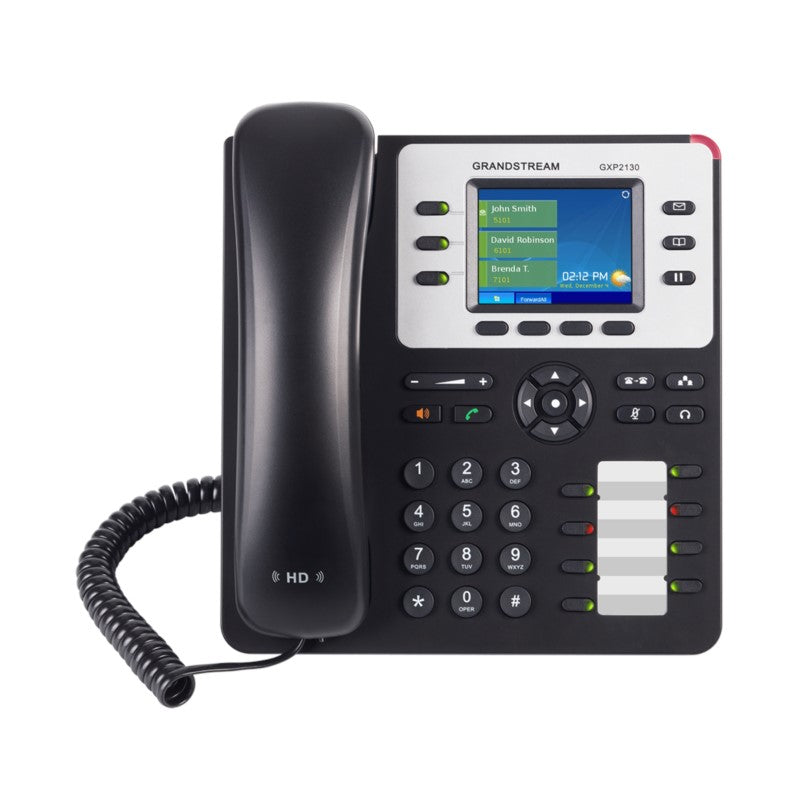
• The GXP2130 is a standard enterprise-grade IP phone that features up to 3 lines, 4 XML programmable soft keys, 8 programmable BLF extension keys, dual Gigabit network ports and 4-way voice conferencing. It also comes equipped with Bluetooth, Electronic Hook Switch (EHS) support for Plantronics headsets for flexibility. Key Features: • Supports 3 lines, 3 SIP accounts and 4-way voice conferencing • 2.8 inch (320×240) color-screen LCD display • Dual Gigabit ports, integrated PoE • 8 dual-colored BLF/speed-dial keys • HD audio on speakerphone and handset • Integrated Bluetooth • 4 programmable context-sensitive soft keys Additional Information: • Weight: 3 lbs • Dimensions: 11 × 10 × 4 in • Phone Type: Desk Technical Specifications: • Protocols/Standards: SIP RFC3261, TCP/IP/UDP, RTP/RTCP, HTTP/HTTPS, ARP, ICMP, DNS (A record, SRV, NAPTR), DHCP, PPPoE, SSH, TELNET, TFTP, NTP, STUN, SIMPLE, LLDP, LDAP, TR-069, 802.1x, TLS, SRTP, IPv6, CDP/SNMP/RTCP-XR • Network Interfaces: Dual switched auto-sensing 10/100/1000 Mbps Gigabit Ethernet ports with integrated PoE • Graphic Display: 2.8 inch (320×240) TFT color LCD display • Bluetooth: Yes, Bluetooth V2.1 • Feature Keys: 3 line keys with up to 3 SIP accounts, 8 speed-dial/BLF extension keys with dual-color LED, 4 programmable context sensitive softkeys, 5 navigation/menu keys, 11 dedicated function keys for: MESSAGE (with LED indicator), PHONEBOOK, TRANSFER, CONFERENCE, HOLD, HEADSET, MUTE, SEND/REDIAL, SPEAKERPHONE, VOL+, VOL- • Voice Codecs: Support for G.729A/B, G.711µ/a-law, G.726, G.722 (wide-band), G723.1, iLBC, Opus, in-band and out-of-band DTMF (in audio, RFC2833, SIP INFO), VAD, CNG, AEC, PLC, AJB, AGC • Auxiliary Ports: RJ9 headset jack (allowing EHS with Plantronics headsets) • Telephony Features: Hold, transfer, forward, 4-way audio conference, call park, call pickup, shared-call-appearance (SCA)/bridged-line-appearance (BLA), downloadable phonebook (XML, LDAP, up to 2000 items), call waiting, call log (up to 500 records), customization of screen, off-hook auto dial, auto answer, click-to-dial, flexible dial plan, hot desking, personalized music ringtones and music on hold, server redundancy and fail-over For a full list of specifications, please refer to the product datasheet.

About This Product

The Grandstream GXP2130 sits in the sweet spot for a midsize business that needs a dependable desktop phone without the complexity of a touchscreen executive model. It is built for the day‑to‑day user who handles a moderate call volume—think account managers, branch staff, or front‑desk personnel—and who benefits from having a handful of programmable keys to monitor colleagues or ring groups. In a Toronto office with a busy open floorplan, the eight BLF keys with dual‑colour LEDs give a quick visual on who is available, which keeps call transfers smooth and avoids unnecessary hold times.

This phone pairs naturally with Grandstream’s own UCM series of IP PBXs or with popular cloud‑based platforms that support standard SIP provisioning. It also works well as a straight replacement for aging entry‑level phones when an organization needs Gigabit passthrough to a desktop PC without sacrificing speed. The integrated Bluetooth and EHS support for Plantronics headsets make it a practical choice for anyone who moves between their desk and a call on a wireless headset, cutting out the tangle of cords.

The trade‑off for the colour screen and Bluetooth is that it is a three‑line device, not a receptionist console. It will not satisfy a heavy call‑queue environment or a user who regularly juggles more than three SIP accounts. The 2.8‑inch display is clear and bright, but it is not a web‑browsing tablet and it will not render complex XML applications as richly as a larger touchscreen phone would. For a deployment where every user needs a sidecar expansion module, you would step up to a model designed for that expansion.

It is also important to note that the GXP2130 is a wired Gigabit device with PoE; it fits perfectly in a structured cabling environment that already provides power at the switch. In a retro‑fit setting where PoE is not available, you would need the optional power adapter, which is a small but real planning consideration. For a GTA‑based company moving to a new leased space, this phone lets you keep one wire to the desk while delivering both network connectivity and reliable voice service.
Services We Provide
  • Professional Installation & Configuration
  • Ongoing Maintenance & Support
  • Troubleshooting & Repairs
  • System Upgrades & Updates



