
Grandstream GXP2135 IP Phone | 8-Line, 32 BLF, Dual Gigabit, Built-in Bluetooth

Frequently Asked Questions

First, double-check that the SIP server address, port, and account credentials entered in the phone's web interface or LCD menu are exactly correct, including any required domain or realm. Also confirm that your network allows outbound SIP traffic on the usual ports (5060 UDP/TCP) and that your firewall or router is not blocking them. If the issue persists, a Toronto-based VoIP support provider can usually resolve this remotely.
If you are using Power over Ethernet (PoE), verify that the switch or injector is supplying power and that the Ethernet cable is securely connected at both ends. If you are using the included power supply, plug it directly into a known-working wall outlet and into the phone's power port. Try a different Ethernet cable if possible, as a damaged cable can prevent both power and data from reaching the phone.
Ensure Bluetooth is enabled on the phone (usually under Settings > Bluetooth). Put your headset into pairing mode, then on the phone scan for available devices and select your headset from the list. You may need to enter a PIN if prompted, which is often 0000 or 1234. Once paired, the phone should route audio through the headset for calls.
This is often a network issue. First, check that your phone has obtained a valid IP address and that there are no duplicate IPs on the network. If your phone is behind a router, ensure SIP ALG is disabled on that router, as it frequently breaks RTP audio. Also confirm that the correct audio codecs are enabled on both the phone and the SIP server.
Log into the phone's web interface, go to the DSS Keys or Programmable Keys page, and assign each key to a BLF (Busy Lamp Field) function for the desired extension. You will need to enter the extension number and optionally the SIP user ID. If your PBX supports presence, the keys will light up to show idle, ringing, or busy status.
Start by checking the physical Ethernet connection: reseat the cable at both ends and inspect for damage. If you are using PoE, an underpowered switch may cause intermittent drops; try using the supplied power adapter instead to see if the issue stops. Also verify that your network is not experiencing packet loss or high latency, which can cause the phone to appear disconnected.
Yes, the GXP2135 is a standard SIP phone and will register with any SIP-compliant PBX or VoIP provider. You will need to manually enter the SIP server details, account credentials, and any codec preferences in the phone's settings. It works well with popular platforms like Asterisk, FreePBX, 3CX, and hosted services.
Power cycle the phone by unplugging it for 30 seconds, then plugging it back in. If the problem returns, check that the phone is set to use DHCP (the default) and that your router is handing out IP addresses. You can also try a different Ethernet port on your switch to rule out a bad port. If the issue persists, a static IP may be needed.
First, check your network for high jitter or packet loss by running a ping test from a computer on the same network. If the network is healthy, log into the phone's web interface and try lowering the audio codec priority to use a narrower bandwidth codec like G.711 instead of a wideband codec, as wideband can be more sensitive to network conditions.
Yes, the GXP2135 supports zero-config provisioning when used with a Grandstream UCM PBX, which will automatically configure the phones once they are on the same network. For other environments, you can set up a provisioning server (HTTP, HTTPS, or TFTP) and point the phones to a config file. The phone's web interface allows you to set the provisioning server URL.
IP Phones

Grandstream GXP2135 IP Phone | 8-Line, 32 BLF, Dual Gigabit, Built-in Bluetooth
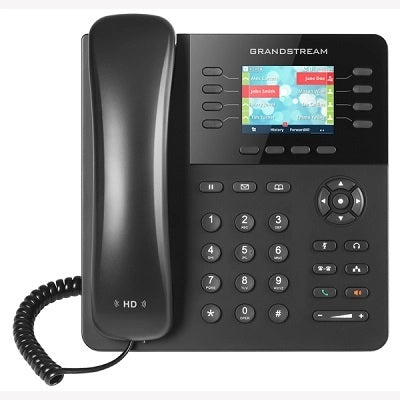
• High-performance IP phone for medium-to-heavy call traffic, engineered to deliver speed and advanced features without complexity. • 32 on-screen BLF keys, eliminating the need for bulky expansion modules, with: • 8 lines & 4 SIP accounts for managing multiple active conversations • Intuitive interface with clear color LCD and programmable soft keys • Uncompromising speed and audio quality, featuring: • Dual Gigabit Ports (PoE) for maximum network speed and simplified deployment • Built-in Bluetooth for syncing mobile devices and wireless headsets • Full HD Audio with wideband codecs for crystal-clear sound quality • Seamless integration and security, including: • Zero-config ready for automated provisioning with UCM series IP PBXs • Enhanced security with TLS and SRTP encryption • 4-way conferencing for easy initiation of a four-person conference call • Package includes: • Grandstream GXP2135 IP Phone Unit • Handset with Handset Cord • Base Stand • Ethernet Cable • Quick Installation Guide • Universal Power Supply (PSU)

About This Product

The Grandstream GXP2135 is a solid choice for a busy office worker or receptionist who needs to juggle multiple calls and keep an eye on colleagues' presence without cluttering their desk with add-on modules. With 32 on-screen BLF keys and support for 8 lines across 4 SIP accounts, it is well-suited for a reception area or a power user in a small-to-medium business, particularly in a GTA office environment where space and tidy cabling matter. The built-in Bluetooth is a practical bonus for pairing a wireless headset or syncing a mobile phone, and the dual Gigabit PoE ports simplify wiring by delivering both data and power over a single cable. That said, this phone may be overkill for a user who handles only a few calls a day, as the array of programmable keys and line appearances could go unused. Conversely, in a large call center with dozens of agents, the 32 BLF keys might feel limiting compared to a model that supports physical expansion modules for hundreds of extensions. The GXP2135 pairs naturally with a Grandstream UCM PBX for plug-and-provision simplicity, but it will also register with any standard SIP server. One tradeoff to note: the color LCD is clear and readable, but it is not a touchscreen, so navigating through menus or directories relies on the physical navigation key and soft keys. For a Canadian business, this model works reliably with major SIP carriers, though you will want to verify that your provider supports the codecs the phone offers if you plan to use wideband audio.
Services We Provide
  • Professional Installation & Configuration
  • Ongoing Maintenance & Support
  • Troubleshooting & Repairs
  • System Upgrades & Updates



