
Grandstream GXP2160 Enterprise IP Phone

Frequently Asked Questions

First, double-check the SIP server address, port, and your account credentials in the phone's web interface under Account settings. If you're behind a firewall, ensure ports 5060 (UDP/TCP) and the RTP range (default 5004-5082) are open. A quick test is to try registering from a different network (e.g., a mobile hotspot) to isolate whether it's a network or account issue.
Verify that your switch or injector provides 802.3af PoE (the GXP2160 is PoE-compatible). Try a different Ethernet cable and port, and if possible, test with the included power adapter to confirm the phone itself works. If the phone powers on with the adapter but not PoE, the switch port may be PoE-disabled or the cable run too long.
In the phone's web interface, go to the 'DSS Keys' page and assign each key to a subscriber or BLF URL provided by your PBX (often a SIP URI like 'sip:extension@domain'). The LED will light green when idle, red when busy, and flash for ringing. If you're using a Grandstream UCM, the phone can auto-provision BLF keys from the PBX's phonebook.
One-way audio typically indicates a network issue. Start by checking that both the phone and the PBX are using the same codec and that RTP ports are open in your firewall. For echo, try lowering the handset or speaker volume, and in the phone's web settings, adjust the 'Voice' > 'Audio Settings' echo cancellation parameters. If the issue persists, a Toronto-based VoIP support provider can usually resolve this remotely.
Yes, the GXP2160 is SIP-compliant and should work with Bell Business SIP trunks. You'll need to configure the account with Bell's server details and ensure your network allows outbound SIP traffic. Bell may require specific codec preferences (like G.711) or authentication settings—check their documentation or contact their support for exact parameters.
Make sure the headset is in pairing mode and within a few feet of the phone. On the GXP2160, go to the 'Bluetooth' menu and scan for devices. If it doesn't appear, power cycle both the headset and the phone. The phone supports Bluetooth 2.1, so newer headsets with 4.0+ may have limited compatibility—check the headset's manual for pairing with older Bluetooth versions.
First, check that the phone is getting stable power—try a different PoE port or use the power adapter. If the flickering is intermittent, it may be a loose cable or interference. If the screen is consistently distorted, the LCD may be faulty; contact your vendor for a replacement. A power cycle often resolves temporary glitches.
In the phone's web interface, go to 'Maintenance' > 'Upgrade and Provisioning' and enter the provisioning server URL (e.g., 'http://192.168.1.100/config'). Set the 'Automatic Upgrade' mode to 'Check for new config' and save. The phone will download the config file named 'cfgxxxxxxxxxxxx.xml' (where x is the MAC address). Ensure your server is reachable and the file is correctly formatted.
This is often due to DHCP lease renewal issues or a power-saving feature on the switch. Start by assigning a static IP to the phone in its network settings. If the problem continues, check the switch logs for port flapping or PoE power cycling. A simple power cycle of both the phone and the switch can also clear temporary ARP cache problems.
Yes, the GXP2160 supports EHS (Electronic Hookswitch) with Plantronics headsets that have an EHS cable. Connect the headset's RJ9 plug to the phone's headset jack, and in the phone's settings, enable 'Headset' mode. You'll then be able to answer and end calls from the headset button. For non-EHS headsets, use the dedicated headset key on the phone.
IP Phones

Grandstream GXP2160 Enterprise IP Phone
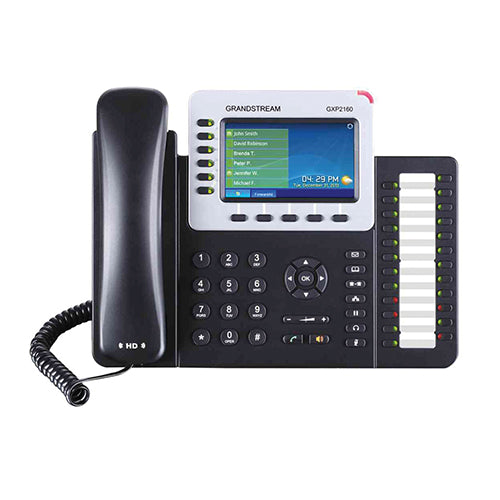
• The GXP2160 is a Linux-based device with 6 lines, 5 XML programmable soft keys, and 5-way conferencing. • Key features: • HD audio and a 4.3 inch (480 x 272) color LCD screen for high-quality calls • Dual Gigabit ports with integrated PoE • Bluetooth connectivity • 24 dual-colored BLF/speed dial keys • 5 programmable context-sensitive soft keys • Integrated headset jack for EHS compatibility • Additional information: • Weight: 2.8 lbs • Dimensions: 15 × 10 × 4 in • Brand: Grandstream • Phone Type: Desk Technical specifications: • Protocols/Standards: SIP RFC3261, TCP/IP/UDP, RTP/RTCP, HTTP/HTTPS, ARP, ICMP, DNS (A record, SRV, NAPTR), DHCP, PPPoE, SSH, TELNET, TFTP, NTP, STUN, SIMPLE, LLDP, LDAP, TR-069, 802.1x, TLS, SRTP, IPv6, CDP/SNMP/RTCP-XR • Network Interfaces: Dual switched auto-sensing 10/100/1000 Mbps Gigabit Ethernet ports with integrated PoE • Graphic Display: 4.3 inch (480×272) TFT color LCD • Bluetooth: Yes, Bluetooth V2.1 • Feature Keys: 6 line keys with up to 6 SIP accounts, 24 speed-dial/BLF extension keys with dual-color LED, 5 programmable context sensitive softkeys, 5 navigation/menu keys, 11 dedicated function keys for various phone functions • Voice Codecs: Support for G.729A/B, G.711µ/a-law, G.726, G.722(wide-band), G723.1, iLBC, Opus, in-band and out-of-band DTMF (in audio, RFC2833, SIP INFO) • Auxiliary Ports: RJ9 headset jack (allowing EHS with Plantronics headsets), USB • Telephony Features: Hold, transfer, forward, 5-way conference, call park, call pickup, shared-call-appearance (SCA)/bridged-line-appearance (BLA), downloadable phonebook (XML, LDAP, up to 2000 items), call waiting, call log (up to 500 records), customization of screen, off-hook auto dial, auto answer, click-to-dial, flexible dial plan, hot desking, personalized music ringtones and music on hold, server redundancy and fail-over

About This Product

The Grandstream GXP2160 is a solid choice for a busy office environment where a user needs to juggle multiple calls and keep an eye on colleague availability. With six line keys and 24 dual-color BLF/speed-dial keys, it's well-suited for a receptionist, executive assistant, or team lead who monitors several extensions at once. The 4.3-inch color LCD makes navigation and presence information easy to read, and the built-in Bluetooth and EHS headset support add flexibility for hands-free conversations. In a Canadian business context, this phone works reliably with most SIP-based PBX systems and major carriers like Rogers or Telus, and the dual Gigabit PoE ports simplify cabling in a modern office LAN.

Where this phone really shines is in a role where the user doesn't need an expansion module—the 24 BLF keys are fixed and can't be increased with add-on key modules, so if you're managing more than 24 extensions, you'd either need a second phone or a model that supports sidecars. For a single-line home office or a desk where only one or two lines are used, the GXP2160 is overkill; a simpler model like the GXP2130 would save money. On the other hand, for a small-to-medium business with up to six SIP accounts and moderate call volume, it hits a sweet spot between capability and cost.

The phone runs on a Linux-based firmware, which contributes to its stability and security. It supports a wide range of codecs including Opus and G.722 for HD audio, so call quality is clear. One practical tradeoff: the Bluetooth is version 2.1, which is older—it pairs reliably with headsets but may not support the latest audio profiles or range. For most desk use, that's fine, but if you need modern Bluetooth features, check compatibility first. Overall, the GXP2160 is a dependable workhorse for a GTA office where multi-line handling and presence monitoring are daily needs.
Services We Provide
  • Professional Installation & Configuration
  • Ongoing Maintenance & Support
  • Troubleshooting & Repairs
  • System Upgrades & Updates



