
Grandstream GXP2170 Enterprise IP Phone

Frequently Asked Questions

Start by confirming the phone has a stable network connection—check the Ethernet cable and PoE status light. Then verify that the SIP account settings (server address, username, password) are entered correctly in the phone’s web interface or on-screen menu. If the issue persists, a Toronto-based VoIP support provider can usually resolve this remotely.
First, check the handset cord and headset connection—reseat both. Then ensure the volume isn’t muted or turned all the way down using the side rocker switch. If using a headset with EHS, confirm the headset is properly paired and the phone is set to headset mode. A quick power cycle often restores audio.
Confirm that your network switch or PoE injector supports 802.3af PoE and that the port is enabled. Try a different Ethernet cable and a different switch port. If the phone powers up with the optional 12V power adapter but not via PoE, the issue is likely with the cabling or switch—not the phone.
Make sure Bluetooth is turned on under Settings > Bluetooth on the phone. Put your headset into pairing mode and scan for devices—select it from the list on the phone. If the headset was previously paired, remove it from the phone’s Bluetooth list and try again. Interference from other devices or a low headset battery can also prevent pairing.
First, power off the phone and the expansion module, then reseat the connecting cable between them. Reconnect power to the phone (the module draws power from the phone). If the module still isn’t detected, check that the phone’s firmware supports expansion modules (current firmware does). A power cycle of the entire unit often resolves detection issues.
Perform a soft reboot by unplugging the power (or Ethernet if using PoE) for 10 seconds and reconnecting. This clears temporary glitches. If the issue returns, check for loose cable connections at the base and the display ribbon inside if you are comfortable—otherwise, contact your VoIP support provider before attempting any hardware fixes.
You can configure BLF keys through the phone’s web interface under the “Programmable Keys” section, assigning each key to a SIP extension or speed-dial number. Alternatively, on the phone itself, navigate to Menu > Settings > Preferences > Programmable Keys and edit the keys directly. For large deployments, use auto-provisioning via TFTP or HTTP.
Yes, it works perfectly with any standard SIP-based PBX, including the Grandstream UCM series. Simply point the phone’s SIP account to the UCM’s IP address or FQDN and use the admin-created extension credentials. The phone will automatically support features like BLF, call park, and shared call appearance when paired with a compatible PBX.
Yes, the phone supports Plantronics headsets with an Electronic Hookswitch (EHS) cable. Connect the Plantronics EHS adapter to the phone’s RJ9 headset jack and pair the headset accordingly. Ensure the headset is set to the correct mode (e.g., DHSG/EHS) as per Plantronics instructions. This allows you to answer/hang up from the headset button.
Download the latest firmware from Grandstream’s support site. Then log into the phone’s web interface, go to Maintenance > Upgrade, and select the firmware file to upload. Alternatively, set up a TFTP server and point the phone to it via the “Firmware Server Path” field. Upgrade only after hours if in production, and confirm the current firmware version first.
IP Phones

Grandstream GXP2170 Enterprise IP Phone
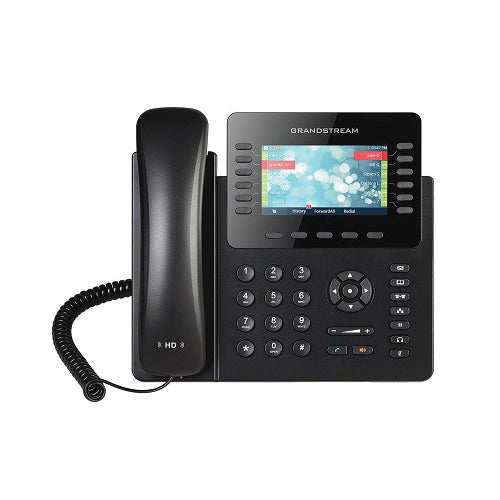
• The GXP2170 is a powerful enterprise-grade IP phone designed for busy users handling high call volumes. This top-of-the-line phone features 12 line keys/line appearances, 6 SIP accounts, and a 4.3 inch (480 x 272) color display LCD with full HD audio. • Key highlights include: • Up to 48 on-screen speed dial/BLF keys for increased productivity • Dual Gigabit network ports with integrated PoE for fast connection speeds • Integrated Bluetooth for syncing with mobile devices and headsets • Supports up to four GXP2200 EXT modules for BLF/speed-dial access to up to 160 contacts • Dimensions: 15 × 10 × 4 in, weight: 3.8 lbs. The phone is designed as a desk model. • Technical specifications include: • Protocols/Standards: SIP RFC3261, TCP/IP/UDP, RTP/RTCP, HTTP/HTTPS, ARP, ICMP, DNS (A record, SRV, NAPTR), DHCP, PPPoE, SSH, TELNET, TFTP, NTP, STUN, SIMPLE, LLDP, LDAP, TR-069, 802.1x, TLS, SRTP, IPV6, CDP/SNMP/RTCP-XR • Network Interfaces: Dual switched auto-sensing 10/100/1000 Mbps Gigabit Ethernet ports with integrated PoE • Graphic Display: 4.3 inch (480×272) TFT color LCD • Bluetooth: Yes, integrated • Feature Keys: 12 line keys with up to 6 SIP accounts, 5 XML programmable context sensitive softkeys, 5 navigation/menu keys, 11 dedicated function keys for various features • The phone supports a range of voice codecs and has auxiliary ports for RJ9 headset jack (allowing EHS with Plantronics headsets), USB, extension module port. • Telephony Features include hold, transfer, forward, 5-way conference, call park, call pickup, shared-call-appearance/bridged-line-appearance, downloadable phonebook (XML, LDAP, up to 2000 items), and more.

About This Product

The Grandstream GXP2170 is a desk phone designed for professionals who handle high call volumes and need quick access to many contacts or lines. Its 12 programmable line keys and support for up to 48 speed-dial or BLF entries via the on-screen interface make it well-suited for receptionists, executive assistants, or team leads who monitor multiple extensions. The phone pairs naturally with Grandstream’s GXP2200 expansion modules, allowing up to 160 additional BLF contacts, which is ideal for a busy office where call routing and presence visibility are critical.

In a real-world deployment, the GXP2170 works best in a structured office environment with Power over Ethernet (PoE) from the network switch, eliminating the need for a separate power adapter. Its dual Gigabit ports let you daisy-chain a computer without sacrificing network speed, a practical advantage in dense cubicle setups. However, this phone is overkill for a user who only makes a few calls daily—a simpler model would suffice. Conversely, it may feel underpowered if you need integrated video calling or advanced app support, as this is a pure voice SIP phone with a focus on telephony features.

For Canadian businesses, particularly in the GTA, the GXP2170 integrates smoothly with most hosted PBX and SIP trunk providers; it supports standard codecs like G.711 and G.722 (HD audio) that Canadian carriers commonly use. The phone’s size and weight (15x10x4 in, 3.8 lbs) mean it occupies desk space, so plan your layout accordingly. Overall, this is a reliable workhorse for anyone who lives on the phone and wants physical keys for efficiency.
Services We Provide
  • Professional Installation & Configuration
  • Ongoing Maintenance & Support
  • Troubleshooting & Repairs
  • System Upgrades & Updates



