
Grandstream GXV3350 IP Video Phone

Frequently Asked Questions

First, verify that the SIP server address, username, and password are entered correctly in the phone's account settings under Settings > Accounts. Ensure the phone has a valid IP address and can reach the internet or your PBX. If it's still not registering, check if your firewall or router is blocking SIP traffic (typically ports 5060 or 5061). A Toronto-based VoIP support provider can usually resolve this remotely if the issue persists.
If you're using Power over Ethernet (PoE), confirm that your switch or injector supports PoE+ (802.3at), as the GXV3350 requires more power than standard PoE. Try using the included power adapter instead to isolate the issue. Also check that the Ethernet cable is securely connected at both ends.
Go to Settings > Bluetooth on the Android interface and ensure Bluetooth is enabled. Put your headset into pairing mode, then select it from the list of available devices. If pairing fails, reset the headset's pairing memory and try again. Once paired, you may need to set it as the active audio device in the phone's call settings.
Check that the microphone is not muted—look for a mute icon on the screen or the physical mute button. If you're using a headset, ensure it's properly plugged in or paired. For the built-in speakerphone, make sure the privacy wheel on the camera is fully open, as it can partially block the mic. If the issue persists, test with a different headset or on a different call to rule out a network audio issue.
Yes, the phone has a 3.5mm headset jack on the side. For a wired headset, simply plug it in and it should work automatically. If you want to use an Electronic Hook Switch (EHS) for a DECT headset, you'll need to connect the EHS cable to the dedicated port on the phone and configure the headset type in the phone's settings.
Video quality depends heavily on your network bandwidth and latency. First, ensure you're using a wired Ethernet connection rather than Wi-Fi for the most stable connection. Check that no other devices are streaming or downloading heavily during your call. In the phone's video settings, you can try lowering the video resolution to 720p or 480p to reduce bandwidth usage.
Make sure the phone is within a reasonable range of your Wi-Fi router, especially if you're using the 5GHz band, which has shorter range. Try switching to the 2.4GHz band in the Wi-Fi settings for better stability. If the issue persists, reboot the phone and your router. For business-critical calls, a wired Ethernet connection is always more reliable.
Since the phone runs Android 7.0, you can install apps from the Google Play Store just like on a tablet. Open the Play Store app, sign in with your Google account, and search for the app you want. Keep in mind that some newer apps may not be compatible with Android 7.0, so check compatibility before installing.
First, clean the screen with a soft, dry cloth to remove any dirt or grease that might interfere with touch sensitivity. Remove any screen protector if you have one, as it could be causing issues. If the problem continues, try rebooting the phone. If the screen is still unresponsive after a reboot, the hardware may need servicing.
The GXV3350 is a SIP-based IP phone, so it works with any SIP trunk provider or on-premises PBX. It is not a cellular phone and cannot connect directly to a mobile carrier's network. To use it with a service like Rogers Business Voice or Bell VoIP, you would need to configure it with the SIP credentials provided by your VoIP service provider.
IP Phones

Grandstream GXV3350 IP Video Phone
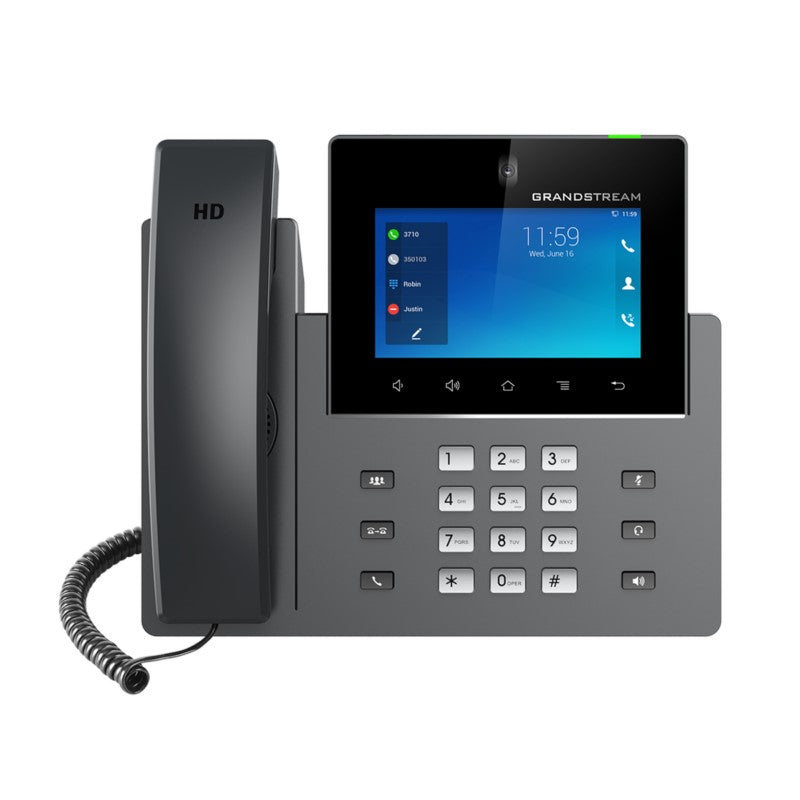
• The GXV3350 IP Video Phone for Android combines a 16-line IP video phone with a multi-platform video collaboration solution and the functionality of an Android tablet, offering an all-in-one communications solution. • Key features include: • 5-inch 1280×720 capacitive touch screen • Tiltable camera with privacy wheel • Built-in Bluetooth for syncing with mobile devices and connecting Bluetooth headsets • Dual-switched auto-sensing network ports • Integrated dualband Wi-Fi (2.4GHz & 5GHz) • Built-in PoE/PoE+ for power and network connections • Dual-mic HD speakerphone with noise reduction, advanced echo cancellation, and excellent doubletalk performance • The phone runs on Android 7.0 and offers instant access to hundreds of thousands of Android apps. • It also features: • 4-core 1.3GHz ARM Cortex A53 processor with 2GB RAM and 8GB eMMC Flash • HDMI output, USB, headset jack, EHS • 6-way audio conferencing and 3-way 720p 30fps HD video conferencing capability • Additional information includes: • Weight: 3.8 lbs • Dimensions: 14 × 10 × 4 in • Brand: Grandstream • Video Room Size: Personal • Phone Type: Desk, Video, WiFi / WiFi Capable

About This Product

The Grandstream GXV3350 is a versatile IP video phone designed for professionals who need more than just a desk phone. It runs Android 7.0, so it functions as a small tablet alongside a full VoIP phone, making it a good fit for receptionists, executives, or remote workers who want to run business apps (like calendars, messaging, or CRM tools) directly on their phone. It pairs well with a SIP-based PBX and can replace a basic desk phone and a separate tablet on a cluttered desk.

A key practical consideration is that this device is best suited for a personal workspace, not a large conference room. The 5-inch screen and built-in camera are fine for one-on-one video calls, but the 3-way video conference limit means it won't handle larger meetings. The dual-switched network ports and built-in PoE+ simplify cabling, which is convenient for offices in the GTA where desk space is tight. However, if you need a phone for a busy call center or a shared lobby, the Android interface might be overkill—a simpler, more rugged model would be a better fit.

For Canadian businesses, the GXV3350 works with most SIP providers and is compatible with standard analog headset adapters. The integrated Wi-Fi is handy for deployments where running Ethernet is impractical, but for reliable voice quality, a wired connection with PoE is still recommended. Be aware that the Android version (7.0) is older, so some newer apps may not be supported or may run slowly. This phone is a solid choice for a knowledge worker who wants one device for calls, video, and light Android apps, but it's not a replacement for a dedicated video conferencing system in a meeting room.
Services We Provide
  • Professional Installation & Configuration
  • Ongoing Maintenance & Support
  • Troubleshooting & Repairs
  • System Upgrades & Updates



