
Grandstream GXV3370 16-line Android IP Video Phone
Frequently Asked Questions
Grandstream GXV3370 16-line Android IP Video Phone
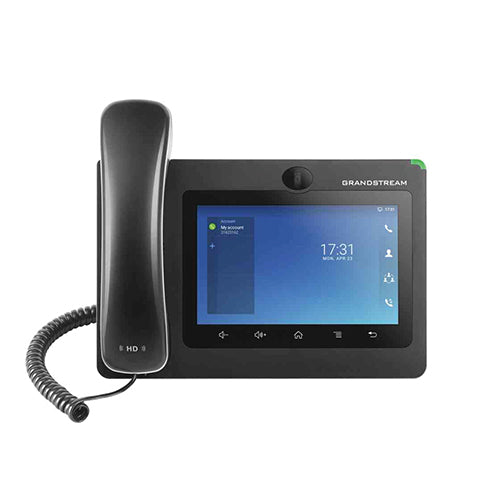
• Powerful desktop video phone for enterprise users • 7” touch screen with advanced megapixel camera for HD video conferencing • Built-in WiFi and Bluetooth, Gigabit network speeds, and innovative telephony functionalities • Runs on Android 7.0 operating system with flexible SDK support for custom apps • Fully interoperable with nearly all major SIP platforms on the market • Features: • 16 lines with up to 16 SIP accounts • Built-in mega-pixel camera for video calling with privacy shutter • Dual-switched auto-sensing 10/100/1000Mbps network ports • Integrated dual-band Wi-Fi (2.4GHz & 5GHz) • Built-in PoE/PoE+ to power the device and give it a network connection • Speakerphone with HD acoustic chamber, advanced echo cancellation, and excellent double-talk performance • 4-core 1.3GHz ARM Cortex A53 processor with 2GB RAM and 8GB eMMC Flash • 7’’ (1024×600) capacitive 5-point touch screen TFT LCD • TLS and SRTP security encryption technology to protect calls and accounts • 7-way audio conferencing and 3-way 720p 30fps HD video conferencing capability • Additional Information: • Weight: 3.4 lbs • Dimensions: 15 × 10 × 4 in • Brand: Grandstream • Video Room Size: Personal • Phone Type: Desk, Video, WiFi / WiFi Capable • Technical Specifications: • Auxiliary Ports: RJ9 headset jack, 3.5mm stereo headset with microphone, USB port, SD, HDMI-out (1.4 up to 720p 30fps) • Feature Keys: 2 function touch keys VOLUME +/-, 3 dedicated Android touch keys HOME, MENU, and BACK • Voice Codecs and Capabilities: G.711µ/a, G.722 (wide-band), G.726-32, iLBC, Opus, G.729A/B, in-band and out-of-band DTMF (In audio, RFC2833, SIP INFO), VAD, CNG, AEC, PLC, AJB, AGC, ANS • Video Codecs and Capabilities: H.264 BP/MP/HP, video resolution up to 720p, frame rate up to 30 fps, bit rate up to 2Mbps, 3-way video conference (720p 30fps), anti-flickering, auto focus and auto exposure • Telephony Features: Hold, transfer, forward (unconditional/no-answer/busy), call park/pickup, 7-way audio conference(including the host), shared-call-appearance (SCA) / bridged-line-appearance (BLA), virtual MPK, downloadable contacts (XML, LDAP, up to 1000 items), call record(local and server), call log (up to 1000 records), call waiting, auto answer, XML customization of screen, flexible dial plan, hot desking, personalized music ringtones and music on hold, server redundancy & fail-over
About This Product
This phone fits comfortably into any SIP-based environment and integrates seamlessly with cloud PBX services, on-premise platforms like Grandstream's UCM series, and most third-party VoIP systems used by Canadian businesses. Because it runs Android 7.0, users gain access to a broad range of apps from the Play Store—think CRM integrations, messaging, or note-taking—but the older OS limits long-term app compatibility and security patches. That trade-off is acceptable in a purpose-built telephony device, especially when it’s isolated on a voice VLAN.
From a hardware perspective, the GXV3370 supports power and data over a single Ethernet cable via PoE+ and includes dual-band Wi‑Fi for flexible placement. For crisp 720p video calls and smooth conference performance, a wired Gigabit connection is strongly recommended, especially in busy office environments. While it handily replaces a traditional phone for the average user, it would be overkill for a call‑center agent who never uses video, and its personal‑sized camera and fixed position mean it can’t replace a dedicated room system for a full boardroom.
For Canadian organizations, the GXV3370 pairs well with local SIP trunks and cloud providers, supporting the codecs and security profiles typical of deployments from Toronto to Vancouver. Grandstream’s open provisioning methods (HTTP/HTTPS, TR‑069, XML) make it straightforward for managed IT providers to deploy and support remotely, which is a practical advantage in multi‑site Canadian businesses.
Services We Provide
- Professional Installation & Configuration
- Ongoing Maintenance & Support
- Troubleshooting & Repairs
- System Upgrades & Updates



