
Grandstream GXV3380 High-end Smart Video Phone

Frequently Asked Questions

First, verify that the SIP account credentials (username, password, and server address) are entered correctly in the phone's account settings. Then check that the phone has a valid IP address and can reach the internet, which you can confirm by pinging a public server from the phone's network tools menu. If the issue persists, a Toronto-based VoIP support provider can usually resolve this remotely.
Ensure the power source is stable. If using Power over Ethernet (PoE), confirm your switch provides PoE+ (802.3at) as the GXV3380 requires more power than standard PoE. Try using the included power adapter instead to isolate the issue. A loose HDMI cable connected to the HDMI-in port can also cause display problems, so check that connection as well.
Check that the microphone is not muted, either by the mute button on the screen or the physical mute key. Also, verify that the phone is not set to a headset mode if you are using the speakerphone. If using Bluetooth, ensure the headset is paired and selected as the audio device. If the problem continues, try a soft reboot of the phone.
Go to Menu > Settings > Accounts, select an account line, and enter the SIP server address, your extension number, and password provided by your VoIP provider. Make sure the transport protocol (UDP, TCP, or TLS) matches what your server supports. If you are unsure, contact your IT department or provider for the exact settings.
First, confirm that the camera privacy shutter is open and not blocking the lens. Then check that the far end is sending video and that your network bandwidth is sufficient (at least 1 Mbps upload for standard video). The GXV3380 supports up to 3-way 1080p video, but if you are in a conference with more participants, video may be limited by your server or service.
Ensure the Ethernet cable is securely connected to the LAN port and to a working switch port. Try a different cable or port. If using PoE, confirm the switch is supplying power and that the phone powers on. You can also set a static IP address from the phone's network settings as a temporary workaround while you troubleshoot the DHCP server.
No, the GXV3380 is a SIP-based IP phone and requires a VoIP service or an on-premises SIP server. It does not have an FXO port to connect to a traditional analog phone line. You will need a VoIP provider or an ATA if you want to use it with an analog line.
Ensure the headset is fully charged and within range (typically 10 meters or less). Try unpairing and re-pairing the headset from the phone's Bluetooth settings. Interference from other wireless devices can also cause dropouts, so test in a different location. If the issue persists, try a different Bluetooth headset to isolate the problem.
During an active call, tap the Transfer soft key on the screen. Then dial the target extension number. You can choose between blind transfer (immediately connects) or attended transfer (wait for the recipient to answer before completing). The phone supports both methods via the on-screen options.
First, clean the screen with a soft, dry cloth to remove any dirt or moisture. Remove any screen protector that might be interfering. If the issue persists, try a soft reboot by holding the power button and selecting Restart. A hard reset should only be done as a last resort after consulting with support, as it erases all settings.
IP Phones

Grandstream GXV3380 High-end Smart Video Phone
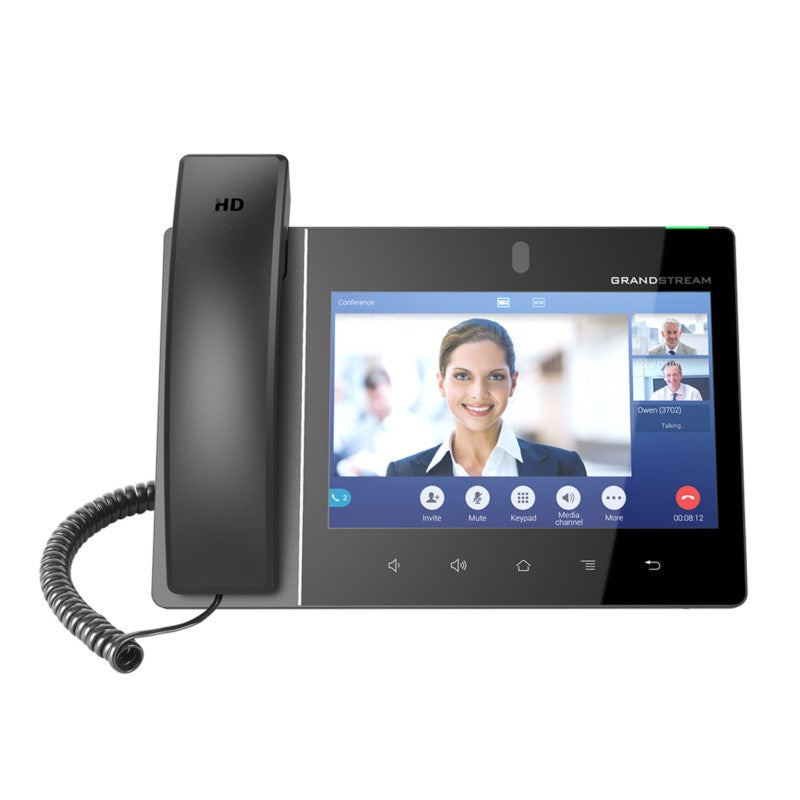
16-line IP video phone with multi-platform video collaboration solution and Android tablet functionality, offering an all-in-one communications solution. • 8 inch 1280×800 capacitive touch screen • 2 megapixel camera with privacy shutter • Runs on Android 7.x operating system • Built-in Bluetooth for syncing with mobile devices and connecting Bluetooth headsets • Dual-switched auto-sensing network ports (10/100/1000Mbps) • Integrated dual band Wi-Fi (2.4GHz & 5GHz) with PoE/PoE+ support • Dual-mic HD speakerphone with advanced echo cancellation and excellent double-talk performance • 64-bit quad-core processor, 2GB RAM, and 16GB Flash • Peripherals include HDMI-in/out, USB, Micro SD, headset jack, EHS (Plantronics headsets) • 7-way HD audio conferencing and 3-way 1080p 30fps HD video capability Additional Information: Weight: 4.8 lbs Dimensions: 15 × 10 × 5 in Brand: Grandstream Video Room Size: Personal Phone Type: Desk, Video, WiFi / WiFi Capable Technical Specifications: Auxiliary Ports: • RJ9 headset jack (allowing EHS with Plantronics headsets) • 3.5mm stereo headset with microphone • USB 2.0 port • micro SD • HDMI-out (1.4 up to 1080p60fps) • HDMI-in (1.4 up to 1080p@60fps) Feature Keys: • 2 function touch keys VOLUME +/-, 3 dedicated Android touch keys HOME, MENU, and BACK Voice Codecs and Capabilities: • Wide-band Opus • wide-band G.722, G.711µ/a, G. 729A/B, G.726-32, iLBC, in-band and out-ofband DTMF (In audio, RFC2833, SIP INFO) • VAD, CNG, AEC, PLC, AJB, AGC, ANS Video Codecs and Capabilities: • H.264 BP/MP/HP, video resolution up to 1080p • frame rate up to 30 fps • bitrate up to 4Mbps • 3-way video conference (1080p@30fps) • BFCP • people video (up to 1080p@30fps) + content video (up to 1080p@15fps) • anti-flickering • auto focus and auto exposure • camera block Telephony Features: • Hold, transfer, forward (unconditional/no-answer/busy), call park/pickup • 7-way audio conference(including the host) • shared-call-appearance (SCA) / bridged-line-appearance (BLA) • virtual MPK • downloadable contacts (XML, LDAP, up to 2000 items) • call record(local and server) • call log (up to 2000 records) • call waiting • auto answer • XML customization of screen • flexible dial plan • hot desking • personalized music ringtones and music on hold • server redundancy & fail-over

About This Product

The Grandstream GXV3380 is a high-end smart video phone designed for executives, managers, and power users who need a single device that combines a full-featured IP phone with Android tablet functionality. It fits naturally in a private office or a small meeting room where the user wants to handle calls, video conferences, and run Android apps without switching between devices. The 8-inch touchscreen and built-in camera with privacy shutter make it suitable for one-on-one or small group video calls, and the HDMI-in port allows it to display content from a laptop or other source on its screen, which can be useful for presentations or reviewing documents during a call.

This device pairs well with a PoE+ switch for clean, single-cable installation, and its dual-band Wi-Fi gives deployment flexibility when running Ethernet is impractical. It can replace a separate desk phone and tablet, reducing desk clutter. However, the GXV3380 runs Android 7.x, which is an older operating system and may not support newer apps or receive security updates. Buyers should confirm that their required Android apps are compatible. The camera is personal-room class, not suitable for large conference spaces, and the 3-way video limit means it will not handle a full-team video meeting without an external bridge or software.

For Canadian businesses, particularly in the GTA, this phone works well with most SIP-based VoIP providers and can be provisioned for use with local carriers. The PoE+ requirement means older switches may need an upgrade or a power injector. It is overkill for a receptionist or a call center agent who only needs basic call handling, and it may be underpowered for a user who needs a modern Android experience or high-resolution video conferencing with multiple participants. Overall, it is a niche device for someone who values an all-in-one desktop communication hub and can accept the trade-offs of an older Android version and limited video conference capacity.
Services We Provide
  • Professional Installation & Configuration
  • Ongoing Maintenance & Support
  • Troubleshooting & Repairs
  • System Upgrades & Updates



