
Grandstream WP810 Cordless Wi-Fi IP Phone

Frequently Asked Questions

First, double‑check that you’ve selected the correct security type (WPA2‑PSK, WPA3, etc.) on the phone to match what the access point expects. Then verify that MAC address filtering isn’t enabled on the network; if it is, add the WP810’s Wi‑Fi MAC address to the allowed list. As a quick test, try connecting a laptop to the same SSID using the same credentials to confirm the network is accepting new clients.
Confirm the SIP server address, port, and transport protocol entered on the phone exactly match what your provider requires, then check that the account credentials (username and password) have no extra spaces or typos. If possible, try registering a softphone with the same credentials on the same subnet to rule out a network‑level blocking issue. Also verify that your firewall allows the necessary SIP and RTP ports between the handset and the SIP server.
Start by lowering the earpiece volume slightly and ensuring the handset isn’t pressed too tightly against your ear. Echo is often caused by audio looping back through the speaker‑to‑microphone path, so try moving to a quieter area or adjusting the position of the phone relative to your face. If the problem persists on every call, have your VoIP administrator check whether AEC (Acoustic Echo Cancellation) is enabled in the phone’s settings.
Ensure the access points in your building share the same SSID and security settings so the phone can roam between them. In the phone’s Wi‑Fi advanced settings, verify that 802.11r (fast roaming) or 802.11k/v assistance is configured to match what your network supports. If roaming still fails, walk the route while watching the signal indicator to identify a possible coverage gap that may need another access point.
First, confirm the WP810’s call isn’t muted—press the mute key to toggle it. Next, try unplugging any headset that’s connected to the 3.5 mm jack, as a faulty headset or jack can route audio away from the built‑in microphones. If the problem remains, test with a call to voicemail or an echo test number while speaking into both the handset and speakerphone modes to isolate whether one microphone path is affected.
The WP810 itself does not draw power over Ethernet because it connects wirelessly; it charges via the included Micro USB cable and power adapter. You simply connect the adapter to a standard 110‑V AC outlet, which is typical in Canadian business premises. If you need to charge multiple handsets in a central spot, any standard USB‑A charging station will work, provided it outputs sufficient current for the battery.
In most Canadian office environments, the 5 GHz band delivers significantly less interference and more consistent latency than the crowded 2.4 GHz band, so it’s the preferred choice for voice traffic. If your access points support it, enable band steering to push the WP810 toward 5 GHz automatically. Reserve 2.4 GHz as a fallback, but avoid it as the primary band unless your building’s layout requires the longer range.
Start by ensuring the phone is running the latest available firmware, as updates often include power‑management improvements. Then check the display and keypad backlight timer settings—keeping the screen lit for an extended idle period consumes extra power. If you’re using the phone in a location with weak Wi‑Fi signal, the radio works harder to maintain the connection, so try moving closer to an access point to see whether battery life improves noticeably.
IP Phones

Grandstream WP810 Cordless Wi-Fi IP Phone
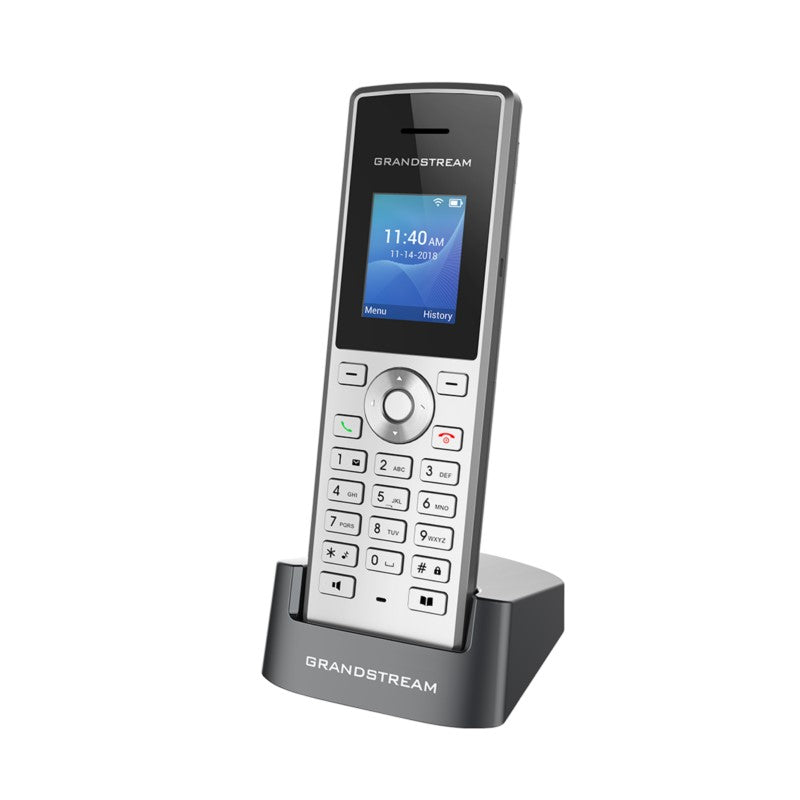
• The WP810 is a portable Wi-Fi IP phone designed for enterprises and vertical market applications, including retail, logistics, medical, and security. It features integrated dual-band 802.11a/b/g/n/ac Wi-Fi, advanced antenna design, and roaming support. • Key Features: • Dual-band Wi-Fi with efficient antenna design and advanced roaming support • 2 SIP accounts, 2 lines • HD voice & dual MIC design with AEC and Noise Shield Technology • Rechargeable battery, 6 hour talk time, 120-hour standby • Configurable button for push-to-talk • Micro USB port and 3.5mm headset jack • Additional Information: • Weight: 1 lb • Dimensions: 7 × 5 × 3 in • Phone Type: WiFi / WiFi Capable • Technical Specifications: • Protocol/Standards: SIP RFC3261, TCP/IP/UDP, RTP/RTCP, HTTP/HTTPS, ARP, ICMP, DNS (A record, SRV, NAPTR), DHCP, SSH, TFTP, NTP, STUN, SIMPLE, 802.1x, TLS, SRTP, IPv6 • Voice Codecs and Capabilities: Support for G.711µ/a, G.729A/B, G.722 (wide-band), iLBC, Opus, in-band and out-ofband DTMF (In audio, RFC2833, SIP INFO), VAD, CNG, AEC, PLC, AJB, AGC, ANS • Graphic: 1.8 inch (128×160) TFT color LCD • Peripherals: 2 soft keys, dial, hangup, speakerphone, phonebook, backlit keypad, proximity sensor, vibration motor, volume button and navigation keys • Auxiliary Ports: 3.5 mm headset jack, Micro USB port for charging, dual-MIC, dual-color MWI LED • Telephony: Hold, transfer, forward, 3-way audio conference, call waiting, call log (up to 100 records), downloadable phonebook (XML, up to 500 items) off-hook auto dial, auto answer, flexible dial plan, personalized music ringtones, server redundancy and fail-over, push to talk • Security: User and administrator level passwords, MD5 and MD5-sess based authentication, 256-bit AES based secure configuration file, SRTP, TLS, 802.1x media access control

About This Product

The Grandstream WP810 is a practical choice for mobile staff who need dependable voice connectivity across a facility, without being tethered to a desk. It fits naturally in warehouses, retail floors, clinics, and security patrol routes where workers move constantly and can’t afford to miss a call. Because it uses dual-band Wi-Fi instead of DECT, it can integrate directly into an existing wireless network, making it a clean option when you want to avoid deploying a separate base station system.

This handset pairs well with mid‑market IP PBXs and cloud UC platforms that expect two‑line SIP endpoints, and it works comfortably in a single‑site Canadian business with a well‑designed Wi‑Fi infrastructure. It’s not a replacement for a ruggedized, high‑capacity DECT solution covering an entire hospital campus, nor is it the right pick for power users who need Bluetooth tethering or a full‑color web browser. The six‑hour talk time is ample for most shifts, but deployments that span back‑to‑back shifts without charging opportunities will need a spare battery strategy.

One trade‑off to consider is that voice quality and roaming are only as good as the wireless LAN underneath it. In older Toronto brick‑and‑beam offices or congested 2.4 GHz environments, you may need a site survey before relying on the WP810 for business‑critical calls. The push‑to‑talk button and noise‑shield mics are genuine assets in loud settings, but they won’t overcome deep coverage dead zones. For a single‑floor GTA office with modern access points, however, this phone delivers clear HD audio and smooth SIP registration out of the box.
Services We Provide
  • Professional Installation & Configuration
  • Ongoing Maintenance & Support
  • Troubleshooting & Repairs
  • System Upgrades & Updates



