
Grandstream WP816 Cordless Wi-Fi IP Phone

Frequently Asked Questions

First, confirm that the phone is connected to your Wi-Fi network and has a valid IP address. Then check that the SIP server address, port, and credentials entered in the phone's account settings exactly match what your provider gave you. If the issue persists, a Toronto-based VoIP support provider can usually resolve this remotely.
Start by checking the Wi-Fi signal strength on the phone's display; if it is weak, move closer to the access point or reduce interference from walls or other electronics. Also ensure your network is not congested by other high-bandwidth activities like video streaming. If the problem continues, verify that your router supports QoS for VoIP traffic.
Put your Bluetooth headset into pairing mode, then on the phone go to Settings > Bluetooth and scan for devices. Select your headset from the list and confirm the pairing. Once paired, you can switch audio to the headset during calls using the phone's audio menu.
First, make sure the charging base is plugged into a working outlet and that the phone is seated properly on the base. Try a different USB-C cable and power adapter if available. If the battery is completely drained, it may take a few minutes before the phone shows any sign of charging.
The WP816 is a SIP-based phone and works with any VoIP provider that supports standard SIP accounts. It is not tied to a specific carrier, so you can use it with a hosted PBX service from a Canadian provider or with your own SIP trunk from Rogers Business or Bell Business.
The push-to-talk feature must be configured in the phone's settings or through your provisioning server. Check that the button is assigned to a valid intercom or PTT group and that the target extension is also configured for PTT. If it still does not work, verify that both phones are on the same network and registered.
You can update the firmware through the phone's web interface by going to Settings > Upgrade and entering the URL of the firmware file provided by Grandstream or your VoIP provider. Alternatively, if your phone is managed via a provisioning server, the update may be pushed automatically. Always back up your settings before upgrading.
This usually means the phone cannot reach your SIP server or the account credentials are incorrect. Double-check the SIP server address and port in the account settings, and ensure that your network allows outbound SIP traffic (UDP/TCP port 5060 or as specified by your provider). A quick test is to try pinging the SIP server from the phone's network tools.
Yes, the WP816 works worldwide as long as you have a Wi-Fi connection and a SIP account. The power adapter supports 100-240VAC, so you only need a plug adapter for the outlet. Keep in mind that Wi-Fi roaming and call quality will depend on the local network.
Reduce the screen brightness and turn off Bluetooth when not in use. Also, ensure the phone is not constantly searching for a weak Wi-Fi signal by staying within good coverage range. If the battery still drains fast, it may need replacement after extended use.
IP Phones

Grandstream WP816 Cordless Wi-Fi IP Phone
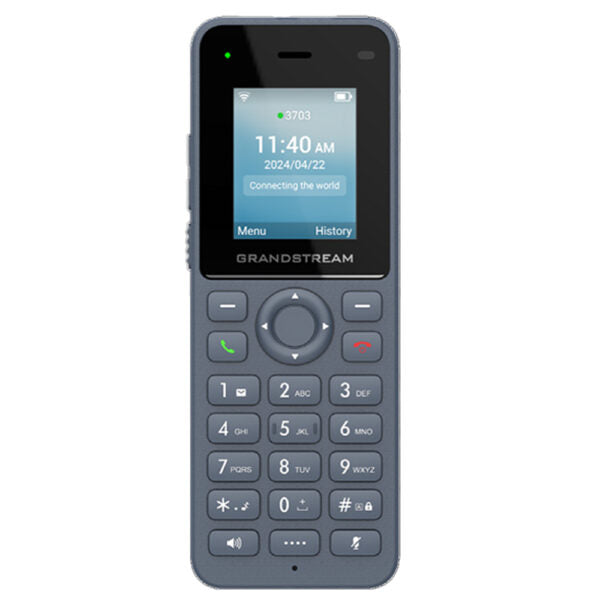
The WP816 is a cordless Wi-Fi IP phone designed for various enterprise and vertical market applications. Equipped with integrated dual band Wi-Fi 6, advanced antenna design, roaming support, 3-way voice conferencing, and Opus HD voice codec, this streamlined device offers 6 hours of talk-time and 120 hours of standby time via a 1500mAh battery. • Key Features: • Dual-band Wi-Fi 6 with efficient antenna design and advanced roaming support • Support for 2 SIP accounts and 2 lines • HD voice and dual MIC design with AEC and Noise Shield Technology • Integrated Bluetooth for headset connection • Rechargeable 1500mAh battery with 6 hour talk time and 120-hour standby • Configurable button for push-to-talk functionality • Type C USB port and 3.5mm headset jack • Accelerometer and emergency button Technical Specifications: • Box Contents: • WP816 phone • Type-C power adapter • Charger base • Belt clip • 1 lithium-ion battery • M3 screw • Wall bracket • Quick installation guide • Power & Green Energy Efficiency: • Universal power adapter • Input: 100-240VAC; Output:+5VDC, 1A (5W) • 1500mAh lithium-ion battery with standby time 120h and talk time 6h Wi-Fi: • Yes, integrated dual-band Wi-Fi 6 802.11 a/b/g/n/ac/ax (2.4GHz & 5GHz) • 802.11k/r/v Supported • Wi-Fi Encryption: Support WEP, WPA, WPA2, WPA3 (personal) Bluetooth: • Yes, integrated Bluetooth 5.0 Protocol/Standards: • SIP RFC3261, DNS (A record, SRV, NATPR), DHCP, SSH, NTP, STUN, LDAP, TR069, • SNMP, STRP, RTP/RTCP, RTCP-XR, TFTP, SIMPLE, HTTP/HTTPS, TCP, UDP, TLS, ARP, • ICMP, IPv4, IPv6, 802.1x For a full list of specifications, please refer to the product datasheet.

About This Product

The Grandstream WP816 is a cordless Wi-Fi IP phone designed for environments where desk phones are impractical but cellular coverage is unreliable. It is a strong fit for warehouse floors, retail sales floors, hospital corridors, or any setting where staff need to stay reachable while moving around a building. The integrated Wi-Fi 6 and roaming support mean it can follow a user across a properly configured wireless network without dropping calls, which is a genuine advantage in larger office or industrial spaces. The device pairs naturally with a hosted PBX or an on-premise SIP server, and its push-to-talk button makes it useful for intercom-style communication among teams. A practical tradeoff is the 6-hour talk time; heavy users will need to dock the phone between shifts, and the reliance on Wi-Fi means call quality depends on network coverage and congestion, not on a dedicated base station. For a small retail shop with a single access point, the roaming features are overkill, but for a multi-floor GTA office with a well-tuned Wi-Fi network, the WP816 can replace a traditional DECT system without requiring dedicated base stations or repeaters.
Services We Provide
  • Professional Installation & Configuration
  • Ongoing Maintenance & Support
  • Troubleshooting & Repairs
  • System Upgrades & Updates



