
Grandstream WP820 Enterprise Portable Wi-Fi Phone

Frequently Asked Questions

Start by confirming the phone is connected to Wi-Fi and can reach the internet by opening its built-in browser or pinging the server. Then verify the SIP server address, username, and password are entered correctly under Account settings. A common mistake is a typo in the server port or transport protocol (UDP vs TCP). If that all looks right, try rebooting the phone and the local network switch; often a simple power cycle clears a stuck DHCP lease or firewall state.
This is typically a roaming issue. The WP820 supports 802.11r and other fast-roaming protocols, but your access points must also be configured for fast roaming and have overlapping coverage without signal gaps. Check that your Wi-Fi network uses the same SSID on all APs and that the 5 GHz band is enabled—many roaming problems vanish with a dual-band setup. If the phone seems to cling to a weak AP, adjust the phone's roaming sensitivity in its advanced Wi‑Fi settings.
One-way audio often points to a NAT or firewall problem. On your SIP server or router, confirm that SIP ALG is disabled—this feature frequently breaks RTP audio streams. If you're connecting from home or a guest network, try a different internet connection or speak to your IT admin about opening the RTP port range. Also check that the phone's mute button hasn't been accidentally pressed; the WP820's mute light can be subtle.
High screen brightness, constant Wi‑Fi scanning for other networks, and active Bluetooth can all eat into battery life. Go to the phone's settings and reduce screen timeout, turn off unused networks in the Wi‑Fi list, and disable Bluetooth if you aren't using a headset. If the battery still drains unusually quickly, fully discharge it once, then charge to 100% with the phone powered off to recalibrate the meter.
These features rely on a compatible server-side application or PBX feature. First, make sure the button is actually mapped to 'PTT' or 'Panic' under the phone's button configuration menu. Then verify with your system administrator that the multicast paging group or panic notification service is active on your PBX. The WP820 sends a standard SIP message; your server must be set up to act on it.
Hold down the power button for about 10 seconds to force a restart—this does not erase any settings. Once it boots, check if the firmware is up to date; a software glitch may be fixed in a newer release. If the freeze happens frequently, avoid loading custom Android apps that may not be optimized for the small screen; stick to Grandstream's built-in functions.
Yes, it works with any standard 802.11 a/b/g/n Wi‑Fi access point. Just connect it to your home network and configure the SIP account using the credentials from your VoIP provider. For the best call quality, give the WP820 priority on your router's QoS settings and avoid using it on a crowded 2.4 GHz channel.
Put your headset in pairing mode, then on the phone go to Settings > Bluetooth and tap 'Scan for devices.' Select the headset from the list and confirm the passkey if prompted. Once paired, all call audio routes through the headset automatically. For call control from the headset, you may need to enable Bluetooth telephony control in the phone's sound settings.
Yes, you can dial an IP address directly from the keypad by entering the target IP after pressing the speaker or dial key. This is handy for testing in a lab or making peer-to-peer calls on the same subnet without any PBX. The feature works without any account configuration, provided both phones can reach each other over the network.
Almost certainly. The phone uses standard SIP protocols, so it's compatible with all major Canadian VoIP providers, including those serving business customers in the GTA. You'll need the provider's server address, account credentials, and possibly STUN settings if you're behind NAT. If you run into registration troubles, a quick call to your provider's support desk will usually confirm the correct parameters.
IP Phones

Grandstream WP820 Enterprise Portable Wi-Fi Phone
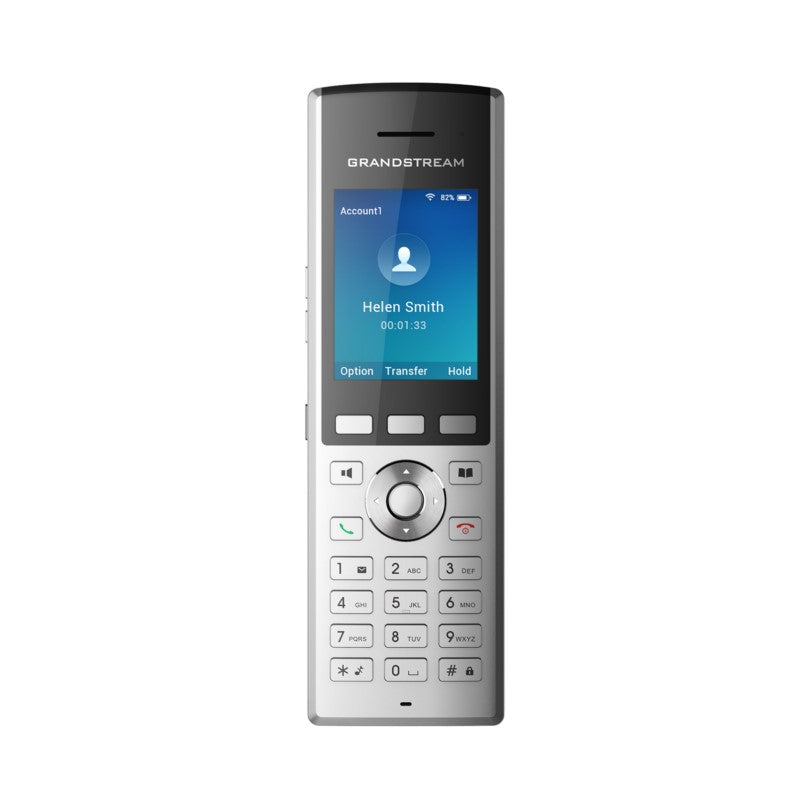
• The WP820 is a portable Wi-Fi phone designed for various enterprises and vertical market applications, including retail, logistics, medical, and security. • Key Features: • Dual-band WiFi with efficient antenna design and advanced roaming support • Bluetooth for syncing headsets and mobile devices (contacts and call transferring) • HD voice & dual MIC design with AEC and Noise Shield Technology • Rechargeable 1500mAh battery, 7.5 hour talk time, 150-hour standby • Accelerometer and configurable button for push-to-talk, panic, and other related functions • Micro USB port and 3.5mm headset jack • 2 SIP accounts, 2 lines • Supports custom Android apps that fit the phone's screen/keys • Battery charger (GMC08) available separately • Technical Specifications: • Protocol/Standards: SIP RFC3261, TCP/IP/UDP, RTP/RTCP, HTTP/HTTPS, ARP, ICMP, DNS (A record, SRV, NAPTR), DHCP, SSH, TFTP, NTP, STUN, SIMPLE, LDAP, TR-069, 802.1x, TLS, SRTP, IPv6 • Voice Codecs and Capabilities: Support for G.711µ/a, G.729A/B, G.722 (wide-band), iLBC, Opus, in-band and out-ofband DTMF (In audio, RFC2833, SIP INFO), VAD, CNG, AEC, PLC, AJB, AGC, ANS • Graphic: 2.4 inch (240×320) TFT color LCD • Peripherals: 3 soft keys, dial, hangup, speakerphone, phonebook, backlit keypad, proximity sensor, accelerator, vibration motor, volume button and navigation keys • Auxiliary Ports: 3.5 mm headset jack, Micro USB port for charging , dual-MIC, dual-color LEDTelephony Hold, transfer, forward, 3-way audio conference, downloadable phonebook (XML, LDAP, up to 1000 items), call waiting, call log (up to 100 records), off-hook auto dial, auto answer, click-to-dial, flexible dial plan, hot desking, personalized music ringtones and music on hold, server redundancy and fail-over, push to talk

About This Product

The Grandstream WP820 brings SIP-based voice over Wi-Fi to workers who aren't tethered to a desk. It's a natural fit for healthcare, retail, warehousing, and security teams where staff move between floors, aisles, or buildings while staying on the organization's phone system. Unlike consumer smartphones, the WP820 is purpose-built for voice, with physical keys, HD voice, and battery life that covers a typical shift. It replaces a desk phone for mobile roles, or it can complement a DECT infrastructure by riding a building's existing Wi-Fi network.

In a well-covered Wi-Fi environment—common in many GTA offices—the WP820 pairs seamlessly with Grandstream's UCM PBX, and it's compatible with nearly any SIP platform, including cloud-hosted services popular with Canadian SMBs. Bluetooth support lets you use a cordless headset for hands-free work, and the ability to sync contacts from a mobile device reduces duplicate entry. The phone is best seen as a dedicated endpoint, not a smartphone replacement; it won't run your company's field service app, but it handles calls reliably where coverage is good.

Battery life is practical for moderate use: about 7.5 hours of talk time and over six days on standby. Heavy users—think security dispatchers or nurses on back-to-back calls—may need to drop it into the charger during a lunch break. Wi-Fi performance is directly tied to your access point layout; dead zones will cause dropouts, and aggressive roaming can sometimes trigger brief audio interruptions. The accelerometer and configurable side button are handy for push-to-talk or panic alerts, but they require proper setup with a compatible server to work.

For a desk-bound worker, this phone is overkill; a wired IP phone is simpler and cheaper. Conversely, guards patrolling a sprawling outdoor lot without dense Wi-Fi will find the WP820 underpowered—it relies entirely on 802.11 coverage. That said, within a well-planned indoor footprint, the WP820 is a solid tool that keeps mobile staff connected on the organization's own voice infrastructure, avoiding the chaos of personal cellphones.
Services We Provide
  • Professional Installation & Configuration
  • Ongoing Maintenance & Support
  • Troubleshooting & Repairs
  • System Upgrades & Updates



