
Grandstream WP825 Ruggedized WiFi Wireless IP Phone

Frequently Asked Questions

Start by verifying that the phone is on the correct Wi-Fi network and can reach the internet. Confirm the SIP server address and port, then re-enter the account password carefully, as a single mistyped character will block registration. If the server uses TLS, make sure the phone’s date and time are accurate; an incorrect clock will break certificate validation.
This typically points to a roaming issue rather than a hardware fault. Check that your access points are broadcasting consistent SSIDs and that 802.11r (fast transition) is enabled on both the phone and the wireless controller. If roaming is still slow, temporarily test with 5 GHz disabled to see if the more stable 2.4 GHz band keeps the call up while you work with your network team on fine-tuning thresholds.
The 8-hour rating is measured under typical office conditions. Real-world drain increases with constant Wi-Fi scanning in fringe-coverage areas, heavy Bluetooth headset use, or frequent push-to-talk sessions. Try moving to a location with stronger signal and temporarily disconnect Bluetooth to isolate the cause; if battery life returns to normal, you are likely dealing with a feature-usage pattern rather than a defective battery.
On the phone, navigate to Menu > Settings > Bluetooth and ensure Bluetooth is enabled. Put your headset into pairing mode, then select ‘Scan for devices’ on the WP825. When the headset appears, choose it and confirm the pairing code if prompted. Once paired, call audio will route to the headset automatically when it is connected.
Echo often comes from the far-end speaker volume being set too high or from the handset’s earpiece leaking sound back into the microphone. Lower the speaker volume slightly and ensure the phone’s Noise Shield Technology setting is enabled in the web interface. If the echo persists, ask the caller to test with a different handset or headset to rule out their own audio loop.
Push-to-talk on the WP825 relies on a configured multicast paging group or a supported server-side feature like Grandstream’s UCM wave application. First, make sure the PTT configuration in the phone’s web UI points to the correct multicast IP and port, and that your network switches pass multicast traffic. A quick test is to set up a second WP825 on the same subnet with an identical paging group; if they can page each other, the phone is working and the issue lies in the server or network policy.
Yes, the phone supports 5 GHz 802.11ac. However, 5 GHz has shorter range and penetrates walls less effectively than 2.4 GHz. In a ruggedized deployment across a warehouse or hospital floor, leaving both bands enabled usually provides better coverage and roaming reliability, letting the phone automatically pick the stronger signal.
Verify the provisioning URL in the phone’s web interface exactly matches the file path and filename on your server, and that the phone can resolve the server’s hostname via DNS. If you are using HTTPS, confirm the phone trusts the server’s certificate. A useful diagnostic is to temporarily set the provisioning method to HTTP and see if the phone fetches the file; that distinguishes a network or path issue from a certificate problem without changing anything permanently.
No, this is the proximity sensor turning off the display to save battery and prevent accidental screen touches. It activates when the phone is held against your face. If the screen stays off when you pull the phone away, clean the upper section of the glass near the earpiece and test again. If the issue persists, the sensor may need recalibration, which support can guide you through remotely.
The phone charges via a standard USB-C port on the bottom. You can use the included cable or a quality third-party USB-C charger. For fastest charging, a 5V 2A adapter is recommended. In a Canadian office, any USB-C charging station that meets safety certification will work, so you can likely integrate it into shared charging areas alongside other devices.
IP Phones

Grandstream WP825 Ruggedized WiFi Wireless IP Phone
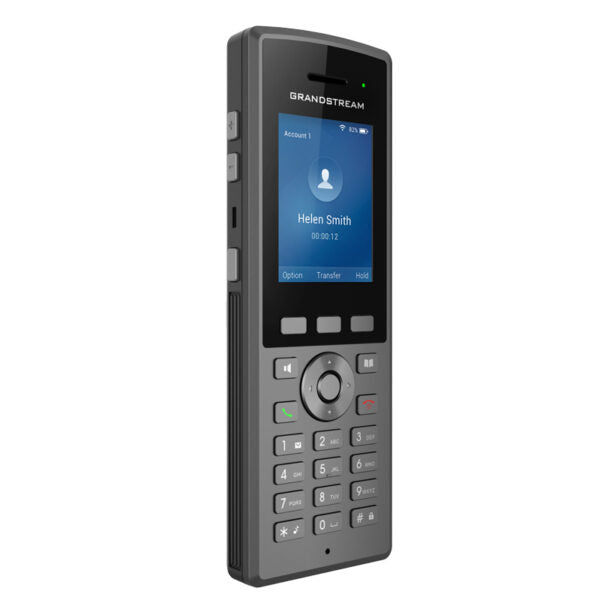
• The WP825 is a ruggedized portable Wi-Fi IP phone designed for various enterprises and vertical market applications, including retail, logistics, medical, and security. This cordless Wi-Fi phone features integrated dual-band 802.11a/b/g/n/ac Wi-Fi, advanced antenna design, and roaming support. Key Features: • Dual-band Wi-Fi with efficient antenna design and advanced roaming support • 2 SIP accounts, 2 lines for seamless communication • HD voice & dual MIC design with AEC and Noise Shield Technology for clear conversations • Rechargeable 2000mAh battery, 8 hour talk time, and 200-hour standby for extended use • Integrated Bluetooth to connect headsets and support configurable button for push-to-talk • Ruggedized design: waterproof, dustproof, and drop safe from 2.5m Technical Specifications: Wi-Fi: • Yes, integrated dual-band Wi-Fi 802.11 a/b/g/n/ac (2.4GHz & 5GHz). 802.11r • Supported (WPA2/WPA2-Enterprise) Wi-Fi Encryption: • WEP, WPA/WPA2, WPA Enterprise, WPA3, WPA3-Enterprise Graphic: • 2.4 inch (240×320) TFT color LCD Bluetooth: • Yes, integrated Peripherals: • 3 soft keys, dial, hangup, speakerphone, phonebook, backlit keypad, proximity sensor, vibration motor, volume button, navigation keys, and accelerometer supporting configurable gestures

About This Product

The WP825 is built for staff who need a dependable cordless handset while moving through challenging environments. It suits warehouses, hospital corridors, retail floors, and outdoor security patrols where dust, moisture, and occasional drops are part of the job. Because it relies entirely on Wi-Fi, the foundation of any successful deployment is a well-planned wireless network with consistent coverage and fast roaming handoffs. The dual-band radio and 802.11r support help, but a site survey before rollout often makes the difference between a phone that feels seamless and one that frustrates users with clipped words or dropped registrations.

This model fits neatly between stationary desk phones and fully ruggedized industrial smartphones. It gives you the core SIP calling experience without the cost and complexity of a mobile device management platform. Paired with a Grandstream UCM or any standards-compliant PBX, it can also serve as a lightweight push-to-talk tool for teams that need instant one-to-many communication. The configurable side button, vibration motor, and accelerometer open up workflow shortcuts—like muting by flipping the handset face down—that can speed up tasks in busy settings.

Prospective buyers should weigh a few practical limits. The 2000 mAh battery delivers a full shift of talk time under normal office conditions, but enabling Bluetooth, using push-to-talk heavily, or roaming across many access points will shorten that window. The 2.4-inch colour screen is clear for call control and a quick directory lookup, yet it is not designed for browsing complex visual menus or large contact lists. If your team spends most of the day at a desk, a wired Gigabit phone with a larger display will feel more natural; the WP825 earns its place when mobility and durability are the top priorities.

In a Canadian business context, the radio’s support for WPA2-Enterprise and WPA3 aligns well with the security policies common in healthcare and government. For GTA-area warehouses or logistics hubs that already run controller-based Wi-Fi, integrating the WP825 is typically straightforward, though tuning the network for low-latency voice roaming may require a brief collaboration with your Wi-Fi vendor or VoIP provider.
Services We Provide
  • Professional Installation & Configuration
  • Ongoing Maintenance & Support
  • Troubleshooting & Repairs
  • System Upgrades & Updates



