
Grandstream WP826 Wi-Fi Phone
Frequently Asked Questions
Grandstream WP826 Wi-Fi Phone
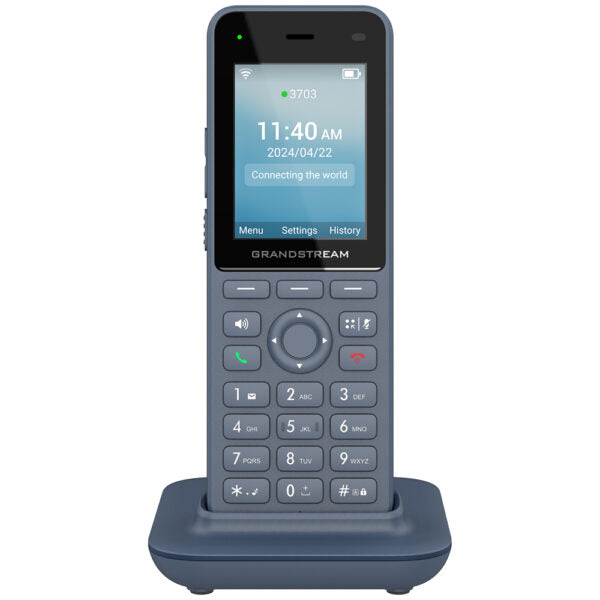
• The WP826 is a high-end cordless Wi-Fi IP phone suitable for enterprise and vertical market applications, including offices, retail, logistics, healthcare, security, and more. • This phone features integrated dual band Wi-Fi 6, advanced antenna design, roaming support, 4-way voice conferencing, and Opus HD voice codec. • It provides 12 hours of talk-time and 240 hours of standby time through a 3000mAh battery to drive employee productivity. • Key features include: • Dual-band Wi-Fi 6 with efficient antenna design and advanced roaming support • HD voice and dual MIC design with AEC and Noise Shield Technology • Integrated Bluetooth for headset connectivity • Configurable button for push-to-talk functionality • Type C USB port • Accelerometer and emergency button • Additional information includes: • Weight: 1.02 lb • Dimensions: 7.25 × 4.65 × 3.1 in • Phone type: WiFi / WiFi Capable • Technical specifications include: • Box contents: WP826 phone, Type-C power adapter, Charger base, Belt clip, Lithium-ion battery, M3 screw, Wall bracket, Quick installation guide • Protocol/Standards: SIP RFC3261, DNS (A record, SRV, NATPR), DHCP, SSH, NTP, STUN, LDAP, TR069, SNMP, STRP, RTP/RTCP, RTCP-XR, TFTP, SIMPLE, HTTP/HTTPS, TCP, UDP, TLS, ARP, ICMP, IPv4, IPv6, 802.1x • Wi-Fi: Yes, integrated dual-band Wi-Fi 6 802.11 a/b/g/n/ac/ax (2.4GHz & 5GHz). Supports 802.11k/r/v • Graphic: 2.4 inch (240×320) color LCD with 1 * Dual color MWI • Bluetooth: Yes, integrated Bluetooth 5.0 • Peripherals: 3 soft keys, navigation keys, confirm key, dial key, hang up key, speaker key, mute key, backlight DTMF keyboard, volume keys, Push-to-Talk key, accelerometer, proximity sensor
About This Product
This handset pairs well with a cloud-hosted PBX or an on-premise SIP platform like FreeSWITCH or Asterisk. It is a logical upgrade for a business currently using older DECT-based cordless phones and looking to consolidate onto a single Wi‑Fi network. The integrated Bluetooth allows for a cordless headset connection, which can be a meaningful ergonomic benefit for power users who spend hours on calls. The inclusion of an emergency button and accelerometer also points toward lone-worker safety applications, making it suitable for healthcare or industrial settings.
Buyers should be aware that this is a Wi‑Fi-dependent device, so call quality and reliability are tied directly to the coverage and configuration of the wireless network. Deploying a fleet of these in a building with weak or poorly designed Wi‑Fi will lead to frustration. It is not a drop-in replacement for a DECT system without careful site survey and network readiness. The 12-hour talk time is generous, but teams running continuous double shifts will need a charging discipline or spare batteries, as the battery is internal and not designed for hot-swapping through a typical workday.
For a very small office with two or three employees who stay at their desks, this device is overkill; a simple desktop phone would be more cost-effective. Conversely, for a campus-wide deployment requiring seamless handoff between access points, the Wi‑Fi 6 and 802.11 k/r/v roaming support are genuinely useful features that justify the step up from a basic Wi‑Fi handset. In the Greater Toronto Area, where many businesses operate across multiple floors of a high-rise, the dual-band radio helps avoid the congestion often found on the 2.4 GHz band.
Services We Provide
- Professional Installation & Configuration
- Ongoing Maintenance & Support
- Troubleshooting & Repairs
- System Upgrades & Updates



