
GRP2601- Essential IP Phone

Frequently Asked Questions

First, confirm that the phone has a valid IP address and can reach the internet – check the network settings under Menu > Status. Then verify that the SIP server address, port, and credentials (username and password) are entered correctly in the account settings. Most registration failures are due to mistyped server URLs or incorrect transport protocol (UDP/TCP/TLS). If the issue persists, a Toronto-based VoIP support provider can usually resolve this remotely.
If you have the PoE model (GRP2601P), ensure the switch or injector is supplying at least 802.3af PoE and that the Ethernet cable is fully seated. For the non-PoE model, verify the power adapter is securely connected and that the outlet is live. A loose cable or a failing power source is the most common cause; try a different cable or power outlet before assuming the phone is defective.
Choppy audio is usually a network issue. Start by checking your internet connection’s upload speed and latency – run a speed test from a PC on the same network. If other devices are streaming video or downloading large files, they can starve the phone of bandwidth. For a permanent fix, enable QoS on your router to prioritize SIP and RTP traffic. If the problem only occurs on long calls, it may be a jitter buffer issue; try adjusting the jitter buffer settings in the phone’s advanced configuration.
Zero-touch provisioning requires a DHCP server that supplies the provisioning server URL (option 66) and a properly configured configuration file on that server. Once the phone boots and gets an IP address, it will automatically download its settings. Ensure your provisioning server is reachable from the phone’s network and that the configuration file is named correctly (typically the phone’s MAC address with a .cfg extension).
First, confirm your headset base is compatible with the phone’s EHS port – the GRP2601 supports Plantronics, Jabra, and Sennheiser headsets with an EHS cable. Check that the EHS cable is firmly connected to the phone’s headset port (RJ9) and the headset base. Then enable EHS in the phone’s settings: go to Menu > Settings > Audio > Headset Mode and select 'EHS'. If the headset still doesn’t work, try a different EHS cable.
Yes, the GRP2601 is a standard SIP phone and should work with any SIP-compliant trunk, including those from Bell, Rogers, and other Canadian carriers. You’ll need to enter the correct SIP server details and authentication credentials provided by your carrier. Some carriers may require specific codec preferences or transport settings; check with their support for recommended configuration.
First, check that the speakerphone is not muted – look for a red MUTE LED. Then try adjusting the volume using the VOL+ button during a speakerphone call. If there’s no sound at all, it’s possible the speaker is disabled in the audio settings; go to Menu > Settings > Audio > Speaker and ensure it’s set to 'On'. If the issue persists after these checks, a hardware fault may be present.
The safest way is to use your provisioning server to push a firmware update, or manually via the phone’s web interface. Log into the phone’s web GUI (find its IP address from Menu > Status), go to Maintenance > Firmware Update, and enter the URL of the firmware file. Always ensure the firmware file is from the official manufacturer source and matches your phone model exactly. Do not attempt a firmware upgrade over a flaky network connection.
This typically means the phone cannot register with the SIP server. Check your network connection first – try pinging the SIP server’s IP from a PC on the same network. If the server is reachable, verify your account settings, especially the SIP user ID and password. Also, ensure the phone’s time and date are correct, as some servers reject registrations with incorrect timestamps.
Yes, the GRP2601 has two 10/100 Mbps Ethernet ports. The second port can be used to daisy-chain a PC, allowing both the phone and computer to share a single wall jack. This is a common setup in cubicle environments. Note that the second port is a pass-through, so the PC will only get network access if the phone is powered on and connected to the network.
IP Phones

GRP2601- Essential IP Phone
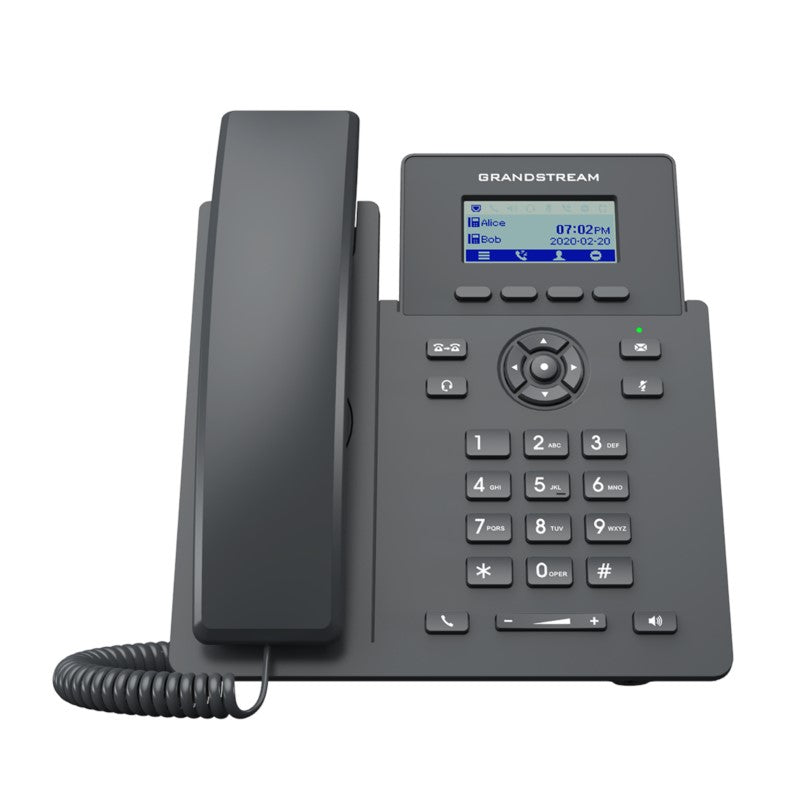
• The GRP2601 is a 2-line IP phone designed for mass deployment and easy management, featuring zero-touch provisioning. • It boasts a sleek design and next-generation features such as EHS support for Plantronics, Jabra, and Sennheiser headsets and multi-language support. • Key highlights include: + GDMS online device management and provisioning + 5-way audio conferencing for easy conference calls + Noise shield technology to minimize background noise + Electronic Hook Switch (EHS) support for Plantronics, Jabra, and Sennheiser headsets + Built-in PoE for a network connection + Enterprise-level protection including secure boot, dual firmware images and encrypted data storage • Weight: 1.87 lb • Dimensions: 9.96 × 8.13 × 2.72 in • Protocols/Standards: SIP RFC3261, TCP/IP/UDP, RTP/RTCP, RTCP-XR, HTTP/HTTPS, ARP, ICMP, DNS(A record, SRV, NAPTR), DHCP, PPPoE, SSH, TFTP, NTP, STUN, SIMPLE, LLDP, LDAP, TR069, SNMP, 802.1x, TLS, SRTP, IPv6 • Network Interfaces: Dual switched auto-sensing 10/100 Mbps Ethernet ports, integrated PoE (GRP2601P only) • Graphic Display: 132 x 48 (2.41’) LCD display • Feature Keys: 4 XML programmable context sensitive soft keys, 5 navigation, menu keys. 8 dedicated function keys for: MESSAGE(with LED indicator), TRANSFER,HEADSET, MUTE, SEND/REDIAL, SPEAKERPHONE, VOL+, VOL- • Voice Codecs and Capabilities: Support for G.729A/B, G.711µ/a-law, G.726, G.722(wide-band), G.723,iLBC, OPUS, in- band and out-of-band DTMF(in audio, RFC2833, SIP INFO), VAD, AEC, CNG, PLC, AGC, AJB • Telephony Features: Hold, transfer, forward, 5-way conference, call park, call pickup, downloadable phonebook(XML, LDAP, up to 2000 items), call waiting, call log(up to 800 records), off-hook auto dial, auto answer, click-to-dial, flexible dial plan, hot-desking, personalized music ringtones and music on hold, server redundancy and fail-over • For a full list of specifications, please refer to the product datasheet.

About This Product

The GRP2601 is a straightforward, no-frills SIP desk phone aimed at organizations that need to equip large numbers of users quickly and consistently. It’s a natural fit for open-plan offices, call centers, or hospitality environments where every desk needs a reliable voice endpoint and IT wants zero-touch provisioning and centralized management through platforms like GDMS. The phone pairs well with hosted PBX services and on-premise SIP trunks from Canadian carriers such as Bell, Rogers, or Telus, and its dual 10/100 Ethernet ports with built-in PoE (on the P model) simplify cabling in dense deployments.

A key tradeoff is the display: the 132x48 pixel LCD is monochrome and small, so this isn’t a phone for power users who need a rich interface or advanced directory browsing. Audio quality is solid for its class, with wideband G.722 and OPUS support, but the noise shield technology is a software filter, not a hardware solution – it helps in moderately noisy environments but won’t eliminate loud background chatter. The 2-line limitation means it’s underpowered for an executive who juggles multiple active calls, but it’s more than adequate for a receptionist or a shared desk where the main need is to make and receive calls reliably.

For a Toronto-based business deploying across multiple floors or branch offices, the GRP2601 is a sensible choice where cost-per-seat matters and the phone’s role is purely voice communications. It would be overkill in a home office where a single-line phone with a larger display might be preferred, and underpowered in a contact center that requires headset integration beyond basic EHS support or a high-resolution screen for CRM integration. Overall, it’s a workhorse endpoint that does its job quietly, without surprises.
Services We Provide
  • Professional Installation & Configuration
  • Ongoing Maintenance & Support
  • Troubleshooting & Repairs
  • System Upgrades & Updates



