
LINKVIL by Fanvil Portable WiFi Phone W611W

Frequently Asked Questions

First, verify the Wi‑Fi connection is active and an IP address is assigned. Then confirm that the SIP server address, extension, and password entered in the phone’s account settings exactly match the provisioning details in your 3CX management console. A simple reboot after these checks often clears transient registration blocks. If registration still fails, ensure the extension isn’t restricted by a MAC address filter in 3CX.
Confirm your wireless network supports fast roaming (802.11r) and that signal overlap between APs is adequate. On the handset, you can check the current Wi‑Fi signal strength from the status screen. If the problem persists, a site survey may reveal gaps in coverage. A Toronto‑based VoIP support provider can assist with optimizing your wireless infrastructure for voice traffic.
Check the phone’s programmable key settings to ensure the PTT function is assigned and linked to a valid target number. Verify the number includes any required line access code or prefix. After making changes, reboot the phone so the new configuration takes effect. If you are using a third‑party PTT application, ensure the server integration is enabled on the PBX side.
This usually points to packet loss or wireless congestion. Move closer to the access point as a test. Ensure your network has QoS enabled to prioritize voice traffic, and try switching the phone to a 5 GHz band to avoid interference common on 2.4 GHz. If the issue is consistent, ask your IT team to check for bandwidth‑heavy applications on the same network segment.
First, confirm the charging base is receiving power and the Type‑C connector is fully seated. Try charging directly with a standard USB‑C cable and adapter to rule out a faulty base. If the battery was deeply discharged, leave it on the charger for at least 30 minutes before attempting to power on. If the handset still shows no signs of life, contact your support provider.
A blank screen can indicate a stalled boot or incorrect provisioning. Remove the handset from the charger and reattach it to force a cold restart. If you can reach the phone’s web interface, verify the firmware version and the provisioning server URL are correct. Do not perform a factory reset without first confirming the cause; instead, contact your IT administrator or a support provider to avoid erasing a working configuration.
Yes, the W611W is a standard SIP device and typically works with any cloud PBX that supports remote SIP registration. You will need to provision the account with the server address, authentication credentials, and codec settings exactly as provided by your service vendor. Keeping the phone’s firmware up to date helps avoid compatibility quirks.
The IP67 rating addresses dust and water, but extreme cold can reduce battery life and make the screen sluggish. While the phone is rugged, sustained use below roughly -20°C is not recommended. Storing the handset inside a jacket pocket when not on a call helps keep it operational in colder months.
Download the latest firmware file from the manufacturer’s portal, then log into the phone’s web interface and upload it under the maintenance section. As a precaution, back up the configuration file from the web interface before upgrading; this gives you a recovery point. If you are uncertain about the process, a Toronto‑based VoIP support provider can handle the update remotely for you.
The clip is designed to snap on and off, so inspect both the clip’s hooks and the matching slots on the phone for wear or damage. Replacement belt clips can be ordered through the manufacturer or your reseller. If the attachment points on the phone body are damaged, a protective case may keep the handset secure.
IP Phones

LINKVIL by Fanvil Portable WiFi Phone W611W
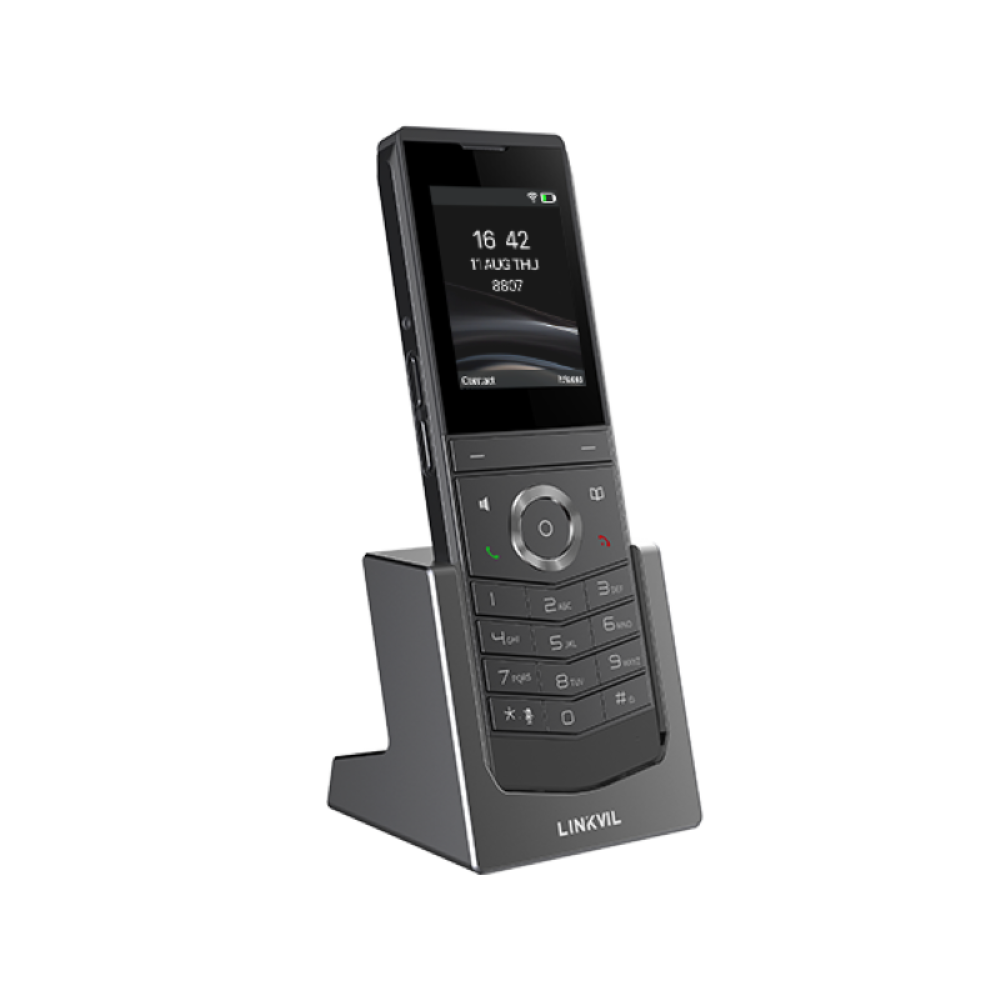
• 2.4" 240 x 320 color screen with intuitive user interface • High protection level of IP67, which is waterproof, dustproof, and drop-safe from a 1.2-meter height • Built-in dual-band Wi-Fi (2.4G/5G) and integrated 802.11 a/b/g/n/ac/ax Wi-Fi (WiFi 6) • Distance sensor support with self-adaptive light-sensing screen that turns off during calls • Configurable push-to-talk button for quick dialing • Up to 10 hours talk time and up to 200 hours of standby time • Equipped with belt clip for easy carrying and added security • Supports standard Type-C interface with included charging base • Compatible with EPYGI IP PBX systems and VoIP gateways • Compatible with 3CX software-based IP PBX for unified communications and VoIP management

About This Product

The W611W is a rugged, pocketable handset built for mobile workers who need reliable voice connectivity away from a desk. With an IP67 rating, it handles drops, dust, and water exposure, making it a natural fit for warehouses, retail floors, healthcare corridors, or outdoor service yards where consumer-grade phones would quickly fail. It connects over dual-band Wi‑Fi including Wi‑Fi 6, so it can slot into a modern wireless network as easily as any mobile device, extending your VoIP system to places where running Ethernet is impractical.

In practice, this phone pairs well with on‑premise or cloud‑hosted SIP platforms like 3CX and EPYGI. It lets a business unify mobile staff on the same directory, voicemail, and call routing as desk users. For Toronto‑area operations that span multiple floors, buildings, or outdoor zones, the W611W can give roaming workers full desk‑phone functionality in a handset that clips to a belt and survives a tumble onto concrete.

The trade‑offs are what you would expect from a purpose‑built voice device. This is not a smartphone replacement—there is no large touchscreen, no app ecosystem, and Bluetooth is absent. Battery life is ample for a shift of moderate talk, but road warriors who spend hours on calls may need to top off during the day. More critically, call quality and reliability hinge on the Wi‑Fi network; dead spots or congestion will translate directly into audio problems, so a solid wireless infrastructure with proper voice QoS is non‑negotiable.

If your deployment is a small, carpeted office where a basic cordless phone would suffice, the W611W’s ruggedization adds cost you may not need. Conversely, if you require full unified communications features like video calling, instant messaging, or desktop integration, this handset will feel underpowered. It is at its best when the primary need is durable, take‑anywhere voice service that stays on the same PBX as your desktop phones.
Services We Provide
  • Professional Installation & Configuration
  • Ongoing Maintenance & Support
  • Troubleshooting & Repairs
  • System Upgrades & Updates



