
Snom D120 2 SIP-line VoIP Phone

Frequently Asked Questions

Confirm that the Ethernet cable is plugged into the phone's network port and a PoE-capable port on the switch, and that the switch has PoE enabled with enough power budget. Try a different cable and port, and test with another PoE device to rule out a switch issue. A Toronto-based VoIP support provider can usually diagnose this remotely if the problem persists.
Check the phone's status screen for a green registered indicator. Verify the SIP server address, username, and password in the account settings. Reboot both the phone and your network router; if registration still fails, contact your VoIP provider to confirm the credentials are active and the line is provisioned.
This often points to a firewall or NAT traversal problem. On your router, temporarily disable SIP ALG and ensure the phone is using a standard codec like G.711. Test with a call between two extensions on the same local network to see if the issue is specific to external calls.
Look for network congestion: run a ping test to your SIP server to check for packet loss or high latency. Make sure the phone's firmware is up to date and reboot your modem and router. If drops continue, a Toronto-based VoIP support provider can run a network diagnostics check remotely.
If you're using PoE, verify the switch port provides sufficient power. If you're using a power adapter (sold separately), confirm it's plugged in and the outlet works. From the phone's web interface, check that the contrast and brightness settings are not set too low; if you can't access the interface, try a different power source.
First check for any debris or misaligned label overlays around the keys. Reboot the phone to clear any temporary software glitch. If the problem persists after a restart, the keypad mechanism may need attention—contact support for further guidance without attempting a factory reset yourself.
Access the phone's web interface or on-screen menu, go to the identity/account settings, and assign a second SIP identity with the credentials from your provider. Make sure the identity is enabled and, if you want a dedicated line key, bind it in the function key settings. Save and reboot to apply.
Yes, the phone has 10 built-in ringtones. You can select a different one for each identity through the audio settings in the phone's menu or web interface. Some firmware versions also allow uploading custom ringtones via the web configuration.
A dedicated RJ-9 headset port is typically included on the handset or base for wired headsets. Connect a compatible headset, then go to audio settings on the phone to route calls to the headset instead of the handset or speaker. Check your unit for the exact port location.
The phone supports both PoE (802.3af) and an external power adapter, which is sold separately. If your network switch doesn't provide PoE, you'll need to purchase the approved adapter. Using an incompatible power supply can damage the unit, so stick with the official accessory.
IP Phones

Snom D120 2 SIP-line VoIP Phone
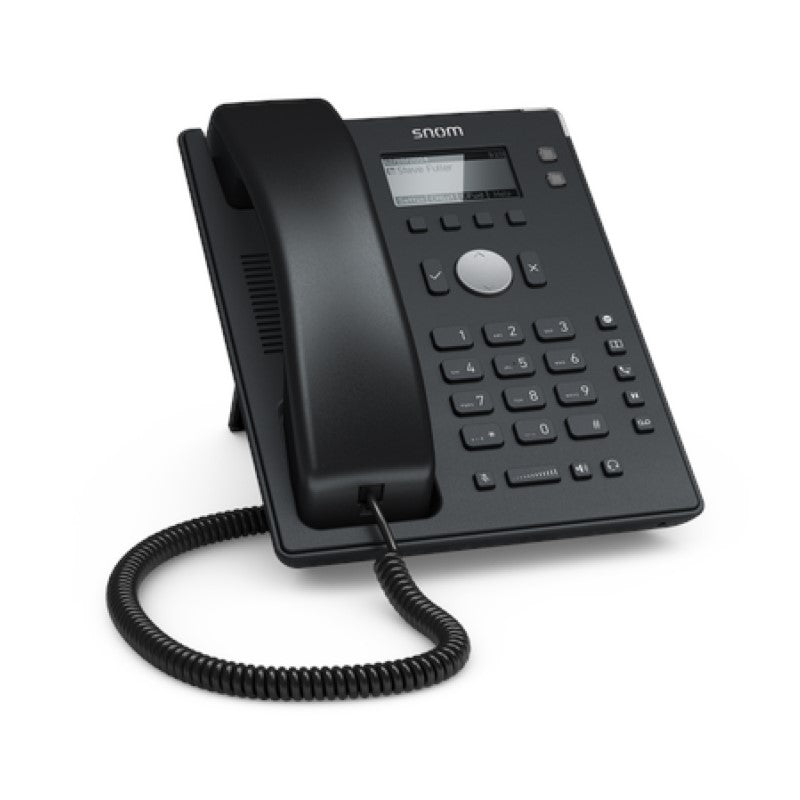
• The snom D120 desk phone offers a higher level of functionality and adaptability at an affordable entry-level price point, thanks to its two SIP lines. A black and white backlit graphical display provides clear overview of call and function key information. • Key features include: • 2 SIP identities • Low power consumption (PoE) • Backlit graphical display • 360-degree call/message indicator • 4 context sensitive function keys + 5 function keys • The phone is priced affordably, reducing running costs. It also comes with a built-in Comfort Noise Generator and Voice Activity Detection for improved communication. • Weight: 1.8 lb • Dimensions: 10 × 9 × 3 in • Phone Type: Desk • Technical specifications: • Audio codecs: G.711 A-law, μ-law, G.722 (wideband), G.726, G.729AB, GSM 6.10 (FR) • 10 built-in assignable ringtones • Comfort Noise Generator (CNG) • Voice Activity Detection (VAD) • Note: Power Supply is sold separately.

About This Product

The Snom D120 is a straightforward, two-line SIP desk phone built for small businesses, home offices, and front-of-house roles where essential communication features matter more than advanced call handling. Its entry-level price and low power consumption make it a sensible pick for cost-conscious deployments, particularly in Canadian settings where simple, reliable hardware fits into cloud-hosted VoIP plans without adding unnecessary complexity.

With a backlit graphical display and a 360-degree call indicator, the phone keeps users informed at a glance. The built-in comfort noise generator and voice activity detection help maintain clearer conversations, even in busy environments. For a basic usage pattern—answering and making calls on one or two lines—it performs capably without overwhelming the user with options.

The trade-off is its limited scale: only two SIP identities and a modest set of programmable keys means it isn’t intended for a heavy receptionist or executive handling multiple simultaneous calls. If your workflow rarely moves beyond a primary line and an occasional second identity, the D120 is well suited; but growing offices that anticipate adding more lines per desk might outgrow it. PoE support is a plus for clean desk setups, but buyers should note the power supply is sold separately when a PoE switch isn’t available. In a GTA office environment where cloud VoIP is common, these constraints are usually minor, and the phone’s straightforward setup makes it easy for a Toronto-based provider to configure remotely.
Services We Provide
  • Professional Installation & Configuration
  • Ongoing Maintenance & Support
  • Troubleshooting & Repairs
  • System Upgrades & Updates



