
Snom D140 Entry-Level SIP Desk Phone

Frequently Asked Questions

First, confirm that the network cable is securely connected and that the phone has obtained an IP address (check via the phone's settings menu). Then verify that the SIP server address, username, and password entered in the phone's account settings exactly match what your provider gave you. If the issue persists, a Toronto-based VoIP support provider can usually resolve this remotely.
Ensure that the Ethernet cable is plugged into a PoE-enabled switch or that a power supply (sold separately) is connected to the phone. Try a different Ethernet cable and a different switch port to rule out a faulty cable or port. If still no power, test the power source with another device.
Connect the phone to your network using the included Ethernet cable. If your network supports PoE, the phone will power on automatically; otherwise, connect a power supply. Once booted, follow the on-screen prompts or access the web interface to enter your SIP account details provided by your VoIP service.
Check that the handset cord is fully inserted into both the phone and the handset. If using a headset, ensure it is properly connected and selected as the audio device. Also confirm that the volume is turned up using the side buttons during a call.
Yes, the Snom D140 is a standard SIP phone and should work with any SIP-based VoIP provider, including Canadian carriers that offer SIP trunking or hosted PBX services. You will need to enter the provider's server settings and your account credentials in the phone's configuration.
First, inspect the Ethernet cable for damage and try a different cable. If the phone is connected through a switch, verify that the switch port is not faulty by testing another device on the same port. Unstable power (if using a power supply) or a weak PoE source can also cause intermittent drops.
Log into the phone's web interface via a browser on the same network. Navigate to the maintenance or firmware update section and either point the phone to a TFTP/HTTP server where your provider hosts the firmware or upload the file manually. Always follow your provider's recommended firmware version.
This usually indicates that the phone cannot register with the SIP server. Double-check your account settings, especially the server address and authentication credentials. Also ensure that your internet connection is active and that no firewall is blocking SIP traffic (commonly port 5060).
Yes, the Snom D140 supports wall mounting. You will need to use the included footstand in a specific orientation or purchase a separate wall mount bracket. The manual provides instructions for securing the phone to a wall plate.
This can be caused by network instability or a SIP NAT issue. First, check that your router is not timing out idle connections; increasing the SIP registration refresh interval in the phone's settings may help. Also ensure that the phone's network settings (e.g., STUN server) are correctly configured for your environment.
IP Phones

Snom D140 Entry-Level SIP Desk Phone
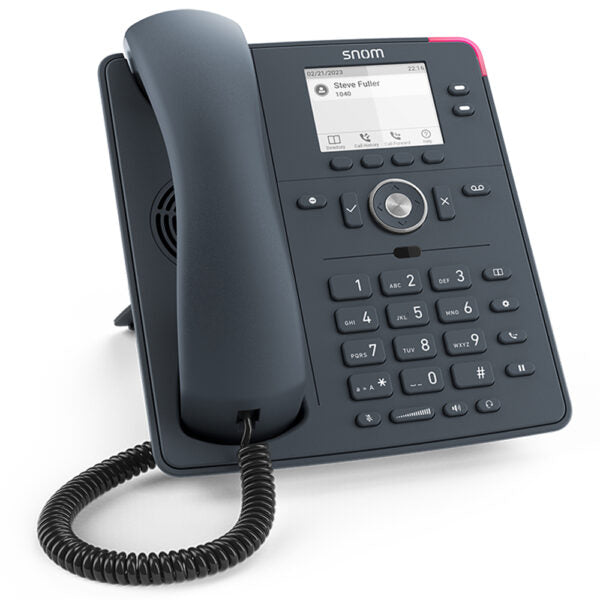
• Suitable for work environments requiring cost-effective yet high-quality communication, the Snom D140 features slate grey housing and telephony functions. • Key features include: • 2 freely programmable SmartLabel keys • 6 dedicated function keys • Context-sensitive function keys for intuitive operation • Low power consumption (PoE Class 1) • Colour: slate gray • SIP identities: 2 • IPv6 & IPv4 support • HD audio • Headset connectable • On-screen smart labels • Security (TLS & SRTP) Note: Power Supply is sold separately. • Weight: 3 lb • Dimensions: 10 × 11 × 5 in • Phone Type: Desk • Technical Specifications: • Model: D140 • APN: 80-S188-00 • Box Contents: IP desk phone, footstand, corded receiver, Ethernet cable, quick installation guide, GNU General public license • Operating system: Linux • Placement: indoor, desktop, wall mounting • Display & Indicators: • TFT LCD display with grayscale backlight • Size (diagonal): 2.8″ (67 mm) • Resolution: 320 × 240 pixel • 3 LED indicators for call status and function key status indication Keypad and Function Keys: • 36 hard keys in total • 12 standard ITU telephone keypad keys • 4 context-sensitive function keys • 5-way navigation key • 2 SmartLabel keys with multicolour LED • 6 dedicated function keys • Keyboard lock

About This Product

The Snom D140 is an entry-level SIP desk phone designed for cost-conscious work environments where reliable, high-quality voice communication is essential but advanced features are not required. It fits well in small offices, reception desks, or shared workspaces where the primary need is straightforward call handling with good audio clarity. The phone pairs naturally with hosted VoIP services common among Canadian small businesses, and its low power consumption (PoE Class 1) makes it easy to deploy over existing network infrastructure without worrying about electrical capacity. A practical tradeoff is the limited two SIP identities, meaning it supports only two lines—adequate for a single user or light call volume, but underpowered for a busy receptionist or power user juggling multiple calls. Conversely, it may be overkill for a simple intercom setup where a basic analog phone would suffice. Buyers should note that a power supply is sold separately, so if PoE is not available on the network switch, an additional purchase is required. For Toronto GTA deployments, this phone integrates well with most Canadian SIP providers and can be wall-mounted to save desk space.
Services We Provide
  • Professional Installation & Configuration
  • Ongoing Maintenance & Support
  • Troubleshooting & Repairs
  • System Upgrades & Updates



