
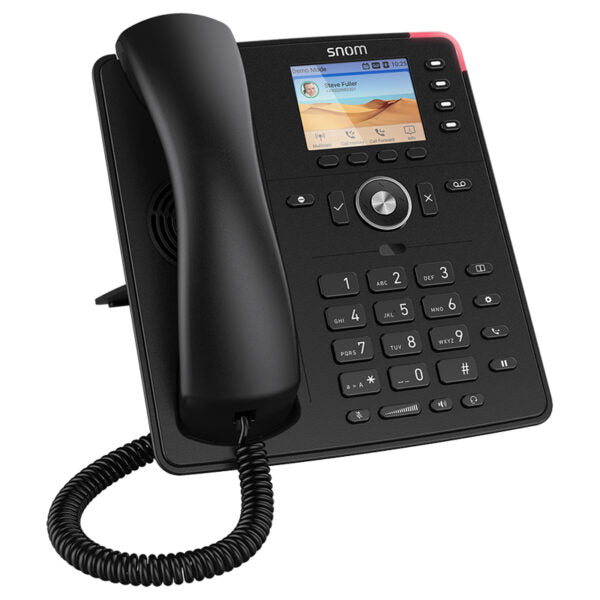
Snom D713 IP Phone

Frequently Asked Questions

First, verify that the Ethernet cable is plugged into the port marked ‘NET’ (not ‘PC’) and that the switch port is delivering PoE (Power over Ethernet). Many office switches require PoE to be enabled per port. Try a different cable and port, and if the phone still doesn’t power up, test the switch with another PoE device to rule out a power budget issue.
Start by checking that the SIP server address, username, and password in the phone’s web interface under the Identity/Account settings exactly match the credentials from your provider. Also confirm that the phone’s firmware is current and that your network firewall isn’t blocking SIP or RTP traffic. If the account was recently created, wait a few minutes and try rebooting the phone.
This one-way audio problem is often caused by network address translation (NAT) or a missing RTP stream. First, on the phone’s web interface under the identity, ensure that ‘NAT traversal’ is enabled (usually set to ‘Auto’ or ‘STUN’). If your firewall has SIP ALG, try disabling it temporarily to see if audio flows in both directions.
Dropped calls are frequently caused by UDP session timeouts on the router or firewall. Check that the SIP registration interval is set to a value shorter than the firewall’s NAT table timeout (often 60 or 120 seconds). Also verify that the phone’s firmware is up to date and that your internet connection is stable, as brief WAN outages will tear down active calls.
First, give the phone up to 15 minutes to finish any background post-update processes. If it remains stuck, power-cycle it once while holding down the ‘*’ key (or according to the Snom recovery procedure) to see if it boots normally. Do not immediately perform a factory reset, as that will erase configuration. If the phone still won’t boot, contact your support team – a Toronto-based VoIP support provider can often resolve this remotely without data loss.
The SmartLabel feature relies on the provisioning server to send the key labels. Check the web interface under ‘Function Keys’ to ensure each key is assigned a type and that the provisioning URL is reachable. You can manually enter labels as a temporary fix, but for a permanent solution verify that the auto-provisioning template from your provider includes the correct display tags.
Yes. The D713 supports EHS (Electronic Hook Switch) via its USB port and a compatible EHS adapter cable for headsets from brands like Jabra or Plantronics. Once the headset base is connected with the EHS cable, you can answer and end calls directly from the headset’s button. Note that the phone does not have built-in Bluetooth for headsets.
The D713 supports up to six SIP identities (accounts), so you can configure multiple extensions on the same device. Each identity can have its own ring tone, dial plan, and can be assigned to a line key. In the web interface, simply add a second identity with the credentials from your VoIP provider and then map it to a function key for one-touch line access.
IP Phones

Snom D713 IP Phone

• The D713 is a cost-effective entry device into the professional world of VoIP telephony, featuring a distinctly designed black unit that fits seamlessly into any work environment. It combines the latest technology with exceptional voice quality at an unbeatable price. Key features: • High-resolution 2.8″ TFT display • 4 self-labelling function keys with flexible labelling solution SmartLabel • HD audio speakerphone • Gigabit Ethernet switch with PoE support • Wireless headset connection via EHS • IPv6 and IPv4 compatibility Additional Information: Weight: 2.4 lb Dimensions: 8.5 × 10.25 × 4.25 in Technical Specifications: Display and indicators: – 320 x 240 widescreen TFT liquid crystal display (LCD) – 5 LED indicators, including 1 red LED for call status indication and 4 multicolor LEDs for function key indication Directory support and call features: – Up to 6 simultaneous calls – 6 SIP identities / accounts Network connection: – 2-port Gigabit Ethernet switch (RJ45) with PoE support Headset support: – 4P4C connector, USB support for Snom EHS Advanced Package contents: – Desk phone unit – Footstand – Corded receiver – 1.5 m (5 ft) Ethernet cable – Quick Installation Guide (QIG) – GNU General Public License

About This Product

The Snom D713 sits squarely in the entry-level tier of SIP desk phones, built for a single person who needs reliable voice without complexity. It fits well on the desk of a knowledge worker, in a small retail counter, or in a co-working space where basic call handling and clear audio are the priority. For Canadian businesses deploying a hosted VoIP service, the D713 offers a straightforward, zero-fuss endpoint that integrates easily into existing network infrastructure, especially with its Gigabit pass-through port that won’t bottleneck a desktop PC.

The phone pairs naturally with any standards-based SIP platform, from on-premise PBXs to cloud services commonly used across the GTA. Its EHS support enables a cordless workflow through compatible wireless headsets, a practical feature for staff who move around while on calls. However, it lacks built-in Bluetooth, so wire-free options are limited to EHS-capable accessories. The four self-labelling function keys are enough for speed dials or basic presence, but a power user who manages many lines or advanced call flows will find the 2.8-inch display and limited button count constraining. The device delivers exactly what is promised at its price point, with no touchscreen, no sidecar expansion, and no onboard video or advanced applications.

If your deployment is a call center or an executive’s office where a large directory, visual call park, or dozens of programmable keys are needed, this phone is underpowered. On the other hand, for a simple ATA replacement where you only need an analog line, the D713 is overkill. It shines as the everyday tool for a typical business user who wants HD audio, straightforward provisioning, and a reliable end point that can be managed remotely with minimal support overhead.
Services We Provide
  • Professional Installation & Configuration
  • Ongoing Maintenance & Support
  • Troubleshooting & Repairs
  • System Upgrades & Updates



