
SNOM D785 Advanced Desk Telephone

Frequently Asked Questions

First, double-check that the SIP credentials (username, password, and registrar server) are entered exactly as provided by your provider—spelling and case can matter. Then verify that your network allows outbound SIP traffic on ports 5060/5061 and that your phone has obtained a valid IP address. If the issue persists, contact your VoIP provider to confirm your account is active and not blocked.
If you're using PoE, ensure your switch or injector is PoE-capable (IEEE 802.3af, Class 3) and that the Ethernet cable is securely connected. If using the power adapter (sold separately), confirm the adapter is the correct voltage (5V DC) and that the outlet works. A simple cable reseat or plugging into a different PoE port often resolves the issue.
Check that your network connection is stable—try a wired Ethernet connection rather than WiFi, as radio interference can cause audio drops. On the phone, reduce the volume a bit and ensure the handset or headset is positioned correctly. Also, ask the other party if they hear echo; it may be on their side. If the problem persists, try a different headset or the built-in speakerphone to isolate the source.
Press the Bluetooth button on the phone (the icon with a 'B') and select 'Pair new device.' Put your headset into pairing mode, then select it from the phone's list. Once paired, you can switch between handset, speakerphone, and headset during calls. If pairing fails, move the headset closer and ensure it is not already connected to another device.
Verify that the BLF keys are correctly configured in your phone's web interface under 'Function Keys' and that the associated SIP accounts are registered. Also, ensure your IP PBX is sending Presence and BLF notifications. Sometimes re-provisioning the phone or restarting the PBX service can refresh the status.
Yes, the phone works behind virtually any standard router. For best results, place the phone on a wired connection to your router/switch rather than Wi-Fi. If you experience one-way audio, check that your router's SIP ALG is disabled—many Canadian ISP-provided routers have this enabled by default and it can cause issues.
Make sure the expansion module is properly attached to the D785 via the proprietary connector on the left side, and that both units are powered on. If the module still isn't detected, go to the phone's settings menu and look for 'Expansion Module' options; sometimes a reboot after connecting the module is needed. Check that both devices have the latest firmware.
During an active call, press the 'Transfer' soft key. You'll hear a dial tone; then dial the target extension. Once you hear it ringing, you can either press 'Transfer' again for a blind transfer or wait for the party to answer and then announce the call before pressing 'Transfer' for a supervised transfer.
First, adjust the brightness from the phone's settings menu under 'Display' or 'Screen.' If it's flickering, reseat the Ethernet cable to rule out power instability (PoE fluctuations can affect the screen). If the issue continues, try a different PoE port or use the AC adapter to see if power supply is the cause.
Check that the Ethernet cable is not damaged and is firmly plugged into both the phone and the switch. If using PoE, power drops can cause disconnects; try the included power adapter (sold separately) to see if the network becomes stable. Also, ensure your network equipment isn't dropping packets due to congestion—connecting the phone directly to the main router can help isolate the issue.
IP Phones

SNOM D785 Advanced Desk Telephone
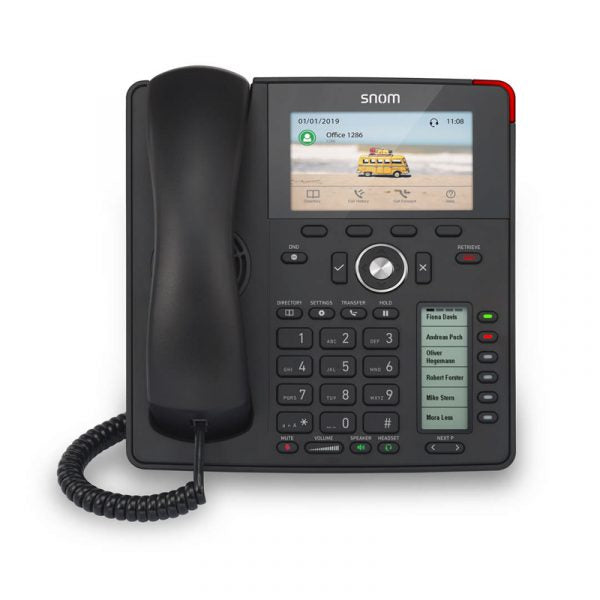
The Snom D785 is an advanced IP phone featuring a large high-resolution colour display, convenient second screen for dynamic contact management, and integrated Bluetooth. With its Digital Signal Processor (DSP), it provides unprecedented HD audio quality. Based on 20 years of experience in audio engineering, Snom provides the best sound quality for every application. Key Features: • High-resolution 4.3″ TFT-colour display • Dedicated displays for extension monitoring • Up to 24 BLF keys (6 physical) • Improved graphical user interface • Dual-angle footstand: 46° and 28° • Wall mountable • Wideband hands-free talking • Digital Signal Processor (DSP) enhanced audio quality • 2-port 1-Gigabit Ethernet switch (RJ45) IEEE 802.3 • Power over Ethernet IEEEaf, Class 3 • USB headset ready • D7 Expansion Module ready • Support for USB WiFi stick • Electronic Hook Switch (EHS) support for wireless headsets • Built-in Bluetooth compatibility Note: Power Supply is sold separately. Additional Information: • Weight: 2.6 lb • Dimensions: 5 × 9 × 11 in • Phone Type: Desk Technical Specifications: • 12 SIP identities / accounts • XML browser • Call lists for dialed, received, missed calls • Local directory with 1000 entries • Multiple language support • DTMF in-band / out-of-band / SIP-INFO • Interoperable with all major IP PBX platforms For a full list of specifications, please refer to the product datasheet.

About This Product

The Snom D785 is designed for professionals who rely on their desk phone as a central communications tool. With its large colour display and support for up to 24 BLF keys (6 physical, the rest programmable), it works well in environments where monitoring multiple extensions or lines is essential—think reception areas, busy sales desks, or executive offices. The integrated Bluetooth and USB headset support make it easy to pair with modern wireless headsets, while the DSP-enhanced audio ensures clear calls even in noisy open-plan spaces.

This phone pairs naturally with hosted VoIP services offered by Canadian carriers like Rogers Business, Bell, or independent providers, and integrates smoothly with popular IP PBX systems such as 3CX, FreePBX, or SBCs common in GTA offices. Its two-port Gigabit switch allows daisy-chaining a computer without sacrificing network speed, a practical benefit for crowded workstations. Note that the power supply is sold separately; if Power over Ethernet (PoE) isn't available in your setup, factor in the cost of an AC adapter.

A key tradeoff to weigh is the phone's depth of features. While the D785 offers extensive programmability and expansion via the D7 module, it is overkill for a user who only needs basic call handling. Conversely, if you are running a small office with limited PoE, the extra expense of this model may not be justified. It hits a sweet spot for power users who want a robust, future-ready device without stepping into executive-level price territory.
Services We Provide
  • Professional Installation & Configuration
  • Ongoing Maintenance & Support
  • Troubleshooting & Repairs
  • System Upgrades & Updates



