
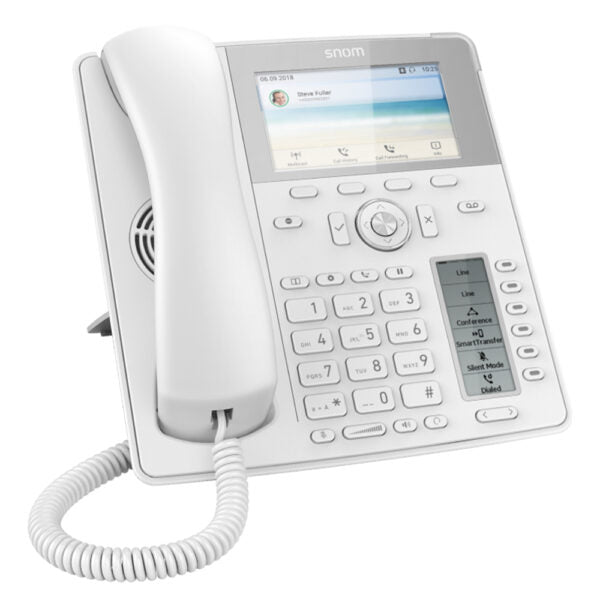
Snom D785 White

Frequently Asked Questions

First check that the Ethernet cable is firmly connected at both ends and that the switch port provides PoE (the phone should power on). From the phone’s menu, confirm it has received a valid IP address on your network. Then review the SIP account settings—server address, username, and password—in the web interface or on-screen menu; a single typo will block registration. If the issue persists, a Toronto-based VoIP support provider can usually resolve this remotely.
Make sure the mute key is not active (the mute LED should be off) and increase the volume using the dedicated key. Verify that the handset, speakerphone, or headset you are using is properly connected. Also confirm that your firewall or network settings aren’t blocking RTP traffic; a quick test with a different phone on the same network can help isolate the problem.
Ensure the switch is supplying sufficient PoE (802.3af/at) and try a different network cable and port. If you’re using an external power adapter, check that it’s securely connected and that the adapter is functional. A blank screen after a known working setup could indicate a hardware fault; in that case, contact your support team for further inspection before attempting any reset.
Put the headset in pairing mode and verify that Bluetooth is enabled on the phone (check the settings menu). Remove any old pairings from the phone’s Bluetooth device list, then restart both the phone and headset. If pairing still fails, confirm that your headset supports standard hands-free profile and is not already connected to another device.
Open the phone’s web interface and double-check that each BLF key is configured with the correct extension number and SIP server. Ensure the PBX supports the BLF subscription type the phone uses (usually dialog-info). Sometimes applying the config and then rebooting the phone resolves state display issues without losing any settings.
Swap the Ethernet cable and try a different port on the switch to rule out physical issues. Verify the switch port isn’t overloaded or set to a power budget below the phone’s requirement. If you’re using VLAN tagging, re-check that the voice VLAN ID is correct in the phone’s network settings.
You can add up to 12 accounts: log into the phone’s web interface, go to the ‘Identity’ section, and select a free identity slot. Enter the SIP credentials (username, authentication name, password) and the registrar server address provided by your VoIP carrier. After saving, you can assign this identity to a line key so it appears on the screen for easy selection.
Yes, the D785 supports USB headsets. Simply plug the headset into the USB port on the back; the phone should detect it automatically. If you don’t hear audio, go to the audio settings and make sure the USB headset is selected as the default device. Check the headset’s compatibility list for Snom phones if recognition remains a problem.
Snom offers dedicated expansion modules, such as the D7C, that connect through the phone’s expansion port. Once connected, the additional keys appear in the web interface where you can program them just like the main BLF keys. This lets you build a larger attendant console without replacing the phone.
Download the latest firmware file from the official Snom support site for your exact model. In the phone’s web interface, go to the firmware update section, choose the file, and start the process. Do not interrupt power during the update; once complete, the phone will restart automatically. Only perform an update if you have a specific reason—don’t downgrade unless a technician advises it after confirming the cause of a problem.
IP Phones

Snom D785 White

The Snom D785 is a high-performance IP phone designed to meet the most demanding requirements. With its large, high-resolution colour display and convenient second screen for dynamic contact management, this phone features integrated Bluetooth and an integrated Digital Signal Processor (DSP) for unprecedented HD audio quality. • High-resolution 4.3 Zoll TFT colour display • 24 freely programmable function keys / BLF keys (6 physical) • Integrated Bluetooth (except D785N) • USB headset compatible • Power over Ethernet • IPv6 & IPv4 • Gigabit Ethernet • Expansion module connectable • Headset connectable • Self-labeling keys • Security features including TLS and SRTP • OpenVPN connectivity Additional Information: • Weight: 2.6 lb • Dimensions: 5 × 9 × 11 in • Phone Type: Desk Technical Specifications: • Model: Snom D785 White • Part number: 80-S006-01 Features: • 12 SIP identities / accounts • XML browser • Call lists for dialed, received, missed calls • Local directory with 1000 entries • Multiple language support • DTMF in-band / out-of-band / SIP-INFO • Interoperable with all major IP PBX platforms User Interface: • Localization (language, time, dial tone) • Red LED for call indication / message waiting • Context-sensitive keys • Programmable line / function keys with multicolor LEDs • Dedicated keys for Message, DND, Directory, Menu, Transfer, Hold, Page switch • Audio keys with LED indication: Mute, Speakerphone, Headset • Volume key • 5-way navigation key • OK and Cancel keys • Menu-driven user interface

About This Product

The Snom D785 is built for busy professionals who juggle multiple calls and need clear visual management. Its large colour display and secondary screen for contacts make it a natural fit for receptionists, executive assistants, or anyone who relies on presence monitoring and fast call routing. With 12 SIP accounts and 24 programmable BLF keys, it can serve as a compact attendant console without necessarily requiring an expansion module.

It pairs well with Snom’s expansion modules when you need even more keys, creating a scalable desk solution. The integrated Bluetooth and USB headset support give you flexibility in how you take calls, though it remains a desk-bound device – not a cordless option for roaming workers. For a standard single-line user or occasional caller, this phone would be overkill; it shines in roles where visual call management and multi-line handling are central.

In a practical deployment, PoE and gigabit Ethernet simplify both installation and network performance. Built-in TLS, SRTP, and OpenVPN support means it can slot into security-conscious environments without extra hardware. The white finish can blend into contemporary office spaces, though it may show wear more visibly over time than darker models. It’s a polished choice for professional front-desk or supervisory positions, but for a high-volume call centre agent who primarily uses a headset, a more headset-centric model might be a better fit.

From a Canadian business perspective, the D785’s broad interoperability with major IP PBX platforms means it works seamlessly with most hosted VoIP services and on-premise systems used across the country. As long as your provider supports standard SIP, this phone will integrate without surprises, making it a dependable option for GTA offices upgrading their communication endpoints.
Services We Provide
  • Professional Installation & Configuration
  • Ongoing Maintenance & Support
  • Troubleshooting & Repairs
  • System Upgrades & Updates



