
Snom D787 SIP Phone
AIM Telecom provides troubleshooting and configuration support for this product to businesses across Toronto and the GTA. Contact us to confirm whether the issue can be handled by phone or requires on-site service.
Get Support Call 416-312-4819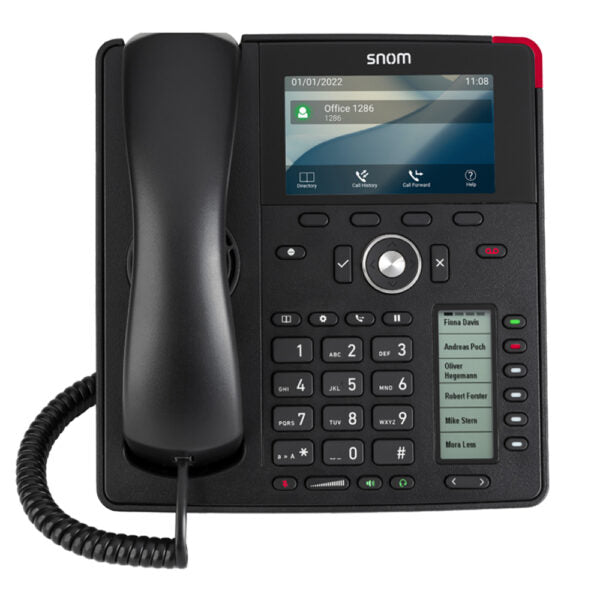
Common issues and fixes
Reviewed troubleshooting steps are not yet available for this model.
Ask AIM Telecom about this productAbout this product
• Snom D787 Desk Phone with 12 SIP accounts, 4.3” color LCD display, and 6 configurable self-labeling multicolor LED keys.
• Key features:
• Elegant design
• WLAN connectivity
• Electronic Hook Switch (EHS) support for wireless headsets
• 2-port Gigabit Ethernet switch
• D7 or D7C Expansion Module ready
• 3-year standard warranty
• Additional information:
• Weight: 3 lb
• Dimensions: 10 × 10 × 5 in
• Phone Type: Desk
• Technical specifications:
• Model: D787
• APN: 80-S179-00
• Part number: 00004621
• Box Contents: Phone unit, foot stand, handset with cord, Ethernet cable, Quick Start Guide
• Color: Black
• Warranty: 3 years
• Key phone features:
• 12 SIP identities / accounts
• XML browser
• Call lists for dialed, received, missed calls
• Local directory with 1000 entries
• Multiple language support
• Speed dialing
• URL dialing
• Local dial plan
• Automatic redial on busy
• Call completion (busy / unreachable)
• Caller identification
• Call waiting
• Call blocking (deny list)
• Auto answer
• Hold
• Music on hold
• Handling of up to 4 simultaneous calls
• Blind and attended transfer
• Call forwarding
• 3-way conferencing on the phone
• Extension monitoring, call pickup
• Call park, call unpark
• Multicast paging
• DND mode (do not disturb)
• Keyboard lock
• Client matter code (CMC)
• Key features:
• Elegant design
• WLAN connectivity
• Electronic Hook Switch (EHS) support for wireless headsets
• 2-port Gigabit Ethernet switch
• D7 or D7C Expansion Module ready
• 3-year standard warranty
• Additional information:
• Weight: 3 lb
• Dimensions: 10 × 10 × 5 in
• Phone Type: Desk
• Technical specifications:
• Model: D787
• APN: 80-S179-00
• Part number: 00004621
• Box Contents: Phone unit, foot stand, handset with cord, Ethernet cable, Quick Start Guide
• Color: Black
• Warranty: 3 years
• Key phone features:
• 12 SIP identities / accounts
• XML browser
• Call lists for dialed, received, missed calls
• Local directory with 1000 entries
• Multiple language support
• Speed dialing
• URL dialing
• Local dial plan
• Automatic redial on busy
• Call completion (busy / unreachable)
• Caller identification
• Call waiting
• Call blocking (deny list)
• Auto answer
• Hold
• Music on hold
• Handling of up to 4 simultaneous calls
• Blind and attended transfer
• Call forwarding
• 3-way conferencing on the phone
• Extension monitoring, call pickup
• Call park, call unpark
• Multicast paging
• DND mode (do not disturb)
• Keyboard lock
• Client matter code (CMC)
More product details
The Snom D787 is a desk phone built for users who manage multiple call lines and require flexible connectivity. It suits office environments where a single handset must handle many identities—think executive assistants, call centre agents, or reception desks. With support for 12 SIP accounts and a colour display, it consolidates communication into one device without the need for multiple physical phones. The inclusion of WLAN connectivity means the phone can be placed where Ethernet cabling is inconvenient, though real-world performance will depend on local Wi-Fi conditions and may require a separate accessory.
Businesses in the Greater Toronto Area considering this model will appreciate its expansion module compatibility. Pairing a D7 or D7C sidecar transforms the phone into a receptionist console with additional programmable keys, making it a natural fit for busy front-office positions. Electronic Hook Switch support also simplifies cable management when using wireless headsets—a common choice in modern Canadian offices.
That flexibility comes with considerations. The integrated two-port Gigabit switch is suitable for pass-through to a desktop PC, but the phone itself will draw power via Power over Ethernet—be sure your switch or injector provides enough. For simple, single-line users, the D787 is overkill; a more basic model would be more cost-effective. Conversely, environments that need pure analog failover or high-density wireless performance may find it underpowered without careful network design.
Overall, the D787 sits in the mid-to-high tier of Snom’s lineup, offering a balance of line capacity and modern conveniences. It is best deployed where the number of accounts justifies the price and where users will actually benefit from the screen and customizable keys, rather than as a default station for occasional callers.
Businesses in the Greater Toronto Area considering this model will appreciate its expansion module compatibility. Pairing a D7 or D7C sidecar transforms the phone into a receptionist console with additional programmable keys, making it a natural fit for busy front-office positions. Electronic Hook Switch support also simplifies cable management when using wireless headsets—a common choice in modern Canadian offices.
That flexibility comes with considerations. The integrated two-port Gigabit switch is suitable for pass-through to a desktop PC, but the phone itself will draw power via Power over Ethernet—be sure your switch or injector provides enough. For simple, single-line users, the D787 is overkill; a more basic model would be more cost-effective. Conversely, environments that need pure analog failover or high-density wireless performance may find it underpowered without careful network design.
Overall, the D787 sits in the mid-to-high tier of Snom’s lineup, offering a balance of line capacity and modern conveniences. It is best deployed where the number of accounts justifies the price and where users will actually benefit from the screen and customizable keys, rather than as a default station for occasional callers.