
Snom D812 Desk Phone

Frequently Asked Questions

Start by confirming that the phone has a valid IP address—press the Settings key and look under Network Status. If it shows 0.0.0.0, check your Ethernet cable and ensure the switch port is active. Next, verify that your SIP credentials (username, password, and server address) are entered correctly under Account settings. If the issue persists, a Toronto-based VoIP support provider can usually resolve this remotely.
First, make sure you're using a PoE switch or injector that provides at least 802.3af power. If you're using the included power adapter, check that it's plugged into a working outlet. Try a different Ethernet cable—damaged cables can prevent PoE from reaching the phone. If the phone still doesn't power up, the issue may be with the switch port or the phone itself.
The D812 supports Electronic Hook Switch (EHS) for compatible DECT wireless headsets. You'll need a headset base station that has an EHS cable—connect that cable to the headset port on the phone (the RJ9 jack near the handset). Then in the phone's settings, enable EHS mode under Audio > Headset. Pair the headset to its base station following the headset's instructions.
Make sure the handset or headset isn't muted—look for a mute icon on the screen. If you're using the handset, check that the handset cord is fully inserted into both the phone and the handset. If you're on speakerphone, try switching to the handset to isolate the issue. If the problem continues, test with a different handset or headset to rule out a hardware fault.
Intermittent call drops are often network-related. Check if the phone's Ethernet cable is securely connected and not near sources of electrical interference. Also verify that your router or switch isn't experiencing packet loss—try pinging the phone's IP address from a computer during a call. If the ping shows high latency or loss, the issue is likely in your local network.
Most PBX systems support automatic provisioning via a configuration URL. In the phone's web interface (access it via the phone's IP address in a browser), go to Management > Auto Provisioning and enter the provisioning server URL provided by your PBX. The phone will then download settings on reboot. For manual setup, you can enter SIP account details directly under the Account menu.
The multicolour LED keys are configurable per account or function. In the phone's web interface, go to Function Keys and check the colour setting for each key. Make sure the key is assigned to an active line or feature. If the LED still behaves oddly, try a factory reset of the phone's settings (not the firmware) after backing up your config, but only if you're certain the cause isn't a simple misconfiguration.
Yes, the USB port on the back of the D812 can be used to charge a smartphone or other USB device. It provides standard charging current, so it's fine for topping up during the workday. Note that the USB port does not support data transfer or USB headset connections.
After a power outage, the phone may need to re-register with your PBX. First, check that the network is back up—try pinging the phone's IP from a computer. Then navigate to Settings > Accounts and see if the registration status shows 'Registered.' If not, press the 'Register' button manually or reboot the phone. If the problem persists, your PBX may need time to restart or you may need to contact your VoIP provider.
The D8C expansion module connects to the D812 via the dedicated expansion port on the phone's right side. Simply plug the module in and secure it with the included bracket. The phone will automatically detect it and add extra programmable keys. You can then configure those keys in the phone's web interface under Function Keys—each key can be assigned to a line, speed dial, or BLF.
IP Phones

Snom D812 Desk Phone
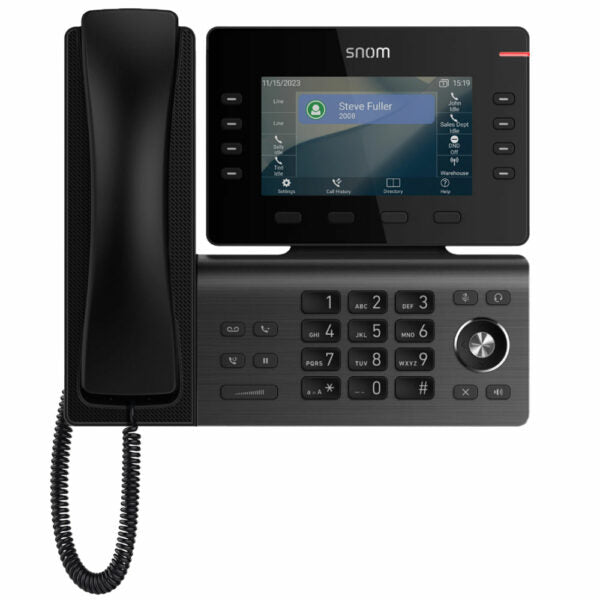
• The Snom D812 Desk Phone features a 5” color LCD, 8 configurable self-labeling multicolor LED keys, and a USB port for connectivity. The phone also boasts an elegant design with Electronic Hook Switch (EHS) support for wireless headsets. • Additional key features include: • A 2-port Gigabit Ethernet switch (RJ45) • D8C Expansion Module1 ready • Elegant design • Electronic Hook Switch (EHS) support for wireless headsets • 3-year standard warranty • The phone has the following technical specifications: • Model: D812 • APN: 80-S211-00 • Box contents include a phone unit, foot stand, handset with cord, Ethernet cable, and Quick Start Guide. • Weight: 3 lb • Dimensions: 11 × 3.5 × 9 in • Phone Type: Desk • The phone supports the following features: • 12 SIP identities / accounts • XML browser • Call lists for dialed, received, missed calls • Local directory with 1000 entries • Multiple language support • DTMF in-band / out-of-band / SIP-INFO • Interoperable with all major IP PBX platforms • Speed dialing • URL dialing • Local dial plan • Automatic redial on busy • Call completion (busy / unreachable) • Caller identification • Call waiting • Call blocking (deny list) • Auto answer • Hold • Music on hold • Blind and attended transfer • Call forwarding • 3-way conferencing on the phone • Extension monitoring, call pickup • Call park, call unpark • Multicast paging • DND mode (do not disturb) • Keyboard lock • Client matter code (CMC) • The phone also supports the following audio/codecs: • G.711 A-law, u-law • G.722 (wideband) • G.726, G.729ab, GSM 6.10 (FR) • Built-in assignable ringtones • Comfort noise generator (CNG) • Voice activity detection (VAD) • For a full list of specifications, please refer to the Product Data Sheet.

About This Product

The Snom D812 is a mid-range business desk phone built for users who need more than a basic handset but don't require a full executive model. Its 5-inch colour LCD and eight self-labelling multicolour LED keys make it a strong fit for receptionists, managers, or anyone who juggles multiple lines and wants visual call status at a glance. The phone supports up to 12 SIP accounts, so it can handle several extensions or trunk lines, and the expansion module port (for the D8C) lets you add more programmable keys as your needs grow. For Canadian offices, the D812 pairs well with most hosted PBX providers and on-premise systems commonly used in the GTA, and its Gigabit Ethernet ports ensure your network connection isn't bottlenecked.

Where this phone really shines is in environments where desk space is at a premium and you need a clean, professional look without sacrificing functionality. The Electronic Hook Switch (EHS) support means you can use a wireless headset without extra cabling—ideal for open-plan offices or anyone who spends a lot of time on calls. The USB port (on the back) is handy for charging a mobile device or connecting a peripheral, though it doesn't support USB headsets directly. One trade-off to keep in mind: there's no built-in Bluetooth, so if you want a wireless headset, you'll need one with a DECT base station that supports EHS.

For a small home office or a single-line user, the D812 is likely overkill—you'd be paying for features like 12 SIP accounts and expansion modules you won't use. On the other hand, it might feel underpowered for a busy call centre agent who needs dedicated headset integration with advanced call control, though the EHS and expansion module help close that gap. Overall, it's a versatile desk phone that scales from a few lines to a modest multi-line setup, and it's backed by a solid three-year warranty.
Services We Provide
  • Professional Installation & Configuration
  • Ongoing Maintenance & Support
  • Troubleshooting & Repairs
  • System Upgrades & Updates



