
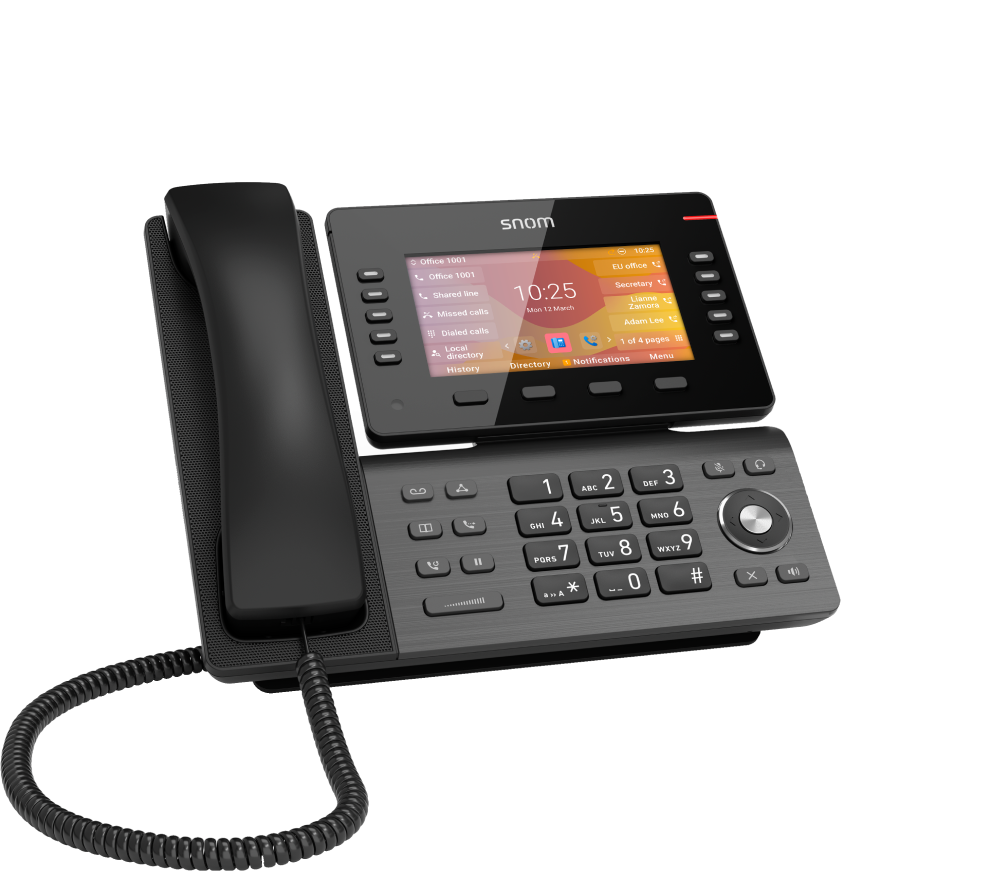
Snom D865 Desk Phone with Dual-band Wi-Fi and integrated Bluetooth 5.0
Frequently Asked Questions
First, check that the phone is within a reasonable range of your access point and that there are no thick walls or metal obstacles between them. Try moving the phone closer temporarily to see if the connection stabilizes. If it does, you may need to adjust your Wi-Fi channel or upgrade your access point to reduce interference.
Go to Settings > Bluetooth on the phone, turn Bluetooth on, and set the phone to discoverable. Put your headset into pairing mode. When the headset appears on the screen, select it and confirm the pairing. If it doesn’t appear, make sure the headset is fully charged and within a few feet of the phone.
Verify that your SIP credentials (username, password, and server address) are entered correctly in the account settings. Then confirm that the phone has a valid IP address and can reach the internet—try browsing to a website from the phone's web interface. If it still fails, your VoIP provider may need to whitelist the phone's MAC address or adjust firewall settings.
Press the Menu button, go to Settings > Network > Wi-Fi, and enable Wi-Fi. The phone will scan for available networks. Select your network, enter the password, and confirm. If your network is hidden, you can manually enter the SSID and security type. Once connected, you may need to restart the phone for the change to take full effect.
First, lower the handset or speaker volume on the phone—excessive volume can cause acoustic feedback. If you're using a headset, try a different headset or check that the headset microphone is not too close to your mouth. If the echo persists, ask the other party to lower their speaker volume as well; the issue may be on their side.
Access the phone's web interface by entering its IP address in a browser. Log in with the admin credentials (default is admin/admin unless changed). Go to Function Keys or Programmable Keys and assign each key to a feature like speed dial, BLF, or DND. Save the settings and the keys will update immediately on the phone.
Make sure the phone is receiving power—check the power adapter or PoE switch. Try a different power outlet or cable. If the phone powers on but the screen remains dark, press the brightness adjustment button (often the OK button) to see if the backlight is turned all the way down. If nothing works, a hardware fault may be present; contact your supplier.
Voicemail is typically configured through your VoIP provider, not the phone itself. On the phone, program a function key with the URL or speed dial for your voicemail number (e.g., *98). Alternatively, you can dial the voicemail access number manually. Check with your provider for the exact configuration steps.
Unplug the power and Ethernet cables, wait 30 seconds, then reconnect power only (no network). If the phone boots to a 'No network' message, the issue may be a corrupt provisioning file on the network. Disconnect the phone from the network temporarily and try a fresh power cycle. If it still hangs, contact support before attempting any firmware recovery.
Yes, the Snom D865 is a standard SIP phone and should work with any carrier that provides SIP credentials. However, some carriers require specific codec or STUN settings—check with your carrier for their recommended configuration. For Canadian business users, the phone's dual-band Wi-Fi is useful in offices where Ethernet runs are limited.
IP Phones
Snom D865 Desk Phone with Dual-band Wi-Fi and integrated Bluetooth 5.0
The Snom D865 is a versatile and adaptable solution for everyday office tasks. Key features include: • WiFi, Bluetooth, and 2 USB ports • 10 freely programmable function keys • High-quality, 40° continuously adjustable 5" LCD screen • HD audio with advanced noise reduction • Hearing aid compatible The device offers an optimal design combined with excellent voice quality, making it a reliable choice for various tasks. For detailed specifications, please refer to the Product Datasheet.
About This Product
The Snom D865 is a desk phone designed for professionals who need flexibility in where they place their workstation. Its built-in dual-band Wi-Fi and Bluetooth 5.0 make it a strong choice for open-plan offices, co-working spaces, or any environment where running Ethernet cabling is impractical or too costly. The adjustable 5-inch LCD screen and 10 programmable keys keep daily tasks like speed-dialing and line selection within easy reach, while the HD audio with noise reduction helps calls stay clear even in busy settings. A key tradeoff to consider: wireless connectivity is convenient, but voice quality and reliability can be affected by network congestion or signal interference, so this phone works best in environments with a strong, properly configured Wi-Fi network. It pairs naturally with cloud-based or on-premise VoIP systems that support Wi-Fi provisioning, and the USB ports allow for charging a mobile device or connecting a wired headset. For a single-line user or a basic reception desk, the D865 offers more than enough features; for a high-volume call center agent who needs dozens of programmable keys or a wired PoE connection for absolute reliability, a more specialized model may be a better fit. In Canadian business settings—particularly across the GTA where many offices are moving to flexible layouts—this phone provides a practical balance of mobility and performance without requiring a dedicated network drop at every desk.
Services We Provide
- Professional Installation & Configuration
- Ongoing Maintenance & Support
- Troubleshooting & Repairs
- System Upgrades & Updates



