
Snom M10 KLE SIP DECT 4-Line Handset-Requires M100 KLE Base

Frequently Asked Questions

First confirm the handset is within range of the M100 KLE base (typically up to 50 metres indoors). Check that the base is powered on and connected to your network. On the handset, go to the settings menu and verify the registration status—if it shows 'not registered,' try re-pairing by pressing the paging button on the base and following the handset's pairing instructions. If the issue persists, a Toronto-based VoIP support provider can usually resolve this remotely.
Call drops are often caused by weak DECT signal. Move the M100 KLE base to a central, elevated location away from metal objects and large electronics. Check for interference from other DECT cordless phones or Wi-Fi routers on overlapping channels. If the handset's battery indicator shows low, charge it fully—a low battery can cause intermittent disconnects during a call.
To pair an additional M10 KLE handset, place the new handset in its charger cradle and go to the base's registration mode (usually by pressing the registration button or through the base's web interface). On the handset, select 'register' from the menu and follow the on-screen prompts. You can add up to 10 handsets total. If you're in a GTA office and need help with multi-handset provisioning, many local VoIP integrators can assist.
This usually means the handset isn't properly registered or the base isn't connected to your VoIP phone system. First, ensure the handset is registered to the base (reboot both devices by removing power for 10 seconds). Next, confirm the base's Ethernet cable is securely plugged into your network and that the base's status light is solid. Finally, log into the base's web interface to verify that SIP account credentials are entered correctly—a common oversight is a missing realm or transport setting. If the problem continues, contact your VoIP provider for account-side checks.
The M10 KLE handset works with the M100 KLE base, which is a standard SIP DECT base station. It should interoperate with most SIP-based VoIP providers in Canada, including popular carriers serving the GTA. However, some providers require specific codecs or proxy settings—check with your provider that they support DECT handsets or ask them for the correct SIP registration details. The base station's web interface lets you configure these settings.
Poor audio on a DECT handset often results from signal interference or low signal strength. Move closer to the base and try the call again. If the issue persists, check that both the handset and base have the latest firmware (updates are available on Snom's website). Also, ensure no other DECT devices are on the same channel—the base usually auto-selects a clear channel, but manual adjustment is possible in its settings. If you're using a headset, verify it's fully inserted into the 2.5mm jack.
Battery life can degrade over time or if the handset is left off the charger for long periods. First, make sure the handset is properly seated in the charger cradle so the charging contacts connect. If it still drains quickly, try a full discharge and recharge cycle. Keep the handset away from heat sources. If the battery doesn't hold a charge, it may need replacement—contact Snom support or your reseller for a genuine battery.
Shared line appearances (KLE) are configured at the base station level through its web interface. Log into the M100 KLE base's admin panel, navigate to the key system emulation section, and assign which line appearances (extensions) should be shared across handsets. On the handset itself, the programmable line keys will then show the shared lines, and you can toggle between them. For step-by-step instructions, refer to the base's user manual—many local VoIP support companies in Toronto offer remote configuration assistance.
Yes, the M10 KLE handset has a 2.5mm headset jack for corded headsets. Plug in a compatible headset and you'll have a hands-free option with audio through the headset instead of the earpiece. Note that this is an analog jack, not USB, so wireless Bluetooth headsets are not supported directly. If you need a wireless headset solution, consider a DECT headset that pairs with the base separately.
First, check the battery—the handset may be completely drained. Place it in the charger and wait a few minutes for the display to show the charging indicator. If the screen remains blank, try a soft reset: remove the battery pack for 30 seconds, reinsert it, and power on the handset. If that doesn't bring the display back, the handset may have a hardware issue—contact Snom warranty support or your Canadian reseller, as the three-year warranty may cover it.
IP Phones

Snom M10 KLE SIP DECT 4-Line Handset-Requires M100 KLE Base
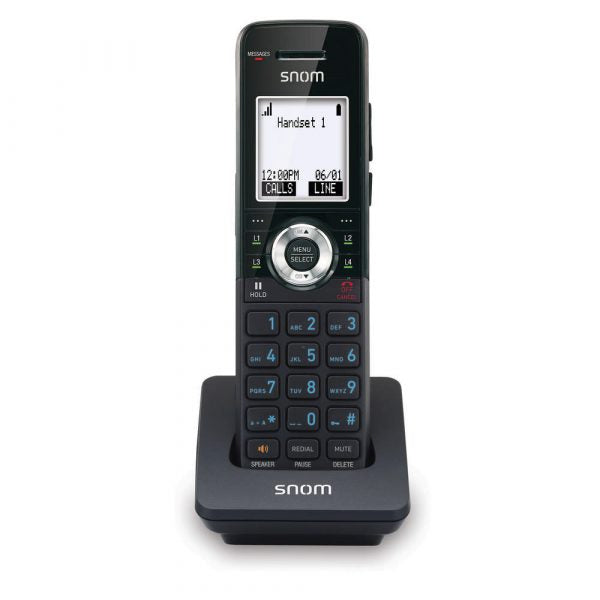
• The M10 KLE SIP DECT 4-Line Handset is designed for small businesses to efficiently manage call routing, offering up to 10 expandable handsets with unique phone numbers and extension capabilities. • Key features include: • Key system emulation for shared line appearances locally • Easy wireless installation • Programmable LED backlit line keys on the cordless handset • Clear mobility with DECT 6.0 digital technology • Scalability for up to 10 handsets • HD voice quality and generous talk time • Intuitive design and three-year warranty • Weight: 1 lb • Dimensions: 8 × 6 × 3 in • Technical specifications include: • HD voice for receiver and speakerphone • Full-duplex speakerphone • HAC receiver • 2.5mm corded headset jack

About This Product

The Snom M10 KLE handset is built for small businesses that need the flexibility of cordless communication without sacrificing PBX-style features. Designed to work exclusively with the Snom M100 KLE base station, it brings key system emulation (KLE) to a DECT environment, allowing shared line appearances and extension dialing across up to 10 handsets. This makes it a strong fit for retail shops, small offices, or warehouses where staff need to move freely while staying reachable on the same business lines.

In a Toronto office setting, the M10 KLE handset pairs well with hosted or on-premise SIP trunks, and its DECT 6.0 digital technology provides reliable coverage within a typical building footprint—though range can be limited by thick walls or metal obstructions. Each handset supports up to 4 lines and includes programmable LED backlit line keys, so users can see at a glance which lines are active or on hold. The full-duplex speakerphone and HD voice capability are welcome for hands-free calls, but the handset is best suited as a secondary or mobility device rather than a primary desktop phone.

Buyers should be aware that this is strictly a handset—the M100 KLE base must be purchased separately, and the system does not support daisy-chaining bases for larger coverage. For a busy front desk or a small team with moderate call volume, the M10 KLE delivers a tidy cordless experience. It could feel underpowered in a deployment requiring more than 10 handsets or where every desk needs a fixed speakerphone, and may be overkill for a single-user home office where a basic cordless phone would suffice.
Services We Provide
  • Professional Installation & Configuration
  • Ongoing Maintenance & Support
  • Troubleshooting & Repairs
  • System Upgrades & Updates



