
Snom M100 KLE Base Station

Frequently Asked Questions

First, confirm the handset is within range of the base station and that the base is powered on with a steady green LED. On the handset, go to Settings > Registration > Register and follow the base's pairing procedure—typically you press the registration/paging button on the base for a few seconds. If the handset still won't register, check that the base isn't already at its 10-device limit; if it is, you'll need to unregister an unused handset via the base's web interface or by contacting your VoIP provider.
Verify that the included power adapter is securely plugged into both the base and a working wall outlet. If you're using Power over Ethernet (PoE), confirm your switch or injector supplies at least 802.3af-compliant power—a standard PoE port should work. Try a different power cable or outlet to rule out a power issue; if neither works, the base may need replacement, and a Toronto-based VoIP support provider can help with that.
This is often a microphone mute or audio path issue. Check that the handset isn't accidentally muted (look for a mute icon on the screen). If the handset is on a desk set with a headset, ensure the headset is properly connected and not in a different audio mode. If the problem persists, try a different handset or call the same number from another device to isolate whether it's the handset or the base station.
Call forwarding is configured per line on your SIP account, not on the base itself. Log into your phone system's web portal (the base's IP address) and navigate to the account settings for each line. There you can set forwarding for busy, no answer, or always—each with a destination number. If you're unsure of the base's IP, check the handset's menu under Settings > Network or ask your VoIP provider for assistance.
Dropped calls usually point to a DECT range or interference issue. Move the handset closer to the base—if it stays stable, you may need to relocate the base or add a repeater. Also check for cordless phone or Wi-Fi interference on the 1.9 GHz band; DECT 6.0 is designed to avoid this, but heavy traffic can still cause drops. If the problem is consistent, try a different handset to confirm it's not a device fault.
No—the M100 is designed exclusively for Snom M10 KLE, M10R KLE, and M18 KLE handsets. Using a non-compatible handset will not register or function. If you need a mixed-brand setup, the base station won't support it; you'd need a separate DECT base for other brands or a SIP softphone on a computer.
Firmware updates are applied through the base's web interface. Connect to the base's IP address in a browser, log in with the default credentials (usually admin/admin), and go to Maintenance > Firmware Update. Check with your VoIP provider for the correct firmware file—Snom releases updates periodically. Never flash a firmware file from an untrusted source, as it can brick the device.
The M100 supports up to 10 devices but only 4 can be on a call at once. To add more handsets, you need to register them via the base's pairing process. If the base already has 10 registered, you'll need to unregister an old one first. Check the base's web interface under DECT > Registered Devices to see how many are active.
A missing dial tone usually means the base isn't registered to a SIP account. Check the base's web interface and confirm that at least one SIP line is configured with valid credentials from your provider. If you're using a hosted PBX, ensure the base's IP is allowed through your firewall. A soft reset (power cycle the base) can also help re-establish the registration.
Yes, the M100 works with any standard SIP trunk provider. For Bell or Rogers, you'll need a SIP-compatible plan—many Canadian carriers offer SIP trunking for business. The base's DECT technology is frequency-compliant in Canada, so there's no regulatory issue. If you're unsure, your VoIP provider can confirm compatibility.
IP Phones

Snom M100 KLE Base Station
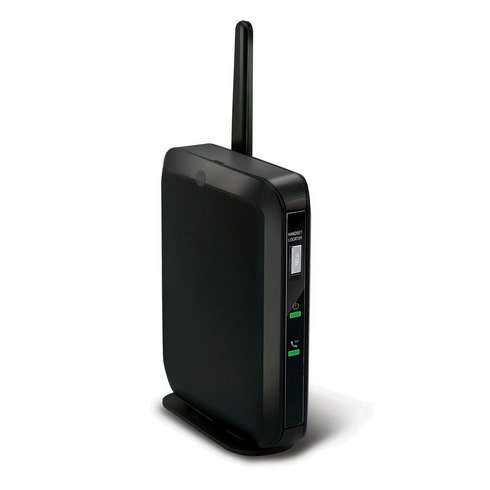
• The M100 KLE SIP DECT 4-Line Base Station supports up to 10 phones, including handsets and desksets with four programmable LED backlit line keys. It features key system emulation for shared line appearances locally without SCA support. Key Features: • Key system emulation • Easy wireless installation • Programmable line keys • Clear mobility with DECT 6.0 digital technology • Scalability • HD voice quality • Advanced call handling • Flexibility • Convenient mounting • Three-year warranty • Compatible with M10 KLE, M10R KLE, and M18 KLE Additional Information: • Weight: 1 lb • Dimensions: 7 × 5 × 3 in • System Features: • Supports up to 8 SIP account registrations (individual or shared among handsets) • Supports 4 programmable line keys on cordless accessories • Supports up to 4 outgoing calls in parallel (system-wide) • Base phonebook up to 1,000 entries • Call history up to 200 entries • Phonebook import/export • XML/LDAP remote phonebook • Do Not Disturb (DND) • 3-way local conference • N-way network conference • External/Internal call transfer between DECT phones • Intercom between DECT phones • Call barring/blocking (block anonymous/blacklist) • Dial plan/digit map • Mute • Redial • 10 speed dial entries • Call transfer: blind/attended • Call hold • Call forwarding: per-line basis (busy/always/no answer) • Call timer (call duration) • Caller ID • Phonebook matching (incoming and outgoing calls) • Multi-language support

About This Product

The Snom M100 KLE Base Station is a practical choice for small offices or growing businesses that need a cord-free phone system without sacrificing desk-phone features. Designed to work with up to 10 compatible Snom DECT handsets and desksets, it lets you keep a shared line appearance across devices—useful for a team that wants to see who's on a call without needing full SIP Shared Call Appearance support. The base station supports up to four simultaneous outgoing calls and eight SIP account registrations, so it can handle a modest reception desk or a handful of active users without feeling cramped. In a Canadian context, this unit pairs well with common SIP trunks from GTA-based carriers, but note that it relies on DECT 6.0 rather than Wi-Fi or Ethernet, so you'll want to keep it within 50–100 metres of your handsets for reliable coverage. If you need more than four concurrent lines or heavy call queuing, this base station would be underpowered; it's best suited to a small team where wireless flexibility matters more than high-volume throughput.
Services We Provide
  • Professional Installation & Configuration
  • Ongoing Maintenance & Support
  • Troubleshooting & Repairs
  • System Upgrades & Updates



