
Snom M10R DECT 4-Line Rugged Handset
AIM Telecom provides troubleshooting and configuration support for this product to businesses across Toronto and the GTA. Contact us to confirm whether the issue can be handled by phone or requires on-site service.
Get Support Call 416-312-4819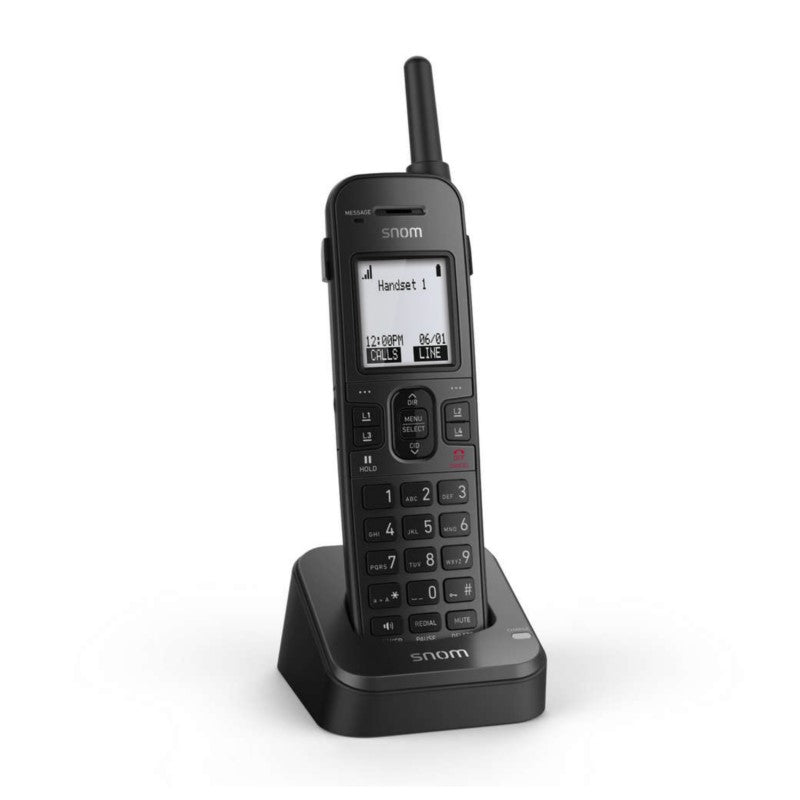
Common issues and fixes
Reviewed troubleshooting steps are not yet available for this model.
Ask AIM Telecom about this productAbout this product
• The M10R KLE SIP DECT 4-Line Handset is designed for small businesses requiring easy call routing management. It features up to 10 expandable, ruggedized handsets that withstand drops and can operate in wet environments.
• Key features include:
• Key system emulation
• Easy wireless installation
• Programmable line keys
• Clear mobility with DECT 6.0 digital technology
• Rugged design
• Scalability
• HD voice quality
• Generous talk time
• Intuitive design
• Three-year warranty
• The handset is paired with the M100 KLE SIP DECT 4-Line Base Station, allowing each handset to have its own extension and unique phone number. It also features programmable LED backlit line keys for easy handling of multiple calls.
• Additional information:
• Weight: 1.43 lbs
• Dimensions: 9 × 5.14 × 2.36 in
• Color: black
• Technical specifications:
• APN: 80-S091-00
• Product dimensions (WxDxH): Cordless HS - 2.2″ 1.42″ x 8.54″, Charger - 3.03″ x 4″ x 1.8″, Cordless HS on Charger - 3.03″ x 4″ x 9.1″
• Product weight: 0.7lbs.
• Giftbox dimensions (WxDxH): 5.12″ x 2.4″ x 8.86″
• Giftbox weight: 0.87 lbs.
• Master pack SCC-14 dimensions (WxDxH): 10.2″ x 5.7″ x 9.6″
• Key features include:
• Key system emulation
• Easy wireless installation
• Programmable line keys
• Clear mobility with DECT 6.0 digital technology
• Rugged design
• Scalability
• HD voice quality
• Generous talk time
• Intuitive design
• Three-year warranty
• The handset is paired with the M100 KLE SIP DECT 4-Line Base Station, allowing each handset to have its own extension and unique phone number. It also features programmable LED backlit line keys for easy handling of multiple calls.
• Additional information:
• Weight: 1.43 lbs
• Dimensions: 9 × 5.14 × 2.36 in
• Color: black
• Technical specifications:
• APN: 80-S091-00
• Product dimensions (WxDxH): Cordless HS - 2.2″ 1.42″ x 8.54″, Charger - 3.03″ x 4″ x 1.8″, Cordless HS on Charger - 3.03″ x 4″ x 9.1″
• Product weight: 0.7lbs.
• Giftbox dimensions (WxDxH): 5.12″ x 2.4″ x 8.86″
• Giftbox weight: 0.87 lbs.
• Master pack SCC-14 dimensions (WxDxH): 10.2″ x 5.7″ x 9.6″
More product details
The Snom M10R is a DECT handset built for small businesses that need reliable wireless calling in tougher environments. Its ruggedized construction can handle drops and splashes, making it a practical choice for warehouses, workshops, or busy retail counters where a standard office phone would quickly show wear. The handset operates over DECT 6.0, which provides clear voice quality and stays out of the way of Wi‑Fi networks, but does require an M100 KLE base station (sold separately) to function.
Because it supports key system emulation and dedicated line keys, the M10R fits well in small teams that need simple call routing. Each handset can have its own extension when registered to the M100 base, up to a maximum of ten handsets per base. For a Canadian office running a hosted VoIP service, this setup is straightforward—the base station connects to your network and the handsets link wirelessly, so you avoid running cables to every desk.
Potential buyers should be aware of a few trade‑offs. DECT range is typically good within a single‑floor office but may not cover an entire multi‑storey building or large outdoor yard without a repeater. Also, because the handset depends on the M100 base, you’re locked into that ecosystem; you can’t pair it with a generic DECT base from another manufacturer. For a solo user or home office, a simpler cordless SIP phone might do the job at a lower cost.
On the other hand, if your team never exceeds ten wireless extensions and you value a phone that can survive a drop from a ladder or a dusty back office, the M10R is a sensible pick. It’s overkill for a call centre that needs dozens of agents, and it’s underpowered for multi‑site deployments where a centralised DECT manager would be more appropriate. In the GTA, you’ll find it works well with most Canadian VoIP providers that support standard SIP handsets.
Because it supports key system emulation and dedicated line keys, the M10R fits well in small teams that need simple call routing. Each handset can have its own extension when registered to the M100 base, up to a maximum of ten handsets per base. For a Canadian office running a hosted VoIP service, this setup is straightforward—the base station connects to your network and the handsets link wirelessly, so you avoid running cables to every desk.
Potential buyers should be aware of a few trade‑offs. DECT range is typically good within a single‑floor office but may not cover an entire multi‑storey building or large outdoor yard without a repeater. Also, because the handset depends on the M100 base, you’re locked into that ecosystem; you can’t pair it with a generic DECT base from another manufacturer. For a solo user or home office, a simpler cordless SIP phone might do the job at a lower cost.
On the other hand, if your team never exceeds ten wireless extensions and you value a phone that can survive a drop from a ladder or a dusty back office, the M10R is a sensible pick. It’s overkill for a call centre that needs dozens of agents, and it’s underpowered for multi‑site deployments where a centralised DECT manager would be more appropriate. In the GTA, you’ll find it works well with most Canadian VoIP providers that support standard SIP handsets.