
Snom M18 KLE – SIP DECT 4-Line Deskset

Frequently Asked Questions

Confirm that the base station is powered and its LAN connection is active. On the handset, ensure you’re within range and that any registration PIN is correct. Try power-cycling the base, then re-attempt registration by placing the handset in the charger and following the subscription procedure. If it still fails, verify that the base’s DECT radio is enabled and hasn’t reached its handset limit. A Toronto-based VoIP support provider can often pinpoint the issue remotely.
First, check the DECT signal strength icon on the handset screen; move closer to the base to rule out range issues. Ensure no large metal objects or thick walls are between the handset and the base. If the problem persists, reboot the base and handset. Also confirm that your network’s jitter and latency are within acceptable limits for VoIP, as packet loss can cause drops. If audio remains choppy, a VoIP support technician can help assess DECT coverage or network quality.
Make sure the handset is seated correctly in the charging cradle and that the power adapter is plugged into a working outlet. Check for debris on the charging contacts. If still blank, leave it on the charger for at least 30 minutes, then try to power it on using the End/Power key. A battery that fails to hold a charge may need replacement; contact your vendor if the issue continues.
Log into the base station’s web interface and navigate to the handset’s line key configuration. Ensure the key is assigned a valid function (e.g., line appearance, speed dial) and that the destination number or extension is correct. After making changes, force a re-provision from the base or power-cycle the handset. If the key still doesn’t respond, a provisioning template may be overwriting the assignment; verify with your VoIP provider.
Verify that mute isn’t accidentally pressed and that the volume is turned up. If you’re using a headset, test the call with the handset speaker to rule out a headset fault. Check the base station’s audio settings for any misconfigured codec priorities that might affect one-way audio. A simple restart of the handset and base can resolve transient audio path issues. If the issue persists, a Toronto-based VoIP support provider can usually resolve this remotely.
The handset may have lost its DECT subscription. Try re-subscribing it via the base’s registration mode while placing the handset in the charger. Power-cycle both the handset and base if that fails. In a multi-cell setup, confirm that roaming is correctly configured for the handset. If the problem keeps recurring, DECT interference or a failing base is possible; consider a site survey.
Line key assignments are managed through the DECT base station’s web interface. Access the admin pages, locate the handset or extension settings, and find the key programming section. There you can assign each of the four keys to a line, speed dial, or feature. After saving, the handset should update automatically; a quick power-cycle forces the new configuration if needed.
Yes, the M18 KLE works with any SIP-based VoIP service as long as it’s paired with a compatible Snom DECT base that handles the SIP trunk. The base station will need to be configured with your provider’s SIP credentials (server, username, password). The desk set itself doesn’t require separate provider settings. Many Toronto businesses use this combination with hosted PBX services; your provider can supply the necessary SIP details.
Echo is often caused by volume being too high; try lowering the speaker volume a couple of notches. Also ensure there’s no nearby hard surface reflecting sound back into the microphone. If echo persists, check the base station’s audio settings for an echo canceller option and verify it’s enabled. In a shared office, physical seating arrangement can matter; test the phone in a different location.
Put your DECT base into registration mode (usually via its web interface or a button on the unit). On the M18 KLE, take it off the charger and navigate to the registration menu. Once the handset finds the base, confirm the subscription. After pairing, the handset inherits the extension and line key settings provisioned on that base. If it doesn’t sync, a quick re-provision from the base web UI should complete the setup.
IP Phones

Snom M18 KLE – SIP DECT 4-Line Deskset
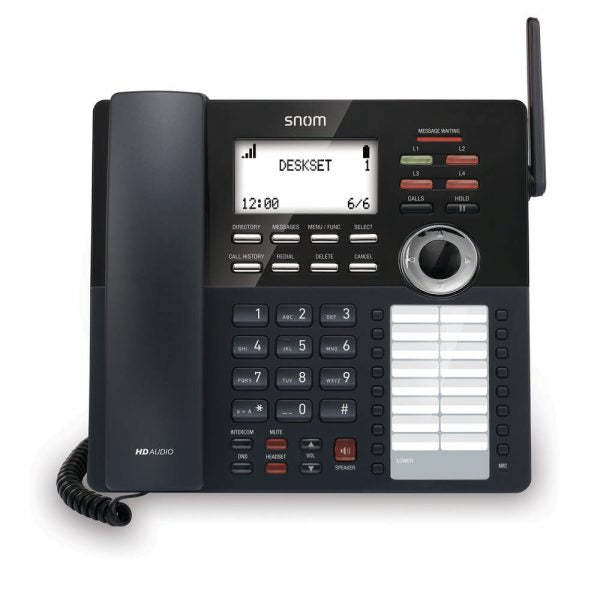
• The M18 KLE SIP DECT 4-Line Deskset is designed for those who want the look of a deskset but the convenience of a handset. It's easy to install, requiring only a nearby power outlet. With four programmable LED backlit line keys on each deskset, you can easily manage multiple calls. • Key features include: • Key system emulation • Easy wireless installation • Programmable line keys • Clear mobility with DECT 6.0 digital technology • Scalability • HD voice quality • Flexible power • Intuitive design • Three-year warranty • Additional information: • Weight: 2.69 lb • Dimensions: 11 × 9 × 5 in • Technical specifications: • Audio/voice: • HD voice for receiver and speakerphone • Full-duplex speakerphone • HAC receiver • 2.5mm corded headset jack

About This Product

The Snom M18 KLE is a cordless desk phone that brings the familiar form of a traditional desktop set into a DECT wireless deployment. It’s designed for businesses already using a Snom multi-cell DECT system—such as an M700 or M900 base station—who want the freedom of a cordless handset without sacrificing the dedicated line keys and speakerphone of a desk phone. It fits naturally at reception desks, small branch office workstations, or any spot where you need to handle up to four calls and prefer a physical button layout over a mobile-style handset.

Because it’s a DECT endpoint, setup is genuinely simple: plug the charging cradle into a nearby outlet, register the handset to your existing base, and the phone inherits provisioning and SIP settings from the system. There’s no Ethernet cable to the desk, so floor plans stay flexible. The four backlit line keys can be programmed for call appearance, speed dial, or system functions, giving users quick control without needing to navigate menus. However, buyers should understand that the M18 KLE is not a self-contained SIP phone; it depends entirely on a compatible base station that handles SIP registration and call control. In multi-site Canadian deployments, for example, it works well as part of a coordinated DECT network but offers no standalone fallback if the base loses connectivity.

Audio quality is solid thanks to HD voice on both the handset and full-duplex speakerphone, making it suitable for clear conversations in moderately quiet office spaces. It’s a practical fit for Toronto-area small businesses that want to keep a conventional desk phone look while benefiting from wireless mobility. The trade-offs to keep in mind: DECT range is limited to a few hundred feet indoors depending on walls and interference, so if your workspace is large or has thick concrete walls, you’ll need the infrastructure of multiple base stations. Also, heavy call centre usage may push this phone beyond its comfort zone—it’s built for regular business calls, not non-stop headset work, though a 2.5mm headset jack is there when needed. For the right environment, it bridges the gap between a wired SIP phone and a pure cordless handset.
Services We Provide
  • Professional Installation & Configuration
  • Ongoing Maintenance & Support
  • Troubleshooting & Repairs
  • System Upgrades & Updates



