
Snom M30 Office Handset-Requires M400, M900 Base Stations
AIM Telecom provides troubleshooting and configuration support for this product to businesses across Toronto and the GTA. Contact us to confirm whether the issue can be handled by phone or requires on-site service.
Get Support Call 416-312-4819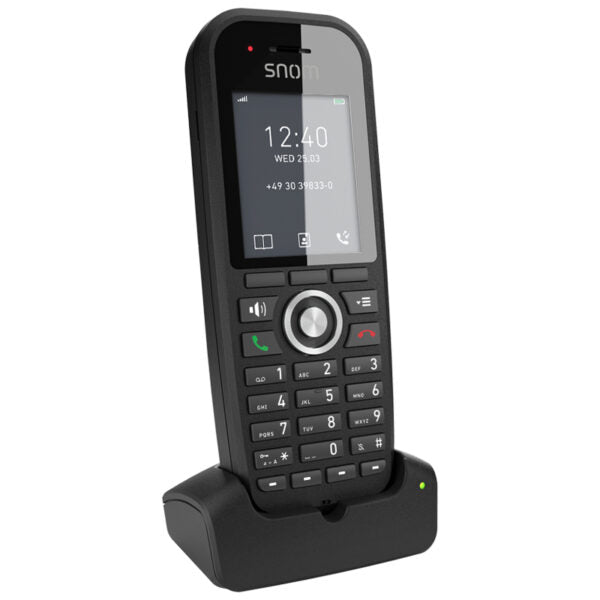
Common issues and fixes
Reviewed troubleshooting steps are not yet available for this model.
Ask AIM Telecom about this productAbout this product
The M30 is a professional-grade handheld phone designed for business use, featuring a large color display and essential call functionality. Key features include:
• Crystal-clear audio quality
• Up to 22 hours of talk time or two weeks of stand-by time
• Four additional keys for speed dial and local contact numbers
• Programmable shortcuts for frequently used menus
• Compatible with up to twenty M400 base stations, handling ten parallel SIP phone calls
This device is multicell compatible, has a backlit keypad, and includes features such as directory access, OTA updates, and a belt clip. Weighing 0.6 lb and measuring 5.8 × 3.75 × 2.4 in, the M30 offers reliable performance.
Technical specifications include:
• Model: M30
• Dimensions: 128 x 53 x 25 mm (LxWxD)
• Weight: 112 g (handset with battery & belt clip)
• Display: 2″ color TFT-LCD display, 176 x 220 pixels
• Battery: 3.7 V / 1,100 mAh / 4.1 W, Li-ion
• Stand-by / Call time: 350h / 22h NB (14h WB)
• Compatible Base Stations: M400, M700, M900
• Crystal-clear audio quality
• Up to 22 hours of talk time or two weeks of stand-by time
• Four additional keys for speed dial and local contact numbers
• Programmable shortcuts for frequently used menus
• Compatible with up to twenty M400 base stations, handling ten parallel SIP phone calls
This device is multicell compatible, has a backlit keypad, and includes features such as directory access, OTA updates, and a belt clip. Weighing 0.6 lb and measuring 5.8 × 3.75 × 2.4 in, the M30 offers reliable performance.
Technical specifications include:
• Model: M30
• Dimensions: 128 x 53 x 25 mm (LxWxD)
• Weight: 112 g (handset with battery & belt clip)
• Display: 2″ color TFT-LCD display, 176 x 220 pixels
• Battery: 3.7 V / 1,100 mAh / 4.1 W, Li-ion
• Stand-by / Call time: 350h / 22h NB (14h WB)
• Compatible Base Stations: M400, M700, M900
More product details
The Snom M30 is a cordless DECT handset built for businesses that already rely on Snom’s M-series multicell base stations. It fits naturally into mid-sized offices, retail floors, and light industrial settings where staff need to move around but still want clear, dependable voice calls. The handset itself is lightweight and comfortable for shift-long use, and the colour screen makes navigating contacts and call lists straightforward without needing a desk phone’s real estate.
This device is not a standalone phone—it requires at least one M400, M700, or M900 base station to operate. When paired with up to twenty M400 bases, it becomes part of a seamless roaming system that can handle ten concurrent SIP calls, which works well for Canadian businesses expanding across a single floor or a multi-storey building in the GTA. The four programmable keys are a practical touch for speed-dialling frequently called extensions or local contacts, though users who need a full directory on screen or extensive BLF monitoring will find the M30 underpowered compared to a desk set.
Battery performance is solid for a typical workday: up to 22 hours of talk time on narrowband, or about a full day of mixed use before it needs the charging cradle. Heavy wideband audio users will see closer to 14 hours of talk time, so for roles with near-constant calling, a spare battery or a quick mid-shift charge might be necessary. The handset’s audio quality holds up well in moderately noisy environments, but it’s not a ruggedized model—warehouses with extreme dust or frequent drops call for a more hardened device.
For a small office with a single base station and only a couple of handsets, the M30 is a sensible, cost-effective endpoint. It becomes overkill in deployments where every user is desk-bound and would benefit from a larger screen and more line keys, or in very large, multi-building campuses where a higher-tier handset with better roaming diagnostics might simplify management. Canadian VoIP providers that support Snom’s auto-provisioning will find the M30 easy to roll out, but always confirm that your base station firmware is current before adding handsets.
This device is not a standalone phone—it requires at least one M400, M700, or M900 base station to operate. When paired with up to twenty M400 bases, it becomes part of a seamless roaming system that can handle ten concurrent SIP calls, which works well for Canadian businesses expanding across a single floor or a multi-storey building in the GTA. The four programmable keys are a practical touch for speed-dialling frequently called extensions or local contacts, though users who need a full directory on screen or extensive BLF monitoring will find the M30 underpowered compared to a desk set.
Battery performance is solid for a typical workday: up to 22 hours of talk time on narrowband, or about a full day of mixed use before it needs the charging cradle. Heavy wideband audio users will see closer to 14 hours of talk time, so for roles with near-constant calling, a spare battery or a quick mid-shift charge might be necessary. The handset’s audio quality holds up well in moderately noisy environments, but it’s not a ruggedized model—warehouses with extreme dust or frequent drops call for a more hardened device.
For a small office with a single base station and only a couple of handsets, the M30 is a sensible, cost-effective endpoint. It becomes overkill in deployments where every user is desk-bound and would benefit from a larger screen and more line keys, or in very large, multi-building campuses where a higher-tier handset with better roaming diagnostics might simplify management. Canadian VoIP providers that support Snom’s auto-provisioning will find the M30 easy to roll out, but always confirm that your base station firmware is current before adding handsets.