
Snom M400 DECT single-cell base station

Frequently Asked Questions

First, ensure the base station has a working network connection: check that the PoE switch or injector is powered and that the Ethernet cable is securely connected. Then verify that the SIP account credentials (username, password, and server address) entered in the base station's web interface exactly match what your provider supplied. If the issue persists, try power cycling the base station by unplugging the Ethernet cable (if PoE) for 30 seconds, then reconnecting.
This usually means the handset has lost contact with the M400 base station. First, bring the handset closer to the base station to rule out a range issue. If it still doesn't connect, restart the handset by removing its batteries for 10 seconds. Next, power cycle the base station (disconnect PoE power for 30 seconds). If the problem continues, you may need to re-register the handset: on the base station's web interface, go to the DECT configuration and initiate a new registration, then follow the handset's menu to pair again.
Choppy audio on DECT systems is often caused by wireless interference or a weak signal. Move the handset closer to the base station and avoid physical obstructions like metal shelving or thick walls. Also, check that your network has sufficient bandwidth for VoIP — try a simple ping test to your provider's server to see if packet loss is occurring. If you're using wideband audio, try switching the handset to narrowband mode temporarily to see if stability improves; this can help isolate the issue.
Zero-touch deployment requires a provisioning server that your Snom M400 can be pointed to during initial boot. Configure your DHCP server to provide option 66 (TFTP server address) or option 43 (custom vendor option) with the URL of your provisioning file. Alternatively, you can manually set the provisioning server URL in the base station's web interface under the 'Provisioning' section. Once configured, the base station will download its settings automatically on subsequent reboots.
Intermittent call drops are often network-related. First, confirm that the PoE power source is stable and not brownout-prone; low power can cause intermittent loss of connectivity. Next, check your router or firewall for any SIP ALG settings that could interfere with VoIP traffic — disabling SIP ALG is often recommended. If the issue occurs only on one handset, try re-registering that handset to the base station to ensure it has a fresh DECT link.
Probable not; power outages can sometimes leave the base station in an unstable state. First, perform a clean power cycle: disconnect the Ethernet cable (which supplies PoE) for at least one minute, then reconnect. Wait for the base station to fully boot (about two minutes). If the LEDs still behave abnormally, check if the unit has a recent firmware update that may have been interrupted — access the web interface and verify the firmware version. If you suspect corruption, contact Snom support before attempting a firmware reflash.
No, the M400 is designed to work exclusively with Snom M-series DECT handsets (M25, M30, M65, M70, M80, M85, M90) and Snom repeaters. Generic DECT handsets will not register. If you have existing handsets from another manufacturer, you will need to replace them with compatible Snom models.
The M400 supports up to 20 handsets per base station, which is sufficient for most small offices. However, keep in mind that simultaneous calls are limited: up to 10 in narrowband or 5 in wideband (HD voice). If your team regularly has more than 5 concurrent HD calls, or if coverage gaps appear with 20 handsets spread across a large floor, you may need to add another M400 base station or a repeater.
First, confirm that your computer is on the same network subnet as the base station. Use a tool like Advanced IP Scanner or check your router's DHCP lease list to find the IP address assigned to the M400 (look for a device named 'Snom' or with its MAC prefix). If you still cannot reach it, try a factory reset (press and hold the reset button on the back for 10 seconds using a paperclip) but note that this will erase all configuration — only attempt after trying other steps.
Audio quality can vary based on the codec used by your VoIP provider and the network conditions. The M400 supports narrowband and wideband audio. If both parties are using devices that support HD voice (wideband) and your provider offers it, calls should sound clearer. If some calls sound poor, check the handset's display for the codec in use during a call. Also, ensure the base station firmware is up-to-date, as Snom periodically improves audio handling in updates. If the issue is intermittent, network congestion may be the cause.
IP Phones

Snom M400 DECT single-cell base station
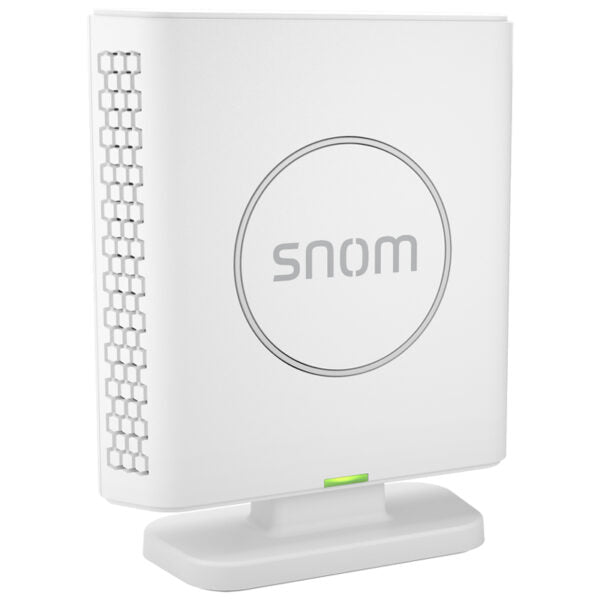
• The M400 DECT base station offers the full range of telephony business features, managing up to 10 parallel calls with up to 20 SIP accounts. • Key features include: • TLS encryption for secure connections • Up to 20 handsets and 10 parallel calls • Wall mountable design • Wideband audio (HD voice) for high-quality voice communication • Single cell operation with remote maintainability and zero-touch deployment • Power over Ethernet (PoE) connectivity • OTA updates for seamless software security patches • Directory support for efficient phonebook management • Additional information: • Weight: 1 lb • Dimensions: 5.4 × 5.7 × 1.8 in • Phone Type: DECT • Technical specifications: • Model: M400 • APN: 89-S071-00 • General Info: • Dimensions: 112 x 90 x 36 mm (LxWxD) • Weight: 170g • Cell type: Single cell • Number of connected handsets: Up to 20 handsets • Number of simultaneous calls: Up to 10 NB calls / 5 WB calls • Compatible handsets: M25, M30, M65, M70, M80, M85, M90 • Repeater support: YES, up to 6 • Power Connector: PoE • Power over Ethernet class (PoE): IEEE 802.3af, Class 2

About This Product

The Snom M400 is a single-cell DECT base station designed for small to medium-sized office environments where cordless flexibility is essential without sacrificing business-grade telephony features. It is an ideal choice for companies that already use or plan to deploy Snom DECT handsets, as it supports up to 20 handsets and handles up to 10 simultaneous calls (5 in wideband mode). The device is powered entirely via PoE, making it easy to mount on a wall or place on a desk without needing a separate power outlet—a practical advantage for tidy office setups in the GTA or elsewhere.

This base station pairs well with Snom's M-series handsets (models M25 through M90) and can extend coverage with up to six repeaters, suiting open floor plans or multi-room offices. However, because it is a single-cell system, its wireless range is limited to a single DECT coverage area; larger facilities may require multiple M400 units or a multi-cell system. The M400 supports TLS encryption for secure SIP signaling, which is a plus for businesses handling sensitive client data, but note that wideband calls are limited to five simultaneous connections, so call centres with heavy HD audio usage may find the narrower bandwidth restrictive.

For Canadian businesses, the M400 works with any SIP-compatible VoIP provider, including regional carriers like Rogers Business or Telus, as long as the provider supports standard DECT registration. The zero-touch provisioning and remote maintainability features are particularly useful for IT teams managing distributed offices in the Greater Toronto Area, as firmware updates and configuration changes can be pushed over the air. This base station is not intended for home use or for environments requiring dozens of users; it is squarely aimed at professional deployments where a handful of cordless users need reliable, secure voice communications.
Services We Provide
  • Professional Installation & Configuration
  • Ongoing Maintenance & Support
  • Troubleshooting & Repairs
  • System Upgrades & Updates



