
Snom M500 Pro Multicell Base Station

Frequently Asked Questions

First, confirm the base station is powered on and its Ethernet cable is securely connected to a PoE switch or injector; the LED on the base should be lit. Next, bring the handset close to the base and use the handset menu to re-initiate registration, making sure you are entering the correct system PIN. If the base has already reached its limit of registered handsets for the current single-cell or multicell setup, new devices will not connect until a slot is freed.
Check that both base stations in your multicell setup are online and that seamless handover is active in the configuration. Walk the path again while watching the handset signal indicator; if the signal drops before a handover occurs, the bases may be too far apart or there may be dense structural interference between them. Repositioning the second base closer to the dead zone, even by a few metres, often clears this up.
Verify that the SIP server address, outbound proxy (if required by your provider), and SIP credentials are entered exactly as supplied, with no leading or trailing spaces. Confirm that the network firewall allows the SIP and RTP ports your provider uses, and that SIP ALG is disabled on your router, as it frequently causes one-way audio or registration failures in Canadian hosted voice setups.
The M500 Pro is designed to pair with Snom’s M-series handsets and desk phones, and using a non-Snom DECT device is not supported. Even if a third-party handset appears to register, features like shared call emulation, busy lamp monitoring, and over-the-air firmware updates will not function predictably. Sticking with the matched Snom endpoints is the only way to get a supportable, fully-featured deployment.
Echo on local handset-to-handset calls can sometimes be reduced by lowering the speaker volume slightly, as acoustic coupling between the earpiece and microphone is often the cause. If that does not help, check whether wideband audio is enabled and whether the issue persists in narrowband mode; switching audio codecs temporarily through the provisioning template can help isolate whether it is a codec-related artefact.
Set up the second base station as a standalone unit first, giving it a different static IP address, and ensure both bases are on the same IP subnet and VLAN. Then, in the web interface of the primary base, add the secondary base’s IP address to the multicell configuration and apply the settings. The handsets will begin to see the additional base automatically once the DECT sync establishes between the two units.
The indoor range is rated for up to 50 metres in open space, but concrete floors, steel framing, and mechanical rooms common in Canadian commercial buildings will reduce that significantly. If you are not getting reliable signal on the second floor, a second base on that floor—connected back to the same network—added as part of a multicell setup is the practical solution. Testing with a single handset while walking the full area will tell you definitively.
Configuration loss after a reboot usually indicates that changes were applied in the web interface but were not saved to persistent memory, or that a provisioning server is overwriting the settings on restart. Check the provisioning URL in the base station and ensure it points to the correct configuration file; if you are making manual changes, confirm you are clicking the save or apply button that commits changes permanently, not just a temporary runtime setting.
Remember that wideband calls consume two channels each on the base station, so the effective limit is four concurrent calls when high-definition audio is active. If your provider or handset configuration is forcing G.722, switching some handsets to a narrowband codec like G.711 can free up capacity. This trade-off between audio quality and call volume is worth evaluating based on your actual usage patterns.
First confirm that the SIP account subscribed to the voice mail server has the correct message-waiting subscription setting enabled in the base station’s account configuration. Then check that the desk phone’s programmable key assigned to voicemail is pointing to the right account. If the issue persists, a Toronto-based VoIP support provider can usually resolve this remotely by validating the SIP NOTIFY messages reaching your base.
IP Phones

Snom M500 Pro Multicell Base Station
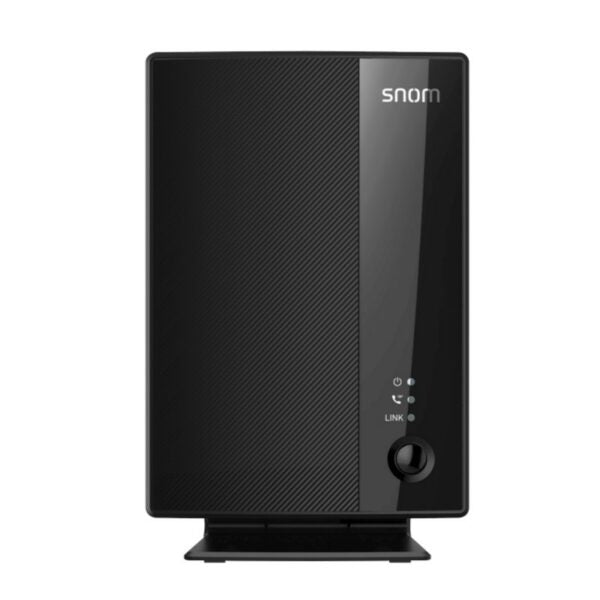
*The Snom M500 Pro DECT Multicell Base Station is a reliable and secure communication solution featuring Wireless DECT technology, providing more reliability and security than WiFi. With up to 19 hours of battery life, it supports shared calls among multiple cordless desksets/handsets with a single SIP account. The base station can be paired with the Snom M55 Handset and Snom M58 Desk Phone. Key Features: • Up to 2 M500 Pro base stations • Up to 16 handsets or desksets • Up to 8 concurrent calls per base • Programmable keys for handsets and desk phones • Zero-touch provisioning • Multicell System • OTA Updates • Power over Ethernet • Security (TLS & SRTP) • 3-Year Warranty Additional Information: • Weight: 1 lb • Dimensions: 7.44 × 4.84 × 2.76 in • Phone Type: DECT Technical Specifications: Frequency Bands: EU: 1880 – 1900 MHz, US: 1920 – 1930 MHz Output Power: EU: < 250mW, US: < 100 mW Protocols: DECT 6.0 Other Features: Seamless handover and roaming Wideband audio Authentication/encryption of base and handset Range: Indoors: up to 50 meters Outdoors: up to 300 meters (for indoor use only) Phone System: Up to 10 registered phones in single-cell setup, up to 48 SIP accounts Up to 8 narrowband or 4 wideband calls per station Up to 16 registered phones in multicell setup Up to 2 registered base stations in multicell setup Phone & SIP Features: Shared call emulation Programmable keys Busy phone monitoring Paging zones Intercom Remote XML and LDAP directories Shared directory with up to 500 entries

About This Product

The Snom M500 Pro is a DECT multicell base station built for businesses that need reliable wireless voice coverage across a modest footprint without depending on Wi-Fi. It makes sense in environments like small warehouses, retail floors, medical offices, or multi-room professional services suites where staff carry cordless handsets and need to roam between base stations without dropping a call. Because it operates on dedicated DECT frequencies, it sidesteps the congestion and unpredictable latency that can affect VoIP over Wi-Fi, and the built-in TLS and SRTP security helps satisfy basic compliance requirements common in Canadian professional offices.

This base station pairs naturally with Snom’s own M55 handset and M58 desk phone, forming a closed ecosystem that simplifies provisioning and firmware management. The zero-touch provisioning and over-the-air update support mean a managed IT provider or in-house admin can deploy handsets across a Toronto-area office without visiting every desk. The multicell setup—supporting up to two M500 Pro bases and sixteen registered devices—is sized for a single-location deployment, not a sprawling campus. If your operation spans multiple floors with dense user counts, a single two-base cluster may feel tight, and you will want to plan the handover zones carefully.

Power over Ethernet simplifies installation, requiring only a single cable run to each base station, which is especially practical in Canadian construction where running new electrical can trigger code and cost complications. The shared-call emulation feature, which lets multiple handsets share a single SIP account, works well for small teams handling a common queue—think a billing department or a clinic front desk. Just be aware that the concurrent-call ceiling (eight calls per base, with wideband audio dropping that to four) can become a limit if your team regularly handles simultaneous conversations near that threshold.

For a very small office with only a couple of cordless users, a single-cell DECT solution might be enough, and the M500 Pro’s multicell capability would be overkill. Conversely, in a large distribution centre where you need seamless handover across dozens of access points and more than two bases, this is not the right scale. It sits in the sweet spot for a compact, security-conscious Canadian business that wants dependable on-premises wireless voice without the complexity of a full Wi-Fi voice deployment.
Services We Provide
  • Professional Installation & Configuration
  • Ongoing Maintenance & Support
  • Troubleshooting & Repairs
  • System Upgrades & Updates



