
Snom M56 DECT Rugged Handset

Frequently Asked Questions

First, ensure the handset and base station are within range (up to 50 meters indoors) and that the base is powered on and registered with your PBX. On the handset, go to Menu > Settings > Registration and verify the PIN matches the base's PIN. If registration fails, power cycle the base station by unplugging it for 10 seconds, then retry. If the issue persists, a Toronto-based VoIP support provider can usually resolve this remotely.
Confirm the battery is properly seated and the charging contacts are clean. Use the included USB-C cable and a power adapter rated at 5V/1A or higher; some computer USB ports may not supply enough current. If the red charging LED does not light, try a different USB-C cable and wall adapter. If still no response, leave it charging for 30 minutes, then press and hold the power button for 5 seconds.
Check that you are within the DECT range (50m indoors) and that there are no large metal obstacles or other wireless devices nearby that could cause interference. On the handset, ensure HD audio is enabled under Settings > Audio. If the problem is isolated to a specific base station, restart the base. For persistent echo or distortion, try lowering the earpiece volume slightly.
First, move closer to the base and verify there are no new sources of interference (e.g., Wi-Fi routers, cordless phones on adjacent frequencies). On the handset, check the signal strength indicator; if it shows one bar or less, the range may be exceeded. Power cycle both the handset (remove battery for 10 seconds) and the base station. If drops continue, try re-registering the handset with the base.
Ensure the alarm feature is configured on the base station or PBX side, as the handset itself only sends the trigger. On the handset, go to Menu > Settings > Alarm and confirm motion detection is enabled and sensitivity is set appropriately. Test by pressing the alarm button briefly; if no alert is sent, check your PBX alarm routing settings. If the motion trigger fails, try recalibrating by holding the handset still for 5 seconds after enabling it.
The M56 is a DECT handset and must be registered to a compatible Snom DECT base station first. Provisioning is done on the base station via its web interface—not on the handset itself. Log into the base's web UI, enter your SIP credentials, and assign an extension. Then register the handset to that base using the PIN. The handset will automatically receive its settings from the base.
The M56 is designed to work with Snom DECT base stations (such as the M300 or M700 series). It may not register with third-party DECT bases due to proprietary pairing protocols. For best results, use it with a Snom base or a base that explicitly lists M56 compatibility. Contact your VoIP provider to confirm interoperability before purchasing.
This means the handset cannot detect the DECT base station. First, ensure the base is powered on and within range. Move the handset closer to the base (within 10 meters) and wait 30 seconds. If the message persists, check that the base is not in 'Registration Lock' mode and that the handset is not already registered to a different base. Power cycling both devices often resolves this.
Firmware updates are delivered over-the-air (OTA) from the DECT base station. Ensure the base is connected to the internet and has the latest firmware installed first. On the handset, go to Menu > Settings > Device Info > Firmware Update and select 'Check for Updates.' If no update appears, the base may need a firmware upgrade. Contact your VoIP provider for assistance if needed.
Reduce the display brightness and backlight timeout under Settings > Display. Turn off Bluetooth when not in use, as it can draw extra power. Also, ensure the handset is not constantly searching for a base—if it frequently shows 'Out of Range,' the battery will drain faster. If the battery is more than two years old, it may need replacement. A fresh battery should deliver up to 19 hours of talk time.
IP Phones

Snom M56 DECT Rugged Handset
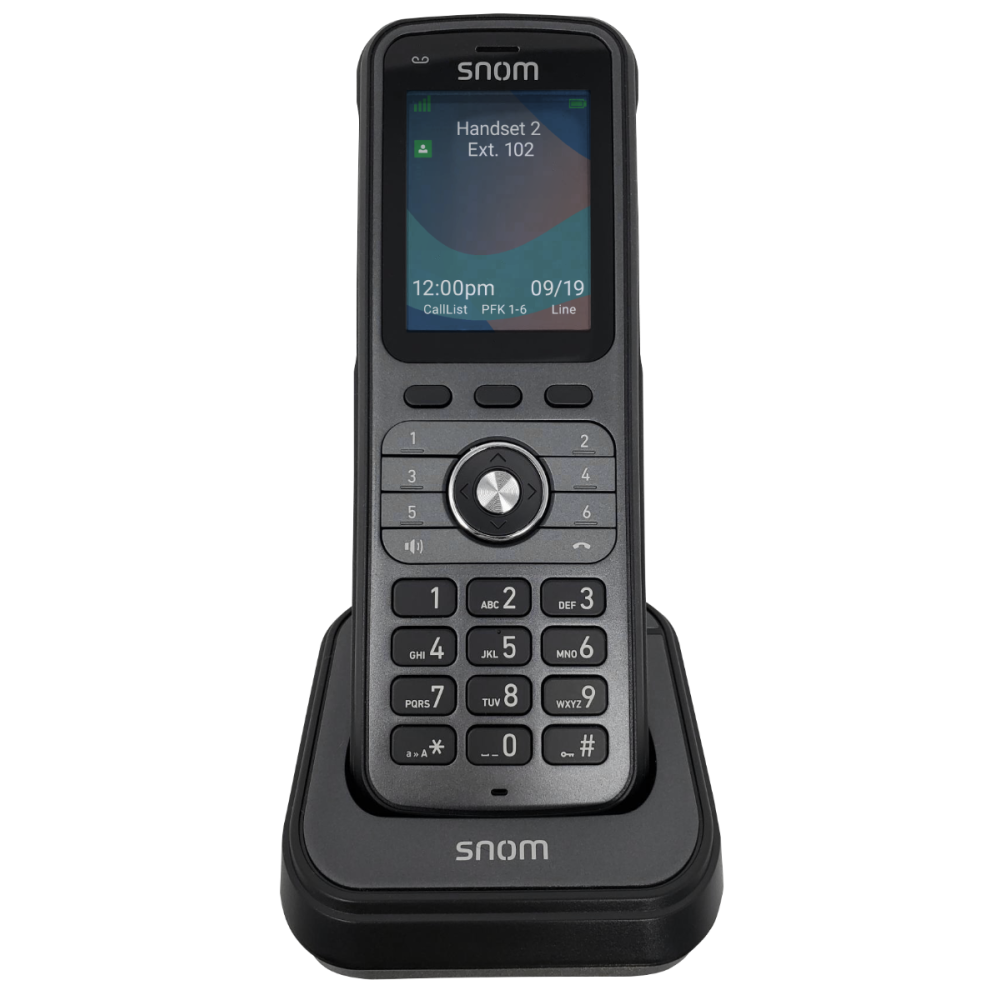
• The Snom M56 Rugged DECT Handset is a durable, high-performance communication device designed for challenging environments. It features a rugged design that protects against drops, dust, and water, making it ideal for industries such as construction and manufacturing. Key Features: • 2.4” color LCD display with 240 x 320 resolution • 6 backlit dual-color LED programmable keys • HD audio support • Up to 19 hours of talk time • Integrated Bluetooth • DECT 6.0 connectivity • Long stand-by time • Antibacterial plastic • Belt clip • OTA updates • 3-Year warranty • Flashlight • IP67 rugged design • Alarm button with motion triggers Weight: 1 lb Dimensions: 5.20 × 2.60 × 7.00 in Phone Type: DECT Handset Technical Specifications: GENERAL INFO: • Model: M56 DECT Rugged Handset • Shared Calls: Up to 16 devices, all visible and manageable on all devices • Range: Indoors up to 50 meters, outdoors up to 300 meters • User Interface: 2.4″ diagonal display with 240 x 320 resolution • Battery: Lithium-ion, 1350mAh, 3.7V, 4.99Wh • Charger: USB type C, charging indicator: red LED • Power Adapter: 100-240 AC Volt, 50/60Hz, 300mA output power

About This Product

The Snom M56 DECT Rugged Handset is purpose-built for workers in physically demanding or hazardous environments, such as construction sites, manufacturing floors, warehouses, and outdoor facilities. Its IP67 rating and drop-resistant housing mean it can survive dust, water immersion, and accidental falls that would destroy a standard office cordless phone. The integrated alarm button with motion triggers adds a critical safety layer for lone workers, making this handset a strong fit for environments where personal security or rapid emergency alerting is a priority.

This handset pairs naturally with a Snom DECT base station (sold separately) to form a multi-handset system covering up to 50 meters indoors and 300 meters outdoors. It can replace a basic two-way radio for on-site voice communication, with the added benefit of HD audio and Bluetooth for hands-free operation. However, because it is a DECT handset, it requires a compatible base and is not a standalone VoIP phone; you cannot plug it directly into a network switch or use it without a base station.

The M56 is overkill for a quiet office where a standard desk phone would suffice, and its rugged build adds weight and cost that aren't justified in a climate-controlled cubicle environment. Conversely, it may be underpowered for a site that needs integrated video calling or advanced call-center features. For Canadian businesses, particularly those with GTA-based warehouse or field operations, this handset's durability and lone-worker alarm make it a practical choice when paired with a reliable DECT base and a VoIP service that supports emergency alerting. Just confirm your base station model and firmware are compatible before purchasing multiple handsets.
Services We Provide
  • Professional Installation & Configuration
  • Ongoing Maintenance & Support
  • Troubleshooting & Repairs
  • System Upgrades & Updates



