
Snom M65 Professional Handset use with M300 and M700 Base Station

Frequently Asked Questions

Make sure the base station is powered on and within range (typically within 50 metres indoors, but walls and metal can reduce this). On the handset, confirm the battery is charged, then follow the subscription procedure from the base’s administration interface or by pressing the pairing button on the base. If the handset still doesn’t register, verify that the base is not already at its maximum handset capacity.
Choppy audio often points to network jitter or packet loss, not the handset itself. Check that the base station is connected to a network switch with QoS enabled and that the handset is not near sources of DECT interference, such as thick concrete walls, large metal objects, or WiFi access points operating on overlapping frequencies. A quick power cycle of the base station can also clear temporary glitches.
Start by checking the display backlight timeout and keypad backlight settings—longer illumination dramatically reduces battery life. Clean the battery contacts with a dry cloth and reseat the battery. If the problem continues after a full charge cycle (leave it on the charger overnight), the battery may need replacement. Avoid storing the handset off the charger for extended periods in a cold environment, as that also degrades runtime.
The tricolor LED uses red to signal missed calls, new voicemail messages, or a low battery. Check the call history and voicemail indicator on the display first; if those are clear, charge the handset fully. The LED should stop flashing once the condition is resolved. If it persists after charging and clearing notifications, a reboot can reset the indicator.
This behaviour usually indicates a gap in DECT coverage between base stations. Verify that all M300/M700 bases are configured as a multi‑cell system and that their placement provides overlapping coverage, especially near stairwells and elevator banks. Temporarily walk the path while on a call to identify dead zones, then consider repositioning a base or adding an extra cell to cover that area.
First, remove and reinsert the battery, then power on. If the screen remains blank, place the handset on the charger for at least 30 minutes and attempt to power on again. Do not initiate a factory reset unless instructed by support, as that can erase provisioning settings. If the issue persists, a Toronto‑based VoIP support provider can usually recover the device remotely or guide you through a safe re‑flashing procedure.
No. The M65 is designed exclusively for the Snom M300 and M700 multi‑cell base stations. It uses specific DECT pairing and feature protocols that aren’t supported by generic DECT bases or other manufacturers’ systems.
The shared address book is managed through the M300/M700 base station and provisioned from your VoIP platform. Contact your system administrator to ensure the directory is enabled and populated on the base; once that’s in place, the M65 will sync it automatically when subscribed and in range.
Confirm that the headset is fully inserted and compatible with the M65’s jack (typically a 2.5mm or 3.5mm four‑pole connector). On the handset, ensure the audio is routed to the headset when you press the call key—sometimes the speakerphone or earpiece takes priority. Try a different known‑working headset to rule out a hardware fault.
IP Phones

Snom M65 Professional Handset use with M300 and M700 Base Station
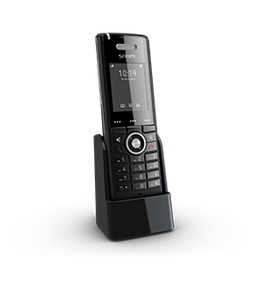
• Sleek design with comprehensive features for seamless mobile coverage across multiple floors or large buildings • Large backlit 2” color display and backlit keypad provide easy visibility and wideband audio ensures crystal clear voice quality • Integrated tricolor LED indicates missed calls, voicemail messages, and low battery status • Access to phone system features such as voicemail, automatic call forwarding, call lists, caller identification, and direct search of the corporate directory when paired with a M700 or M300 base station • Key Features: • Wideband speakerphone • CAT-iq 1.0 compliant • DECT encryption • 250 hours standby time • Local and shared address book • Headset plug • SW upgrade over-the-air • Two-line display (2×16 characters) • Comfortable and intuitive menu structure • Selection of ring tones • Dimensions: • Weight: 0.8 lb • Dimensions: 7 × 5 × 3 in • Phone Type: DECT Handset • Technical Specifications: • Display: • 5 cm (2“) diagonal • 176 x 220 pixels • 262k TFT color LCD with backlight • 8 lines, height 16 pixels/line, 16 characters per line • Backlit keypad with 24 keys: • Standard ITU telephone keypad, 12 keys, 4×3, with star and pound/hash key • Three context-sensitive function keys • Five navigation keys (left, right, up, down, OK) • Off-hook key, cancel key • Speakerphone key with red LED when speakerphone is on • Menu key • Three side keys (volume up/down, mute)

About This Product

The Snom M65 is a professional DECT handset designed exclusively to pair with Snom M300 and M700 multi-cell base stations. It’s built for businesses where staff move across large floors, warehouses, or multiple buildings and need dependable cordless voice access to the corporate phone system. Typical users include healthcare, retail, and logistics teams already invested in a Snom DECT infrastructure—or planning to add mobility to a Snom-based VoIP deployment.

Because the M65 is a companion device and not a standalone phone, it only works within an existing Snom DECT ecosystem. Organizations considering it should already have or be installing compatible base stations; otherwise the handset will not function. Its feature set—wideband audio, a 2‑inch colour display, and integrated headset jack—puts it in a mid‑range tier well‑suited for active professionals, but it may be overkill for a user who rarely leaves a desk. In Canadian office environments, particularly across the GTA where hosted VoIP is widespread, the M65 integrates smoothly with most SIP‑based platforms when provisioned through the M‑series bases.

The handset’s strength lies in tight integration with the base station’s roaming and directory features, enabling seamless handovers between cells. The CAT‑iq 1.0 compliance means reliable wideband voice and encryption, but it also means the device is part of a controlled ecosystem—you won’t be able to register it to a generic DECT base or use it as a consumer cordless phone. Buyers should plan for base station placement carefully, as indoor coverage and material obstructions will directly impact call reliability.
Services We Provide
  • Professional Installation & Configuration
  • Ongoing Maintenance & Support
  • Troubleshooting & Repairs
  • System Upgrades & Updates



