
Snom M70 Office DECT Headset with Ruggedized Design

Frequently Asked Questions

First, confirm that the base station is powered on and has a registered SIP trunk or PBX connection. On the M70, go to Settings > Registration and verify the base's DECT ID is listed. If not, manually register the handset by entering the base's PIN (default is usually 0000). Ensure the handset is within range (typically 50–100 metres indoors). If the issue persists, a Toronto-based VoIP support provider can usually resolve this remotely.
Check the signal strength indicator on the handset screen. If bars are low, move closer to the DECT base or reposition the base to a central location away from metal obstructions and large electronics. Also ensure you are not near a microwave or other 1.9 GHz interference sources. If the audio remains poor, try a different handset to rule out a hardware fault.
Verify the charging contacts on the handset and charger cradle are clean and free of debris. If the battery is swollen or the handset feels hot, stop using it and contact support. The M70 has a reported 200 hours standby, but actual talk time depends on usage. Try a different charger cradle if available. Do not attempt to replace the battery yourself unless explicitly guided by documentation.
On the M70, go to Settings > Bluetooth and set the handset to discoverable mode. Put your headset into pairing mode (refer to its manual). The M70 should list nearby devices; select your headset and confirm the PIN if prompted. Note that Bluetooth is for headset use only — the handset still uses DECT for the base connection.
The alarm key requires configuration on the DECT base or PBX to trigger an action (e.g., speed dial an emergency number or send a notification). Check with your system administrator to ensure the alarm feature is properly provisioned. On the handset, there is no built-in alarm function by default — it must be mapped via the base's web interface.
The multi-colour LED indicates different events: red for missed calls or low battery, green for new voicemail, and blinking during an incoming call. Refer to the handset's quick reference for the full colour code. If the LED is flashing and you have no new messages, check the voicemail box anyway as some systems set the indicator prematurely.
This is often a range issue. The M70 is rugged but DECT range is limited by building materials. Try walking near the base to see if the connection stabilizes. If you need to cover a larger area, consider adding a DECT repeater (if your base supports it) or relocating the base to a more central position.
Yes, the M70 is designed to be compatible with Snom DECT base stations like the M700, M800, and M9. Ensure the base's firmware is up to date and that the handset is paired following the standard registration procedure. Check the base's web interface for a list of registered handsets.
First, verify that vibration is enabled in the handset's sound and alert settings. The vibration motor may also be triggered by the alarm key or incoming calls depending on profile. If it still doesn't vibrate after enabling, there may be a hardware fault; contact your reseller or Snom support.
The M70 is ruggedized and MIL-STD-810g tested for shock and temperature, but it is not rated for water immersion. If it gets wet, dry it immediately with a soft cloth and place it in a warm, dry area for 24 hours. Do not attempt to charge it until completely dry. If it fails to power on after drying, the internal components may be damaged.
IP Phones

Snom M70 Office DECT Headset with Ruggedized Design
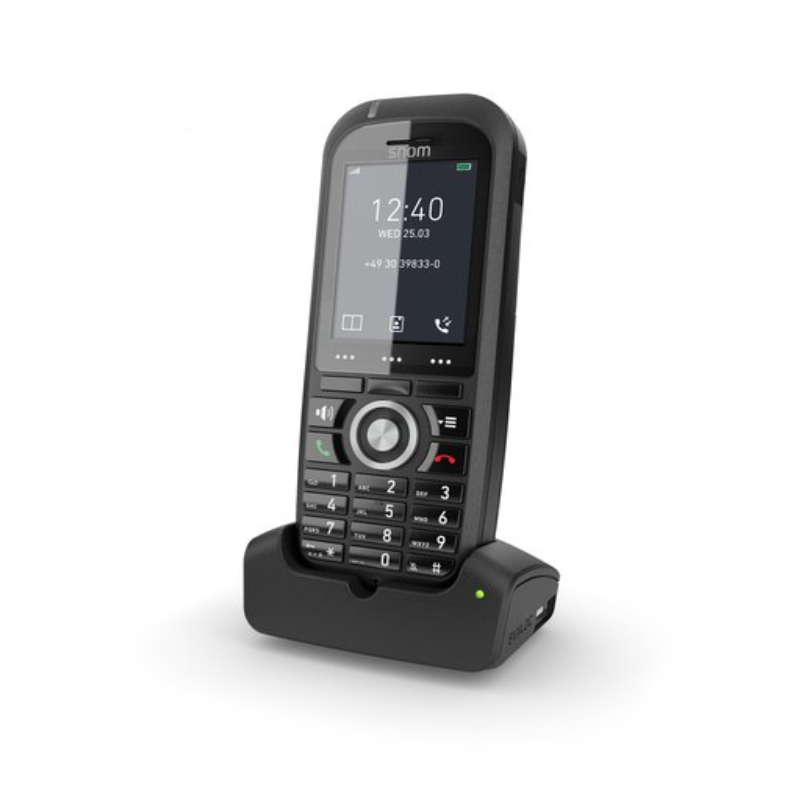
* The Snom M70 DECT handset is an ideal choice for businesses seeking flexibility and reliability. Its compact size and lightweight design make it easy to take on the go, while its ruggedized construction ensures durability in various environments. * This modern DECT telephone features a high-resolution LCD color screen, delivering exceptional HD audio quality at long range. Users can pair well-known Bluetooth headsets for enhanced comfort. * The M70 handset boasts an alarm key and vibration alarm to enhance user convenience, while also offering integration with existing base stations. Key Features: • Ruggedized and robust design • HD audio support • Alarm key • Integrated Bluetooth LE • Large temperature range • Integrated belt clip • HAC compliant • Compatible to existing base stations (1) • Vibration alarm • Multi-colour LED • 200 hours standby • MIL-STD-810g 516.6 tested Additional Information: • Weight: 0.8 lb • Dimensions: 8 × 4 × 4 in • Phone Type: DECT Handset Technical Specifications: • Display: • 5 cm (2“) diagonal • 240 x 320 pixels • 262k TFT color LCD with backlight • Backlit keypad with 24 keys: • Standard ITU telephone keypad, 12 keys, 4×3, with star and pound/hash key • Three context-sensitive function keys • Five navigation keys (left, right, up, down, OK) • Off-hook key, cancel key • Speakerphone key with red LED when speakerphone is on • Menu key • Three side keys (volume up/down, mute) • Alarm key on the top of the handset • 28 keys in total Comfortable and intuitive menu structure Selection of ring tones Tricolor LED indication of missed calls/new voice messages, low battery Speakerphone Mute microphone Vibration alarm

About This Product

The Snom M70 is a rugged DECT handset built for environments where a standard office phone would quickly fail. Think warehouse floors, manufacturing lines, or cold storage facilities where drops, dust, and temperature extremes are part of the daily routine. It pairs with Snom DECT base stations such as the M700 or M800, replacing a standard handset in a deployment that already uses Snom infrastructure. The tradeoff is that the M70 is purely a handset — it does not include a base station, and it requires a compatible Snom base to function.

At this price point, it is a targeted investment for workplaces that need MIL-STD-810g durability and features like an alarm key, vibration alerts, and Bluetooth LE headset support. In a standard office with carpeted floors and desk-based workers, the ruggedization is overkill, but for a Toronto-area logistics hub or a Canadian plant with extreme temperature swings, the M70's wide operating range and HAC compliance make it a sensible choice. If your team spends their day on concrete floors or outdoors in a loading bay, this handset extends the life of your phone fleet where a typical DECT handset would crack or fail.
Services We Provide
  • Professional Installation & Configuration
  • Ongoing Maintenance & Support
  • Troubleshooting & Repairs
  • System Upgrades & Updates



